



As an Amazon Associate I earn from qualifying purchases.
Quick answer: Which charger for Microsoft Surface Pro 13 (2026)? The simplest choice is INIU 65W 3-Port Charger 65 W - full charging speed (from 60 W USB-C PD). The minimum is 39 W - a weaker charger will not do. Cheaper alternatives below.

Which charger for Microsoft Surface Pro 13 (2026)? A 60 W USB-C PD adapter is all you need
Short answer: the Surface Pro 13 (2026) may or may not come with a power supply, depending on your market and configuration. Microsoft ships a 39 W Surface Connect adapter only in select markets and configurations. The US store configuration includes it, while the Microsoft UK store sells the power supply separately. Check your order page before you buy anything.
So, which charger for Microsoft Surface Pro 13 (2026)? Microsoft says 39 W is the minimum, and below that the tablet can't keep up under load. Full-speed charging starts at 60 W over USB-C PD (Power Delivery, the standard USB-C fast-charging language). You charge through one of the two USB-C USB4 ports or through Surface Connect.
This guide is for you if you bought the Surface Pro 13 without an adapter, or if you want a second one for the office or your travel bag.

Specs and charging
The Microsoft Surface Pro 13 (2026) specs that matter when choosing an adapter:
- Battery: 53 Wh
- Minimum adapter power (manufacturer): 39 W
- Full charging speed: from 60 W USB-C PD
Do you have to buy Microsoft's own adapter?
No, but it is the simplest choice. Microsoft's rule for fast charging is a Surface Power Supply of at least 65 W or any USB-C PD charger of at least 60 W. That means a good third-party USB-C PD adapter of the right wattage charges as fast as the original.
The original makes sense if you only have this one device and want zero guesswork. You buy it, plug it in, and you're done.
A third-party adapter is the better pick in a few cases. If you want one brick for the tablet and your other gadgets, a multi-port model is more practical. The same goes for travel and for a lower price. All four chargers we list below have 3 ports and deliver about 60 W to this tablet, which is 100% of what it can use for fast charging.
Don't pay extra for more watts. Microsoft gives 60 W as the point where full speed starts, and a stronger charger will not make the Surface Pro 13 charge faster. Its battery is 53 Wh, and a 60-65 W adapter is already enough.

Will the charger you already own do the job?
It depends on its wattage. Here is how common chargers compare with this tablet's numbers (39 W minimum, 60 W for full speed):
- iPhone charger (20 W): well below the 39 W minimum. At 20 W, the iPhone charger falls short of the 39 W minimum Microsoft gives, so it will not keep up when the Surface is working under load.
- iPad or tablet charger: most are also under 39 W. Check the label on the brick before relying on it.
- Android phone charger: many fast phone chargers stop below 60 W. Anything under 39 W has the same problem as the iPhone charger. Anything between 39 W and 60 W works, but not at full speed.
- Older USB-C laptop charger: a 45 W model clears the minimum but stays under the 60 W line, so charging is slower than full speed. A 60 W or 65 W one is exactly what you need.
- The 39 W Surface Connect adapter: it is enough to run the tablet, but it charges more slowly than a 60 W USB-C PD charger.
Which adapter should go in your Surface Pro 13 bag?
If you want the safest, simplest option, buy Microsoft's own Surface Power Supply of 65 W or more. For the cheapest way to get full speed, the INIU 65W 3-Port Charger (65 W) delivers about 60 W to this tablet and has three ports.
If you want one charger for the Surface and your other devices, the UGREEN Nexode 65W (65 W) and the Anker 735 (Nano II 65W) (65 W) both have three ports and also give the tablet about 60 W. For travel, the Anker Nano 70W 3-Port (70 W) is a compact option, and it too gives this tablet about 60 W.
| Charger | Power | Estimated speed |
|---|---|---|
| INIU 65W 3-Port Charger | 65 W | 100% |
| UGREEN Nexode 65W | 65 W | 100% |
| Anker 735 (Nano II 65W) | 65 W | 100% |
| Anker Nano 70W 3-Port | 70 W | 100% |

1. INIU 65W 3-Port Charger (65W GaN)
Cheapest at full speed · 3 ports - several devices at once
65W GaN charger. With the Microsoft Surface Pro 13 (2026) it charges at up to about 60 W via USB PD (100% of the laptop's full charging speed, estimate based on specs and protocols).

2. UGREEN Nexode 65W (65W GaN)
3 ports - several devices at once
65W GaN charger. With the Microsoft Surface Pro 13 (2026) it charges at up to about 60 W via USB PD (100% of the laptop's full charging speed, estimate based on specs and protocols).

3. Anker 735 (Nano II 65W) (65W GaN)
3 ports - several devices at once
65W GaN charger. With the Microsoft Surface Pro 13 (2026) it charges at up to about 60 W via USB PD (100% of the laptop's full charging speed, estimate based on specs and protocols).
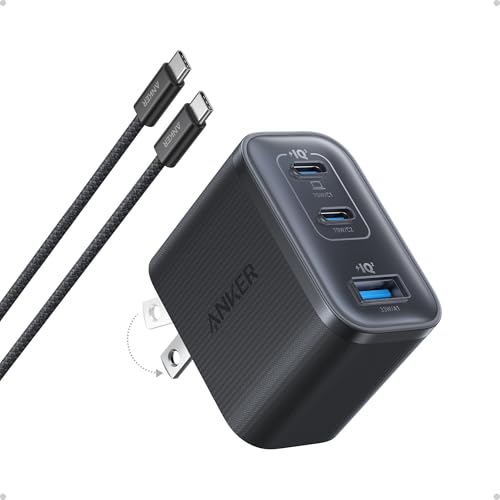
4. Anker Nano 70W 3-Port (70W GaN)
3 ports - several devices at once
70W GaN charger. With the Microsoft Surface Pro 13 (2026) it charges at up to about 60 W via USB PD (100% of the laptop's full charging speed, estimate based on specs and protocols).
Three things to watch before you pay
First, don't go below 39 W. Under that minimum, the Surface Pro 13 can't keep up with the power it uses when it's busy. The battery may drain even while the charger is plugged in.
Second, 60 W is the threshold for full speed. Microsoft does not publish a maximum input power, so don't assume the tablet draws exactly 60 W, and don't pay extra for a bigger adapter hoping for faster charging.
Third, a multi-port charger shares its power. When you plug a second device into the same charger, the tablet may get less than the full 60 W. If speed matters, give the Surface its own port or charge the other device separately.
Fun fact: Not every buyer gets the same adapter. In the US store configuration, the Surface Pro 13 comes with a 39 W Surface Connect power supply, while buyers in the UK have to buy the power supply separately. The adapter in the US box is the one that Microsoft rates only as a minimum, not as the fast-charging option.
Charging questions about the Surface Pro 13 (2026), answered
Which charger for Microsoft Surface Pro 13 (2026) if I want full-speed charging?
Choose a USB-C PD charger of at least 60 W, or a Microsoft Surface Power Supply of at least 65 W. That is Microsoft's own rule for fast charging. A 65 W USB-C charger is a common, easy choice.
Is a charger included in the box?
It depends on your market and configuration. Microsoft ships a 39 W Surface Connect power supply only in select markets and configurations. The US store configuration includes it, while the Microsoft UK store sells it separately.
Is my iPhone charger enough for the Surface Pro 13?
Probably not. A 20 W iPhone charger is well below the 39 W minimum that Microsoft gives for this tablet. Under load, it won't keep up.
Can a more powerful charger harm the battery or charge faster?
It won't charge faster. Full speed starts at 60 W USB-C PD, and a higher-wattage adapter gives no extra speed. A USB-C PD charger only supplies the power the device asks for, so a stronger one is not a problem, just not useful.
Should I charge through USB-C or Surface Connect?
The Surface Pro 13 has two USB-C USB4 ports that both charge, plus Surface Connect. Microsoft's fast-charging rule is a 65 W Surface Power Supply or a 60 W USB-C PD charger. For a third-party adapter, USB-C is the port to use.
Sources
- Microsoft Surface Pro 13 (2026) - learn.microsoft.com - official manufacturer specifications (learn.microsoft.com)
- Microsoft Surface Pro 13 (2026) - support.microsoft.com - official manufacturer specifications (support.microsoft.com)
- Microsoft Surface Pro 13 (2026) - microsoft.com - official manufacturer specifications (microsoft.com)
- Microsoft Surface Pro 13 (2026) - fonearena.com - industry article (fonearena.com)
- Microsoft Surface Pro 13 (2026) - arynews.tv - industry article (arynews.tv)
- Microsoft Surface Pro 13 (2026) - digitalcitizen.life - industry article (digitalcitizen.life)

Leave a comment
This site is protected by hCaptcha and the hCaptcha Privacy Policy and Terms of Service apply.