









Updated: 27.09.2026
As an Amazon Associate I earn from qualifying purchases.
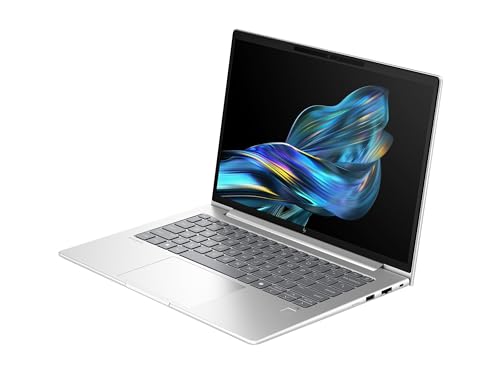
Quick answer: Which charger for HP EliteBook 6 G1q 14? The simplest choice is Motorola TurboPower 68W 68 W - full charging speed (from 65 W USB-C PD). Cheaper alternatives below.

Which charger for HP EliteBook 6 G1q 14? Essential power facts
If you are asking which charger for HP EliteBook 6 G1q 14 to buy, the short answer is simple: you need a USB-C Power Delivery adapter of at least 65 W. HP recommends 65 W as the minimum baseline because anything lower will struggle when the machine runs heavy workloads. Hitting that 65 W threshold also activates HP Fast Charge, which refills the 56 Wh battery to around 50% in roughly 30 minutes.
In the European Union, many configurations of this laptop arrive without a wall plug in the box due to regional unbundling regulations. Whether your packaging arrived without an adapter or you simply need a reliable second charger for your commute, choosing the right block takes just a moment.
Specs and charging
The HP EliteBook 6 G1q 14 specs that matter when choosing an adapter:
- Battery: 56 Wh
- Full charging speed: from 65 W USB-C PD

Do you need an original HP adapter or will a third-party USB-C charger do?
You do not need to hunt down an official HP-branded power supply. The EliteBook relies on standard USB-C Power Delivery protocols, meaning any certified third-party adapter meeting the power spec will charge the machine just as reliably.
An original HP brick is a fine choice if you want single-device simplicity from the original manufacturer. However, third-party alternatives often give you multiple ports so you can juice up your laptop and phone simultaneously from one wall outlet, usually at a friendlier price.

Can you power this laptop with the phone or tablet chargers you already own?
Before spending money on a new brick, it helps to check what you already have in your drawers. Here is how the EliteBook 6 G1q 14 behaves across common power ratings:
- 20 W phone chargers: These cannot keep up. The laptop will either refuse to charge or will slowly lose battery percentage while you actively type and work.
- 30 W to 45 W tablet or ultrabook chargers: These fall below the manufacturer's recommended 65 W minimum. They might add some charge while the laptop sleeps with the lid shut, but under load the system will drain the battery faster than the plug can replenish it.
- 65 W or higher USB-C PD laptop chargers: These hit the exact performance tier this laptop requires. You get stable system power alongside fast charging without throttling.
Finding the right 65 W or higher adapter for your setup
If your primary goal is matching full charging speed at the lowest price, Motorola TurboPower 68W reaches the required 65 W level for this laptop without unnecessary extras. For an all-around daily setup with multiple outputs, UGREEN Nexode 65W or Anker 735 (Nano II 65W) let you plug in three devices while keeping bulk to a minimum.
If you want a tiny bit of extra breathing room on trips, Anker Nano Charger 70W 3-Port (B121A) delivers solid multi-port flexibility. Users running heavier multi-gadget desks can opt for Anker Nano 100W (3 Ports, Smart Display), which supplies full-speed 65 W power to the laptop with ample capacity left over for accessories.
| Charger | Power | Estimated speed |
|---|---|---|
| Motorola TurboPower 68W | 68 W | 100% |
| Anker Nano 100W (3 Ports, Smart Display) | 100 W | 100% |
| UGREEN Nexode 65W | 65 W | 100% |
| Anker 735 (Nano II 65W) | 65 W | 100% |
| Anker Nano Charger 70W 3-Port (B121A) | 70 W | 100% |

1. Motorola TurboPower 68W (68W GaN)
Cheapest at full speed
68W GaN charger. With the HP EliteBook 6 G1q 14 it charges at up to about 65 W via USB PD (100% of the laptop's full charging speed, estimate based on specs and protocols).

2. Anker Nano 100W (3 Ports, Smart Display) (100W GaN)
3 ports - several devices at once
100W GaN charger. With the HP EliteBook 6 G1q 14 it charges at up to about 65 W via USB PD (100% of the laptop's full charging speed, estimate based on specs and protocols).

3. UGREEN Nexode 65W (65W GaN)
3 ports - several devices at once
65W GaN charger. With the HP EliteBook 6 G1q 14 it charges at up to about 65 W via USB PD (100% of the laptop's full charging speed, estimate based on specs and protocols).
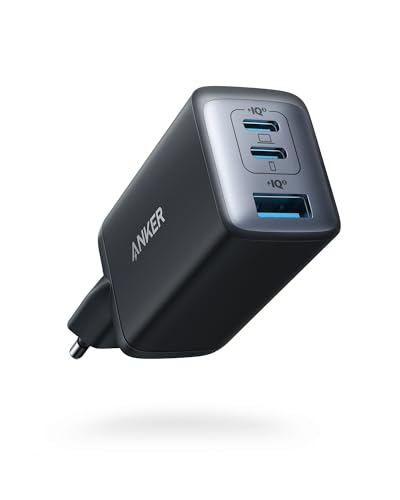
4. Anker 735 (Nano II 65W) (65W GaN)
3 ports - several devices at once
65W GaN charger. With the HP EliteBook 6 G1q 14 it charges at up to about 65 W via USB PD (100% of the laptop's full charging speed, estimate based on specs and protocols).
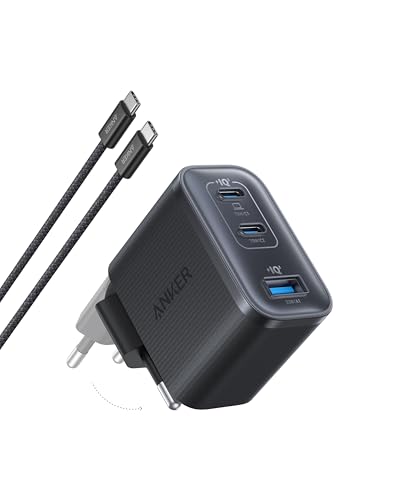
5. Anker Nano Charger 70W 3-Port (B121A) (70W GaN)
3 ports - several devices at once
70W GaN charger. With the HP EliteBook 6 G1q 14 it charges at up to about 65 W via USB PD (100% of the laptop's full charging speed, estimate based on specs and protocols).
Power quirks to keep in mind with the EliteBook 6 G1q 14
Pay close attention to workload spikes. Independent tests from Notebookcheck logged a maximum draw of 69 W from the bundled 65 W adapter under extreme load. That explains why HP sets 65 W as the strict baseline; anything less leaves no headroom when the hardware is pushed.
Watch out for power renegotiation on multi-port chargers. If you buy a 65 W multi-port block and plug your phone into the second socket, the laptop port typically steps down to 45 W or 30 W. Whenever you need fast charging or heavy computing power, keep the laptop on its own dedicated high-output port.
A notable packaging split: While buyers in the United States still get a standard 65 W USB-C power supply included in the box, availability varies widely across Europe. Under EU directive 2022/2380, manufacturers are required to offer unbundled hardware options, meaning many European shipments intentionally exclude the wall plug entirely.
Clearing up doubts about charging the HP EliteBook 6 G1q 14
Which charger for HP EliteBook 6 G1q 14 provides full-speed charging?
Any quality USB-C Power Delivery charger delivering at least 65 W provides full speed. This matches HP's recommended minimum specification and enables HP Fast Charge, bringing the 56 Wh battery up to roughly 50% in about 30 minutes.
Does the HP EliteBook 6 G1q 14 come with a power adapter in the box?
It depends on where you buy it. In the US, a 65 W USB-C PD adapter is generally included, but in the European Union, many configurations ship without one to comply with unbundling regulations.
Can I safely connect a 100 W USB-C charger to this laptop?
Yes, completely safely. USB-C Power Delivery negotiates current dynamically, meaning the laptop only draws the wattage it actually requires, while the higher-rated brick simply operates with extra thermal headroom.
Will a 20 W smartphone charger work in an emergency?
No, a 20 W phone block falls far below the manufacturer's 65 W threshold. The laptop may reject it outright, and even if it registers a connection, the battery will continue to deplete while you use the machine.
Which of the two USB-C ports should be used for charging?
You can use either port. Both connections are USB4 ports that support standard USB-C Power Delivery input, giving you total freedom to plug your cable into whichever side fits your workspace.
Sources
- HP EliteBook 6 G1q 14 - h20195.www2.hp.com - official manufacturer specifications (h20195.www2.hp.com)
- HP EliteBook 6 G1q 14 - notebookcheck.net - industry article (notebookcheck.net)
- HP EliteBook 6 G1q 14 - thurrott.com - industry article (thurrott.com)
- HP EliteBook 6 G1q 14 - pcworld.com - industry article (pcworld.com)
- HP EliteBook 6 G1q 14 - storagereview.com - industry article (storagereview.com)


Leave a comment
This site is protected by hCaptcha and the hCaptcha Privacy Policy and Terms of Service apply.