









Updated: 27.09.2026
As an Amazon Associate I earn from qualifying purchases.
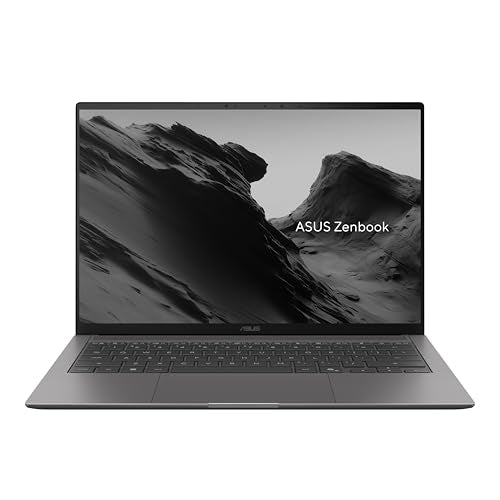
Quick answer: Which charger for ASUS Zenbook S14 UX5406AA? The simplest choice is UGREEN Nexode 100W 100 W - full charging speed (from 100 W USB-C PD). Cheaper alternatives below.

Which charger for ASUS Zenbook S14 UX5406AA? Powering your new ultrabook correctly
If you just unboxed your laptop in Europe, you might have noticed an empty space: there is no power adapter in the European retail box. When considering which charger for ASUS Zenbook S14 UX5406AA to get, remember that ASUS states the laptop is fast-charge capable starting from a 100 W USB-C Power Delivery (PD) adapter, while 65 W to 68 W is the absolute baseline to charge it reliably.
Charging runs entirely through either of the two built-in Thunderbolt 4 USB-C ports, both supporting standard USB Power Delivery. There is no proprietary barrel plug or magnetic connector to worry about.
Whether you bought the Zenbook without a bundled charger, need a reliable spare for the office, or want a compact travel adapter that powers both your laptop and phone, this guide breaks down exactly what power brick you need.
Specs and charging
The ASUS Zenbook S14 UX5406AA specs that matter when choosing an adapter:
- Battery: 77 Wh
- Full charging speed: from 100 W USB-C PD

Official ASUS power brick or a third-party USB-C adapter?
You do not need to hunt down an original ASUS power supply to get top charging performance. Because the Zenbook S14 uses standard USB Power Delivery over its Thunderbolt 4 ports, any reputable USB-C PD brick with sufficient wattage works just as well.
An original ASUS adapter makes sense if you prefer staying strictly with first-party gear for single-device charging and total peace of mind. However, original bricks are usually single-port, bulky, and more expensive.
A good multi-port third-party charger is often the smarter daily choice. It costs less, packs smaller into a bag, and delivers enough power to fast-charge your Zenbook while simultaneously topping up your phone or headphones from a single wall outlet.

Can you use your existing phone or tablet charger?
Before spending money on a new brick, it helps to check what you already have in your drawers. Here is how the ASUS Zenbook S14 UX5406AA behaves with common chargers:
- 20 W iPhone or smartphone charger: Practically useless while working. The laptop may trickle-charge very slowly when completely shut down, but while turned on, the 77 Wh battery will drain faster than the charger can supply power.
- 30 W to 45 W tablet or phone brick: Still below the usable baseline. You will likely see a slow-charger warning in Windows, and under active use the battery level will drop or stay stagnant.
- 65 W to 68 W laptop adapter: This is the bare functional minimum. Independent measurements by Notebookcheck show that the Zenbook draws up to 87 W under load before settling around 48 W, so a 65 W or 68 W adapter will keep it running, but charging will be noticeably slower under load.
- 100 W USB-C PD charger: This is the sweet spot. It unlocks the official fast-charge capability defined by ASUS tech specs and keeps the laptop fully powered even during intensive tasks.
Selecting the right power supply for your daily routine
If you want top charging speed without overpaying, UGREEN Nexode 100W is the most cost-effective option to hit the full 100 W threshold, offering four ports to feed your laptop and mobile gear together. Another premium full-speed choice is Anker Nano 100W (3 Ports, Smart Display), which provides clear real-time power readouts across three ports.
If you prefer a lighter, travel-friendly brick and do not mind charging at a steady baseline pace, Anker Nano Charger 70W 3-Port (B121A) hits around 70% of the laptop's real-world peak speed while maintaining multi-device flexibility. Motorola TurboPower 68W also meets the baseline wattage for reliable desk use, while UGREEN Nexode 65W gives you three ports in a tiny footprint at the entry-level 65 W mark.
| Charger | Power | Estimated speed |
|---|---|---|
| UGREEN Nexode 100W | 100 W | 100% |
| Anker Nano 100W (3 Ports, Smart Display) | 100 W | 100% |
| Anker Nano Charger 70W 3-Port (B121A) | 70 W | 70% |
| Motorola TurboPower 68W | 68 W | 68% |
| UGREEN Nexode 65W | 65 W | 65% |
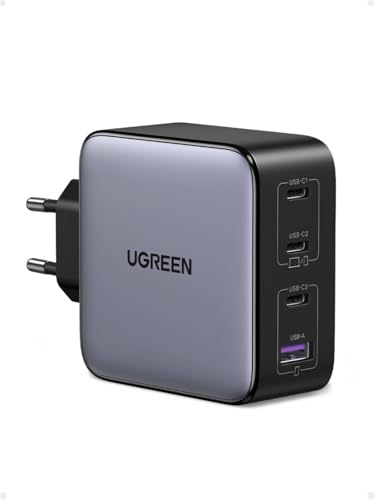
1. UGREEN Nexode 100W (100W GaN)
Cheapest at full speed · 4 ports - several devices at once
100W GaN charger. With the ASUS Zenbook S14 UX5406AA it charges at up to about 100 W via USB PD (100% of the laptop's full charging speed, estimate based on specs and protocols).

2. Anker Nano 100W (3 Ports, Smart Display) (100W GaN)
3 ports - several devices at once
100W GaN charger. With the ASUS Zenbook S14 UX5406AA it charges at up to about 100 W via USB PD (100% of the laptop's full charging speed, estimate based on specs and protocols).
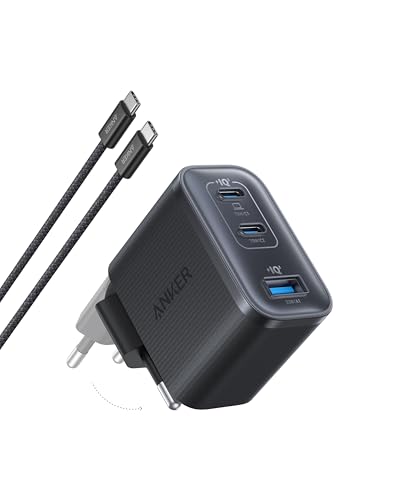
3. Anker Nano Charger 70W 3-Port (B121A) (70W GaN)
3 ports - several devices at once
70W GaN charger. With the ASUS Zenbook S14 UX5406AA it charges at up to about 70 W via USB PD (70% of the laptop's full charging speed, estimate based on specs and protocols).

4. Motorola TurboPower 68W (68W GaN)
68W GaN charger. With the ASUS Zenbook S14 UX5406AA it charges at up to about 68 W via USB PD (68% of the laptop's full charging speed, estimate based on specs and protocols).

5. UGREEN Nexode 65W (65W GaN)
3 ports - several devices at once
65W GaN charger. With the ASUS Zenbook S14 UX5406AA it charges at up to about 65 W via USB PD (65% of the laptop's full charging speed, estimate based on specs and protocols).
Power pitfalls to watch out for with the Zenbook S14
Connecting a sub-65 W charger during heavy workloads means your battery may actively discharge even while plugged in. Notebookcheck testing showed the laptop can pull up to 87 W under peak load, so anything under 65 W simply cannot keep up when the processor runs hard.
Keep multi-port power sharing in mind when buying a travel block. A 100 W charger only provides 100 W to the laptop if it is the only device connected; plugging in your phone simultaneously might drop the primary laptop port to 65 W, extending your charge time.
A surprising regional difference: Outside Europe, ASUS includes a 68 W USB-C power brick in the box with a 240 W USB-C cable, yet independent testing by Notebookcheck concluded that this bundled 68 W unit is actually insufficient to sustain full peak performance without dipping into battery reserves during spikes.
Real user questions about charging ASUS Zenbook S14 UX5406AA
Which charger for ASUS Zenbook S14 UX5406AA gives the fastest speed?
According to ASUS technical specifications, the Zenbook S14 reaches its full fast-charging capability when paired with a 100 W USB-C Power Delivery adapter. While the laptop can function on a 65 W or 68 W unit, 100 W ensures optimal charging speed even when the system is under heavy load.
Is a power adapter included in the box with the Zenbook S14?
In European retail packaging, ASUS does not include a power adapter in the box. In regions outside Europe, such as the US, ASUS bundles a 68 W USB-C PD brick along with a 240 W USB-C cable.
Can I safely charge this laptop with a 140 W USB-C brick?
Yes, it is entirely safe. USB Power Delivery communicates actively with the laptop, meaning the Zenbook only draws the wattage it requires. A 140 W charger will simply supply the laptop at its supported full speed without damaging the battery.
Will a 65 W charger from an older laptop work?
Yes, a 65 W USB-C PD charger works and represents the minimum usable baseline for this model. However, since the Zenbook can draw up to 87 W under heavy load according to test measurements, charging will slow down considerably during demanding workloads.
Does it matter which USB-C port I plug the charger into?
No, you can plug your charger into either of the two Thunderbolt 4 USB-C ports located on the laptop. Both ports fully support the USB Power Delivery standard for charging.
Sources
- ASUS Zenbook S14 UX5406AA - asus.com - official manufacturer specifications (asus.com)
- ASUS Zenbook S14 UX5406AA - notebookcheck.net - industry article (notebookcheck.net)
- ASUS Zenbook S14 UX5406AA - ultrabookreview.com - industry article (ultrabookreview.com)
- ASUS Zenbook S14 UX5406AA - gizmochina.com - industry article (gizmochina.com)
- ASUS Zenbook S14 UX5406AA - hitechcentury.com - industry article (hitechcentury.com)


Leave a comment
This site is protected by hCaptcha and the hCaptcha Privacy Policy and Terms of Service apply.