









Best PSU for RTX 5060 Ti?
NVIDIA states a 600 W power supply as the official minimum for the RTX 5060 Ti. The manufacturer calculated this value for a build featuring the very powerful Ryzen 9 9950X processor. If your PC uses a Core i7-14700K or Core i9-14900K processor, it is safer to choose a 650 W model, as these two units draw more power in games than the flagship Ryzen.
| CPU | CPU while gaming | GPU + CPU while gaming | Our PSU pick |
|---|---|---|---|
| Ryzen 7 7800X3D | 58 W | 238 W | 600 W |
| Ryzen 5 9600X | 75 W | 255 W | 600 W |
| Ryzen 7 9700X | 77 W | 257 W | 600 W |
| Ryzen 7 9800X3D | 80 W | 260 W | 600 W |
| Core Ultra 7 265K | 93 W | 273 W | 600 W |
| Ryzen 7 9850X3D | 102 W | 282 W | 600 W |
| Core Ultra 9 285K | 111 W | 291 W | 600 W |
| Ryzen 9 9950X3D | 126 W | 306 W | 600 W |
| Ryzen 9 9950X (GPU maker's reference setup) | 132 W | 312 W | 600 W |
| Core i9-14900K | 166 W | 346 W | 650 W |
| Core i7-14700K | 178 W | 358 W | 650 W |
CPU power: TechPowerUp, average of 14 games, CPU only. GPU: board power from the manufacturer (RTX 5060 Ti: 180 W). Motherboard, memory, drives and fans draw extra, hence the headroom in the pick.
CPU power draw: TechPowerUp, average across 14 games, CPU only. GPU power draw: rated board power specified by the manufacturer (RTX 5060 Ti: 180 W). The motherboard, memory, drives, and fans consume additional power, hence the headroom in the recommendation.
The table above will help you quickly match the power supply wattage to the specific processor installed in your computer. Simply find your chip and check the recommended power supply wattage.
Is a 550 W power supply enough and what about smaller models
You often ask whether an existing 500 W or 550 W power supply can handle the new graphics card. The answer is: both values are below the official minimum set by NVIDIA, which is why we simply do not recommend such power supplies. The card has a total board power of 180 W, and consumes an average of 160 W or 166 W in games, but the devil lies in sudden transient power spikes.
TechPowerUp measurements clearly show that short power spikes lasting just 20 milliseconds reach 214 W on the 8 GB version and 217 W on the 16 GB version. Combine that with a heavily loaded processor, and a 550 W PSU might run out of headroom, triggering protections that can shut down the PC during gameplay.
Potential overclocking also changes things, as highlighted by MSI in its recommendations. For standard gaming, the manufacturer suggests 600 W regardless of the CPU, but requirements increase after overclocking. With Core Ultra 5 or Ryzen 5 processors, 650 W is recommended, with Core Ultra 7, Ryzen 7, and the X3D series, 750 W is needed, and for the top-tier Core Ultra 9 and Ryzen 9, the recommended power is 850 W.
Fun fact: the 12V-2x6 connector replaced the earlier 12VHPWR. According to Corsair, its sense pins are 1.5 mm shorter and the power terminals are 0.25 mm longer, so the card only receives full power when the plug is fully seated.
Power connectors and the 8 GB and 16 GB versions
To connect the RTX 5060 Ti, all you need is a single standard PCIe 8-pin cable or a newer PCIe Gen 5 (12V-2x6) cable rated for at least 300 W. You do not need to force a cable upgrade, as the card includes a factory adapter in the box. At the same time, NVIDIA recommends choosing a power supply compliant with the PCIe CEM 5.1 standard.
Many gamers also wonder whether choosing a higher VRAM version requires a more powerful power supply. TechPowerUp tests show that the RTX 5060 Ti 8 GB draws an average of 160 W in games, while the 16 GB variant consumes an average of 166 W. The difference is just 6 W, which in practice means that both versions require the exact same power supply.
With upgrading your PC in mind, we selected power supplies of 650 W and above that comply with ATX 3.1 and PCIe 5.1.
Recommended PSUs for the RTX 5060 Ti
As an Amazon Associate I earn from qualifying purchases.

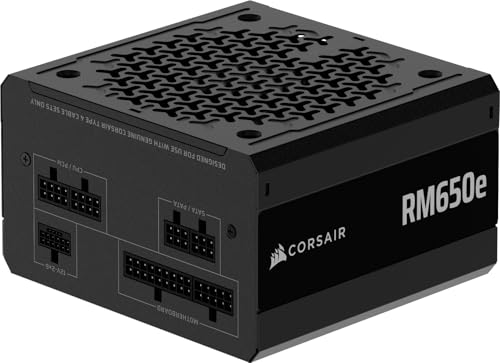
1. Corsair RM650e (2025)
650 W · Cybenetics Gold · ATX 3.1 · modular
Fully modular, so you only plug in the cables you actually need. Includes a 12V-2x6 cable and Zero RPM mode, which keeps the fan silent under light loads. 7-year warranty.

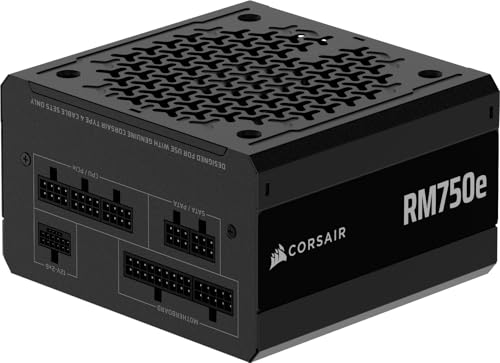
2. Corsair RM750e (2025)
750 W · Cybenetics Gold · ATX 3.1 · 12V-2x6 600 W
Fully modular, with a native 12V-2x6 cable rated up to 600 W and Zero RPM mode. 7-year warranty.

3. NZXT C750 Gold Core
750 W · 80 PLUS Gold · Cybenetics Platinum · modular
Fully modular, featuring a 135 mm fan with Zero RPM mode and a 7-year warranty. The 12V-2x6 cable here is rated for 300 W: plenty for cards that require a 300 W cable, but not meant for the RTX 5080 (450 W).
What to look for before buying a power supply
When buying a new unit, look primarily for compatibility with ATX 3.1 and PCIe 5.1 standards. Power supplies built to these specifications are engineered to handle brief power spikes reaching up to double their rated wattage.
Another feature worth noting is the efficiency certification, such as 80 PLUS Gold or Cybenetics Gold. Such a power supply wastes significantly less energy as heat, allowing its fan to run quieter. In models like Corsair RMe, you will even find a Zero RPM mode, where the fan does not spin at all under light loads.
Pay attention to the cabling type and the warranty period offered by the manufacturer as well. Fully modular power supplies allow you to connect only the cables you actually need, which improves airflow inside the case. Meanwhile, a long warranty, ranging from 7 years for Corsair RMe to even 10 years for be quiet! Pure Power 12, provides longer protection in the event of a failure.
Frequently asked questions about power supplies for RTX 5060 Ti
Is a 550 W power supply enough for RTX 5060 Ti?
A 550 W power supply falls below the official 600 W minimum stated by NVIDIA, which is why we do not recommend it. The RTX 5060 Ti card generates brief power spikes exceeding 210 W, which, combined with a heavily loaded processor, can cause a weaker unit to shut down. It is better to choose a reliable 600 W or 650 W model.
Is a 650 W power supply enough for RTX 5060 Ti?
Yes, a 650 W unit will easily handle any typical configuration without any issues. It is the closest power tier above the official minimum that provides a safe power headroom. Such a power supply is sufficient even for power-hungry processors like Core i7-14700K and Core i9-14900K.
Do RTX 5060 Ti 8 GB and 16 GB need different power supplies?
No, both versions of the graphics card require a power supply with the exact same specifications. Power consumption measurements show that the 8 GB version draws an average of 160 W during gaming, while the 16 GB version draws around 166 W. The difference of a few watts has no impact on choosing the power supply tier.
Which power supply for RTX 5060 Ti and Ryzen 7 7800X3D?
A 600 W or 650 W power supply is the optimal choice for this setup. The Ryzen 7 7800X3D processor draws an average of just 58 W during gaming, so combined with an 180 W card, the entire platform features very low power consumption.
Does RTX 5060 Ti need a 12V-2x6 cable?
The card does not strictly require a modern 12V-2x6 cable directly from the power supply. A single traditional PCIe 8-pin cable is sufficient to run it, and you will find an included adapter in the box with the card. However, a power supply with a PCIe 5.1 connector is recommended by the manufacturer due to newer power delivery standards.
Sources
- NVIDIA: GeForce RTX 5060 family - specifications - manufacturer page (nvidia.com)
- TechPowerUp: NVIDIA GeForce RTX 5060 8 GB review - power consumption - industry article (techpowerup.com)
- TechPowerUp: AMD Ryzen 7 9850X3D review - power consumption and efficiency - industry article (techpowerup.com)
- MSI: Recommended PSU table for NVIDIA 30/40/50 series - industry article (msi.com)
- Corsair: Evolving standards - 12VHPWR and 12V-2x6 - industry article (corsair.com)
- be quiet!: Pure Power 12 - manufacturer page (bequiet.com)
- Corsair: RMe Series 2025 - manufacturer page (corsair.com)

Leave a comment
This site is protected by hCaptcha and the hCaptcha Privacy Policy and Terms of Service apply.