









Updated: 26.09.2026
As an Amazon Associate I earn from qualifying purchases.
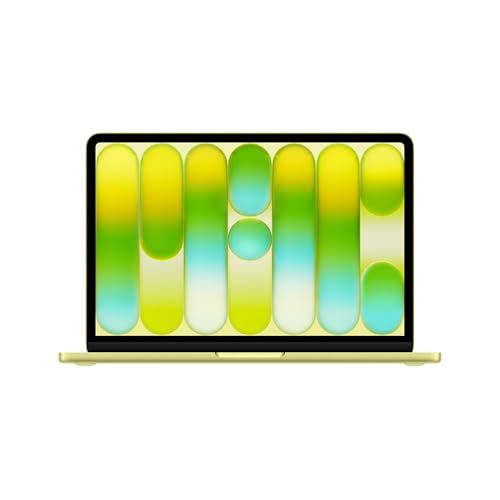
Quick answer: Which charger for Apple MacBook Neo 13? The simplest choice is Google 45W USB-C Charger 45 W - full charging speed (from 30 W USB-C PD). Cheaper alternatives below.

Which charger for Apple MacBook Neo 13? Essential power requirements
In the European Union and the UK, Apple ships the MacBook Neo 13 without a wall adapter in the box, though you still receive a 1.5-meter USB-C charging cable. If you are wondering which charger for Apple MacBook Neo 13 makes the most sense, the basic power threshold is easy to remember: this laptop draws a maximum of 30W over USB-C Power Delivery (USB-C PD, the universal standard for modern fast charging).
Both USB-C ports on the sides of the laptop support charging, giving you complete flexibility on where to plug in. Apple notes in its technical specifications that this machine is not fast-charge capable, meaning any adapter pushing more than 30W to 35W will not speed up the process.
Whether you just unboxed your laptop and need your primary power brick or simply want a lighter travel spare for your desk, you do not need an overpriced plug. Here is exactly what you need to know to get full charging speed without spending more than necessary.
Specs and charging
The Apple MacBook Neo 13 specs that matter when choosing an adapter:
- Battery: 36.5 Wh
- Full charging speed: from 30 W USB-C PD

Do you need to buy an original Apple wall adapter?
You do not need to buy an original Apple plug to power your laptop safely. As long as a charger supports the standard USB-C PD protocol and delivers at least 30W, the laptop negotiates power identically regardless of the brand name on the plastic.
An original Apple adapter makes sense if you prefer a single-port plug that matches the classic white finish and you want zero guesswork. It does the job cleanly, but it typically offers only one output port for the money.
Third-party chargers are often the smarter practical purchase. Reliable alternative brands offer multi-port options that can charge your laptop, your phone, and your headphones from a single wall socket, saving weight and space in your everyday bag.
Can you use a charger you already own?
Before ordering anything new, check the small text printed on the power plugs you already have around the house. Here is how the MacBook Neo 13 behaves with different common adapters:
- 20W phone charger (like an iPhone plug): Outside Europe, Apple includes a 20W USB-C plug. Independent tests show it charges the laptop at an 18W peak. It will slowly charge the 36.5 Wh battery, but under heavy multitasking, your battery percentage may drop or stall.
- 30W to 35W MacBook or iPad charger: This hits the laptop's real ceiling of around 30W. You get 100% of the maximum charging speed supported by the hardware.
- 45W to 65W laptop or tablet charger: Works completely safely. The laptop draws its required 30W and ignores the remaining capacity.
- 96W to 140W MacBook Pro brick: Independent testing confirms that powerful high-end adapters charge this laptop no faster than a standard 35W unit. Using one is entirely safe, but buying one specifically for this machine is a waste of money.
Selecting the right adapter for your routine
If you want the cheapest single-port option that unlocks the laptop's full charging speed, look at the Google 45W USB-C Charger. It easily covers the full 30W draw of the laptop with power to spare.
Another excellent single-port choice is the Samsung 45W Power Adapter EP-T4511. It delivers the same stable 30W top speed in a clean, compact design.
If you want a bit more headroom for demanding accessories, the Motorola TurboPower 68W provides plenty of capacity while running this laptop at its absolute limit.
For everyday commuters and travelers, multi-port plugs are far more convenient. The UGREEN Nexode 65W and the Anker 735 (Nano II 65W) both feature three ports. They can supply the full 30W to your laptop while simultaneously keeping your phone and wireless earbuds topped up from a single outlet.
| Charger | Power | Estimated speed |
|---|---|---|
| Google 45W USB-C Charger | 45 W | 100% |
| Samsung 45W Power Adapter EP-T4511 | 45 W | 100% |
| Motorola TurboPower 68W | 68 W | 100% |
| UGREEN Nexode 65W | 65 W | 100% |
| Anker 735 (Nano II 65W) | 65 W | 100% |

1. Google 45W USB-C Charger (45W GaN)
Cheapest at full speed
45W GaN charger. With the Apple MacBook Neo 13 it charges at up to about 30 W via USB PD (100% of the laptop's full charging speed, estimate based on specs and protocols).

2. Samsung 45W Power Adapter EP-T4511 (45W)
45W charger. With the Apple MacBook Neo 13 it charges at up to about 30 W via USB PD (100% of the laptop's full charging speed, estimate based on specs and protocols).

3. Motorola TurboPower 68W (68W GaN)
68W GaN charger. With the Apple MacBook Neo 13 it charges at up to about 30 W via USB PD (100% of the laptop's full charging speed, estimate based on specs and protocols).

4. UGREEN Nexode 65W (65W GaN)
3 ports - several devices at once
65W GaN charger. With the Apple MacBook Neo 13 it charges at up to about 30 W via USB PD (100% of the laptop's full charging speed, estimate based on specs and protocols).
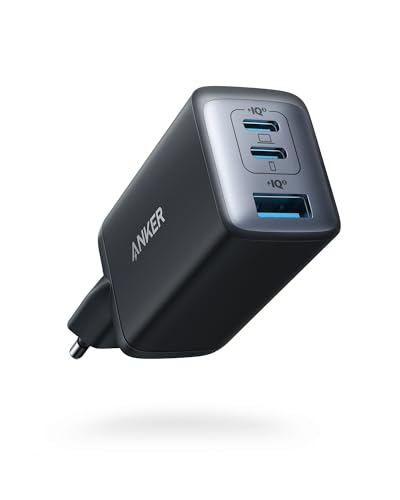
5. Anker 735 (Nano II 65W) (65W GaN)
3 ports - several devices at once
65W GaN charger. With the Apple MacBook Neo 13 it charges at up to about 30 W via USB PD (100% of the laptop's full charging speed, estimate based on specs and protocols).
Real charging speeds and traps to avoid
According to independent test measurements, the MacBook Neo 13 takes roughly 2 hours for a complete 0 to 100% charge when connected to an adapter rated at 35W or higher. You can expect to hit around 50% battery in roughly 45 minutes, which provides hours of standard office use.
Keep in mind that buying an oversized 100W or 140W charger will not make the process any faster. The power management chip inside the laptop caps incoming power near 30W to protect the battery and manage internal temperatures.
The biggest trap with multi-port adapters is automatic power redistribution. If you buy a compact dual-port plug and plug your phone into the second slot, the main port may drop down to 18W or 20W. Make sure your multi-port unit has enough total wattage (at least 60W to 65W) so the main laptop port stays above 30W when several devices are connected.
Lastly, avoid using old USB-A phone chargers with adapter tips. Basic USB-A plugs lack the USB-C PD voltage profiles required by the laptop, meaning the laptop will either charge at a crawl when asleep or refuse to charge entirely while you work.
Frequently asked questions about charging the MacBook Neo 13
Which charger for Apple MacBook Neo 13 provides full speed?
Any quality USB-C Power Delivery charger rated at 30W or higher gives you full charging speed. Independent tests confirm the laptop caps its intake around 30W, meaning 45W or 65W adapters offer optimal performance without leaving extra charging speed on the table.
Does the laptop include a charger in the box?
In the European Union and the UK, Apple does not include a power adapter in the box with this model. You will find a 1.5-meter USB-C to USB-C cable included, but you must supply your own compatible USB-C wall plug.
Can I charge the laptop using an iPhone 20W plug?
Yes, you can charge it with a 20W adapter, but it will be slow. Test figures show a 20W plug peaks at roughly 18W on this laptop. It works fine for overnight charging, but it may struggle to add percentage while you are actively running demanding apps.
Will a 65W or 100W adapter damage the battery?
No, a higher-wattage charger will not harm your battery at all. USB-C Power Delivery uses two-way communication between the laptop and the adapter. The laptop draws only the 30W it requires, regardless of how much power the charger can potentially deliver.
Can I use either USB-C port to recharge the laptop?
Yes, both USB-C ports on the MacBook Neo 13 support charging input. You can plug your power cable into whichever port is more convenient for your desk setup.
Sources
- Apple MacBook Neo 13 - apple.com - official manufacturer specifications (apple.com)
- Apple MacBook Neo 13 - notebookcheck.net - industry article (notebookcheck.net)
- Apple MacBook Neo 13 - macrumors.com - industry article (macrumors.com)
- Apple MacBook Neo 13 - sixcolors.com - industry article (sixcolors.com)
- Apple MacBook Neo 13 - macrumors.com - industry article (macrumors.com)

Leave a comment
This site is protected by hCaptcha and the hCaptcha Privacy Policy and Terms of Service apply.