








As an Amazon Associate I earn from qualifying purchases.
Quick answer: our top pick is Logitech M240 Silent Bluetooth (Bluetooth · quiet clicks · AA battery · compact).
Best mouse for MacBook Neo? Start with Bluetooth
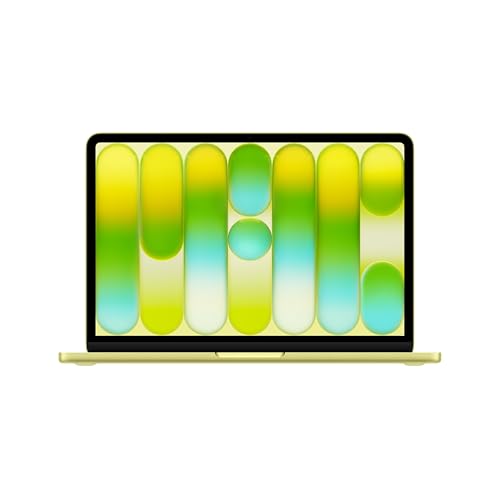
The simple answer: for the MacBook Neo, buy a Bluetooth mouse, because it won't take up either of the two ports. To start with, the cheap Logitech M240 Silent is enough. If you like the gestures you know from the trackpad, get the Apple Magic Mouse. If the mouse is going to travel in a bag, choose the Logitech MX Anywhere 3S for Mac.
For desk work lasting several hours a day, also consider the Logitech MX Master 4 for Mac. It is large and designed for right-handed users only.
- Logitech M240 Silent: a simple Bluetooth mouse with silent clicks, powered by an AA battery.
- Apple Magic Mouse: the best for macOS gestures.
- MX Anywhere 3S for Mac: compact, made for a laptop bag.

Bluetooth or receiver: which port on the Neo
The MacBook Neo has two USB-C ports and not a single USB-A. One port works at up to 10 Gb/s, the other only at up to 480 Mb/s. There is no Thunderbolt at all.
So a mouse with a classic USB-A receiver needs an adapter or a hub, and the receiver will still take up one of the two ports. That is a poor setup, because the second port is often needed for charging or a flash drive. That is why Bluetooth is the most convenient option here: you pair the mouse once and both ports stay free.
If you come across a mouse with a USB-C receiver, plug it into the slower port. According to Macworld, the faster one is the port closer to the hinge, so leave it for a monitor or a drive. The slower port is more than enough for a mouse. Apple, by the way, recommends charging through the slower port.
Fun fact: the two USB-C ports in the MacBook Neo look the same, but one is about 20 times slower. And that one is enough for a mouse receiver.
Below we have gathered mice chosen by three criteria: they connect via Bluetooth, they suit macOS, and they serve different purposes, from a cheap mouse for a bag to a model for long hours of work.

Mice we recommend for the MacBook Neo
1. Logitech M240 Silent Bluetooth
Bluetooth · quiet clicks · AA battery · compact
A simple, affordable Bluetooth mouse that suits the character of the MacBook Neo. It connects without a receiver, so both USB-C ports stay free. It has quiet clicks and runs on a single AA battery.
2. Apple Magic Mouse (USB-C)
Multi-Touch gestures · Bluetooth · USB-C · lightweight
The Apple mouse with a touch surface that supports the gestures you know from the trackpad. Macworld rates it the best for gestures. The battery lasts about a month, but the charging port is on the bottom.

3. Logitech MX Anywhere 3S for Mac
compact · Bluetooth · up to 70 days · works on glass
A small mouse for the laptop bag. According to Macworld, it even works on glass, the battery lasts up to 70 days, and the mouse pairs with three Apple devices. The for Mac version connects via Bluetooth.
4. Logitech MX Master 4 for Mac
haptics · Bluetooth · up to 70 days · USB-C
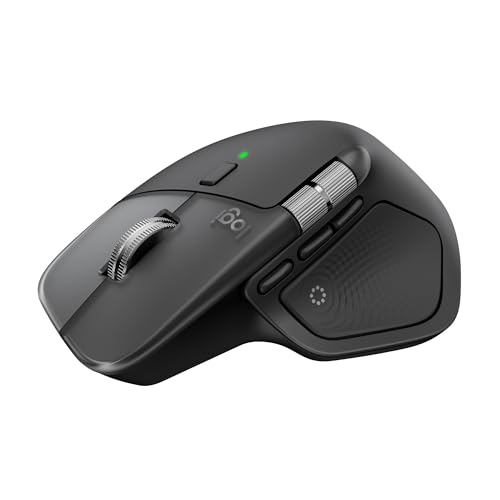
A large mouse for long desk sessions, shaped for the right hand. Macworld rates it the best for productivity. The for Mac version connects via Bluetooth without a receiver, so it won't take up a port on the Neo.
Magic Mouse or Logitech: gestures, shape, battery
Magic Mouse has a touch surface, so you can scroll vertically and horizontally, and open Mission Control with two fingers. Macworld considers it the best for gestures. The battery lasts about a month.
It also has drawbacks. According to Macworld, it is less comfortable for larger hands.
Fun fact: the Magic Mouse charging port is on the underside, so while charging the mouse lies upside down and can't be used (Macworld).
Logitech mice focus on a comfortable shape and longer battery life. The MX Anywhere 3S for Mac has fast charging and a battery of up to 70 days. It works on glass, so it will cope with a café table, and it pairs with three devices. The for Mac version connects via Bluetooth.
According to Macworld, the MX Master 4 for Mac is the best mouse for productivity. It connects via Bluetooth without a receiver, has a battery of about 70 days and a haptic panel under the thumb. It is shaped for the right hand, so left-handed users should skip it.
If lightness matters to you, the M240 Silent and Pebble Mouse 2 M350s are simple Bluetooth mice with quiet clicks, powered by an AA battery. They fit well in a laptop bag.
For a desk with a full setup, you will also need a dock and a monitor. They are covered in separate articles on the docking station and the monitor for MacBook Neo.
Mouse or trackpad on the MacBook Neo
The trackpad stays useful for gestures and for quick work on your lap, on a train or on the couch. You don't have to give it up even after buying a mouse.
A mouse comes in handy during long work at a desk. Selecting text, dragging files and precise work in a spreadsheet or graphics app are more comfortable with it. Many people use both at once: the trackpad for gestures, the mouse for everything else.
If you mostly work on the go, a travel mouse such as the MX Anywhere 3S for Mac or Pebble Mouse 2 M350s makes more sense than a large model. If you mostly work at a desk, you can afford a bigger shape.
Frequently asked questions about mice for the MacBook Neo
Which mouse for the MacBook Neo?
A Bluetooth mouse is the most convenient, because it doesn't take up a port. The budget option is the Logitech M240 Silent, for gestures the Magic Mouse, and for a bag the MX Anywhere 3S for Mac. For long work at a desk, the MX Master 4 for Mac is a good choice.
Does a mouse with a USB receiver work with the MacBook Neo?
Yes, but with caveats. A USB-A receiver requires an adapter or a hub and will take up one of the two ports. Plug a USB-C receiver into the slower port, because that is enough for a mouse.
Does the Magic Mouse work with the MacBook Neo?
Yes, it is Apple's mouse for macOS and Macworld considers it the best for gestures. Keep in mind that the charging port is on the underside, so it can't be used while charging. The battery lasts about a month.
Does the MacBook Neo have a USB-A port?
No. It has two USB-C ports: one up to 10 Gb/s and one up to 480 Mb/s. It also has no Thunderbolt, so older accessories with USB-A require an adapter.
Mouse or trackpad on the MacBook Neo?
The trackpad is enough for gestures and short work. A mouse is useful for long work at a desk and precise selection. It's best to have both.
See also
- Which charger for Apple MacBook Neo 13 - 5 recommended USB-C adapters
- Best docking station for MacBook Neo - the one-monitor limit and the workaround
- Best monitor for MacBook Neo - one 4K 60 Hz screen over USB-C
- Best external SSD for MacBook Neo - which port and what is worth buying
- Best mouse for Mac mini M6 - Magic Mouse or Logitech MX Master 4
Sources
- Apple: MacBook Neo technical specifications - manufacturer page (apple.com)
- Macworld: MacBook Neo ports, which to use - industry article (macworld.com)
- Macworld: Best mouse for MacBook and Mac - industry article (macworld.com)
- Macworld: Logitech MX Master 4 review - industry article (macworld.com)
- iMore: Best Magic Mouse alternatives - industry article (imore.com)

Leave a comment
This site is protected by hCaptcha and the hCaptcha Privacy Policy and Terms of Service apply.