








As an Amazon Associate I earn from qualifying purchases.
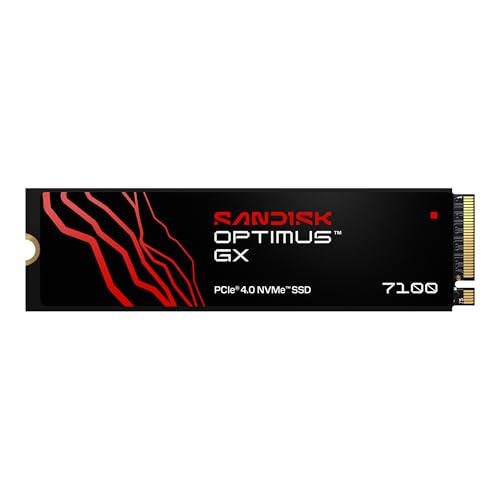
Quick answer: our top pick is SanDisk Optimus GX 7100 1TB (M.2 2280 · PCIe 4.0 · up to 7250 MB/s · no heatsink).
SanDisk Optimus GX 7100 PS5 compatible? Yes, but you buy the heatsink yourself
Sony recommends an SSD with at least 5500 MB/s read speed, and the SanDisk Optimus GX 7100 is rated at up to 7250 MB/s. It's a PCIe 4.0 x4 drive in the M.2 2280 format, and the PS5, PS5 Slim and PS5 Pro all have an M.2 NVMe PCIe 4.0 x4 slot. The only thing missing is the heatsink Sony requires. The GX 7100 doesn't come with one, so you buy it separately.
| Spec | Sony requirement | Optimus GX 7100 | Result |
|---|---|---|---|
| Interface | PCIe 4.0 x4 NVMe | PCIe 4.0 x4 | yes |
| Sequential read | 5500 MB/s or faster recommended | 7250 MB/s | yes |
| M.2 size | 2230 to 22110 | 2280 | yes |
| Heatsink | required | not included, buy one | caution |
The heatsink is the only piece missing.

Optimus GX 7100 and WD_BLACK SN7100: same design, new name
SanDisk renamed the drive at CES 2026, so you'll see both versions in stores. It's the same model: PCIe 4.0 x4, no DRAM, in 500 GB, 1 TB, 2 TB and 4 TB capacities. If a listing says WD_BLACK SN7100, don't look for differences in the specs.
In GamesRadar's test (1 TB version), the drive averaged about 7084 MB/s read and 6858 MB/s write. That's slightly below the numbers on the box, but still well above Sony's recommendation.
There is one honest limitation. The PS5 doesn't support HMB, a cache borrowed from the host system's memory, so a drive without its own DRAM runs in the console without that help. Picture a Friday evening when you move several big games from your library to the new drive. During a long copy like that, speed can drop and the progress bar will crawl, even though the drive is working normally.
You'll also see a version with the letter M, the Optimus GX 7100M. It's a short M.2 2230 drive made for handhelds and you don't need it for the PS5. For the console, get the model without the M.
Heatsink: there's no factory version, so you need to buy one
Sony doesn't allow an M.2 SSD to be used without cooling. It can be a heatsink or a thermal conductive plate. The GX 7100 has no version with a heatsink, and there are plenty of models on the market to choose from.
One example is the ARCTIC M2 Pro, which you fit onto a 2280 drive without tools, and thermal pads are included. The drive and heatsink together can be up to 11.25 mm thick, so check the dimensions in the listing of the model you pick. If you buy a drive with a built-in heatsink, don't add a second one.
Sony's installation steps look like this:
- Get a #1 Phillips screwdriver. A flashlight is optional.
- Touch a grounded metal object to discharge static electricity.
- Use Sony's instructions for your console: there are separate ones for the CFI-1000 group and for CFI-2000/7000.
- Don't turn on the console with the cover off.
- Format the drive on first use, which erases all data. After that, the PS5 measures the read speed on its own.
You can download new games straight to the M.2 drive by setting the install location in the storage settings. Games you've already installed can be moved from the game library with the move games and apps option. You can put the drive with your games into another PS5 signed in to the same account, but you have to take it out before sending the console in for repair.
How the licensed Optimus GX PRO 850P differs
According to StorageReview and PlayStation Direct, the officially licensed SanDisk drive for the PS5 is a different model, the Optimus GX PRO 850P. It has a heatsink designed for the console's M.2 slot, so you just insert it, screw it in and format it, with no cooling to hunt for.
The GX 7100 meets Sony's interface and speed requirements, but you have to buy and fit the heatsink. If you'd rather have a drive that's ready to install, go for a model with a factory heatsink. If buying a heatsink doesn't bother you, the GX 7100 will do the job too.
1 TB, 2 TB or 4 TB for GTA 6
GTA 6 went on sale on November 19, 2026 on PS5 and Xbox Series X|S. Rockstar said the game can take up to 212 GB depending on the device. According to Dexerto and TweakTown, citing PlayStation Game Size, the standard PS5 version is about 210 GB.
At that size, a 1 TB drive holds roughly 4 such games, a 2 TB drive about 9, and a 4 TB drive about 18. Formatting takes up part of the capacity, so in practice you'll get slightly fewer. 1 TB is enough if GTA 6 is your main title and you want room for a few smaller games next to it. 2 TB gives you peace of mind with several big titles at once. 4 TB is for people who don't want to manage their library at all.
Fun fact: the 2023 PS5 system update raised the maximum M.2 SSD capacity from 4 TB to 8 TB.
Below we've gathered the drive in different capacities, a heatsink, and a model with a factory heatsink for the PS5, chosen according to Sony's requirements. If you're only buying one: go for 2 TB if you play several big titles at once.
SanDisk Optimus GX 7100 and a heatsink for PS5

1. SanDisk Optimus GX 7100 1TB
M.2 2280 · PCIe 4.0 · up to 7250 MB/s · no heatsink
The former WD_BLACK SN7100 under a new name. Reads up to 7250 MB/s according to SanDisk. There is no heatsink version, so for the PS5 you buy a heatsink separately.
2. SanDisk Optimus GX 7100 4TB
M.2 2280 · PCIe 4.0 · 4 TB · no heatsink
The largest capacity in this series, for anyone with a big game library. You buy the heatsink separately.
3. ARCTIC M2 Pro M.2 heatsink
heatsink for M.2 2280 drives · thermal pads included
The most popular M.2 heatsink in this roundup. You fit it on a 2280 drive without tools, and the thermal pads are included.

4. SanDisk Optimus GX PRO 850P 2TB for PS5
M.2 2280 · PCIe 4.0 · PS5 heatsink · PlayStation licensed
The 2 TB version of the officially licensed PS5 drive, with a heatsink that fits the console slot. Room for several big games at once.
Frequently asked questions about the Optimus GX 7100 in PS5
Are the WD_BLACK SN7100 and SanDisk Optimus GX 7100 the same drive?
Yes. SanDisk changed the name at CES 2026, and you'll still see both in stores. It's the same PCIe 4.0 x4 drive with no DRAM.
Does the Optimus GX 7100 need a heatsink in the PS5?
Yes. Sony requires cooling for the M.2 drive, meaning a heatsink or a thermal plate. The GX 7100 has no version with a heatsink, so you buy one separately.
Does the Optimus GX 7100M fit the PS5?
You don't need it. It's a short M.2 2230 drive for handheld consoles, and for the PS5 you pick the 2280 model without the M.
How does the Optimus GX 7100 differ from the Optimus GX PRO 850P?
The GX PRO 850P is an officially licensed PS5 drive with a heatsink made to fit the console's slot. The GX 7100 meets Sony's interface and speed requirements, but you have to buy and install the heatsink yourself.
Does the Optimus GX 7100 fit the PS5 Pro?
Yes. The PS5, PS5 Slim and PS5 Pro have the same M.2 NVMe PCIe 4.0 x4 slot and accept drives from 250 GB to 8 TB. The same heatsink requirement and the 11.25 mm total thickness limit apply.
See also
- Best SSD for GTA 6 on PS5 - 210 GB per Game and How Many TB to Buy
- Best Heatsink for a PS5 SSD - up to 11.25 mm and Fits Under the Slot Cover
- PS5 storage full? How to free up space and which SSD to add
- Is the Acer Predator GM7 compatible with PS5? Yes, with a heatsink you buy separately
- Is the Crucial P310 compatible with PS5? Yes, in 2280 with a heatsink
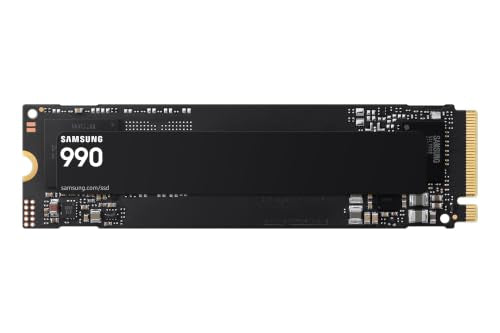
- Is the Samsung 990 compatible with PS5? Yes, but the heatsink is sold separately
Sources
- PlayStation: How to add M.2 SSD storage to PS5 consoles - manufacturer page (playstation.com)
- SanDisk: Desktop and laptop gaming storage drives - manufacturer page (sandisk.com)
- PlayStation Direct: SanDisk Optimus GX PRO 850P NVMe SSD for PS5 consoles - manufacturer page (direct.playstation.com)
- GamesRadar: WD Black SN7100 review - industry article (gamesradar.com)
- StorageReview: SanDisk expands Optimus SSD lineup with PS5 and ROG Xbox Ally options - industry article (storagereview.com)
- PCWorld: SanDisk Optimus GX 7100M review - industry article (pcworld.com)
- PCWorld: WD Black SN770 review (PS5 and HMB) - industry article (pcworld.com)
- GamesRadar: Best PS5 heatsink - industry article (gamesradar.com)
- Tom's Hardware: PlayStation 5 update adds support for 8TB SSDs - industry article (tomshardware.com)
- Rockstar Games Newswire: Grand Theft Auto VI pre-load begins on November 10 - manufacturer page (rockstargames.com)
- Dexerto: GTA 6 file size revealed - industry article (dexerto.com)

Leave a comment
This site is protected by hCaptcha and the hCaptcha Privacy Policy and Terms of Service apply.