








As an Amazon Associate I earn from qualifying purchases.
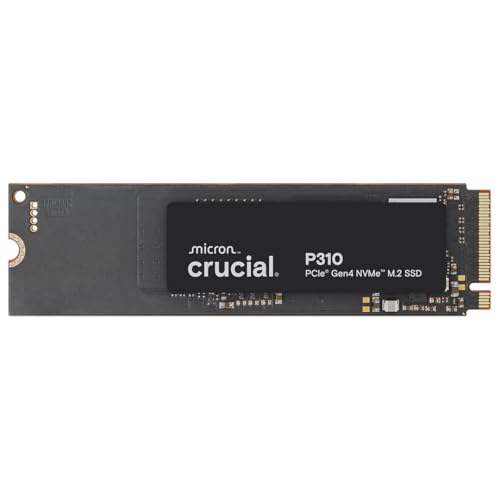
Quick answer: our top pick is Crucial P310 1TB with heatsink (M.2 2280 · PCIe 4.0 · up to 7100 MB/s · factory heatsink).
Is the Crucial P310 compatible with PS5? Yes, but only the 2280 version
A common belief is that any fast M.2 drive will do for the PS5. It won't. Sony requires the drive to be cooled, and the console doesn't support M.2 SATA drives at all. The Crucial P310 fits if you buy the 2280 version, ideally one that already comes with a heatsink.
| Spec | Sony requirement | Crucial P310 (2280) | Result |
|---|---|---|---|
| Interface | PCIe 4.0 x4 NVMe | PCIe 4.0 x4 | yes |
| Sequential read | 5500 MB/s or faster recommended | 7100 MB/s | yes |
| M.2 size | 2230 to 22110 | 2280 | yes |
| Heatsink | required | not included, buy one | caution |
After you format the drive, the PS5 measures its read speed on its own, so you can see right away how it performs in your console.

2230 or 2280: which version to buy and why it's confusing
Crucial sells the P310 in two lengths. The short 2230 is for handheld consoles, and the full-size 2280 is for the PS5. The drive has the same name, and only the end of the model number differs, so it's easy to click the wrong listing.
Just separate the two cases. For a PS5 sitting under your TV at home, 2280 is what you need. For travel, with a handheld in your backpack, you need 2230.
Read the full listing name before you buy. Also make sure it's an NVMe drive, not M.2 SATA.

Version with a heatsink or a plain drive plus a separate heatsink
Sony requires cooling for the M.2 drive: a heatsink or a heat-conducting plate. Crucial launched the P310 with a factory heatsink as a separate 1 TB and 2 TB variant, and sellers describe it as the PS5 version. Wccftech calls this heatsink low-profile.
The version with a heatsink is ready to install. With a plain 2280, you buy the heatsink separately, and according to GamesRadar there are plenty of models on sale. That's a good plan B, since the heatsink version can be hard to find.
One rule: don't add a second heatsink to a drive that already has one built in. Here's the installation in brief, according to Sony:
- Get a Phillips #1 screwdriver. A flashlight is optional.
- Before installing, touch a grounded metal object to discharge static electricity.
- Don't turn on the console with the cover removed.
- Use Sony's instructions for your model group. There are separate ones for CFI-1000 and CFI-2000/7000.
- Format the drive the first time you use it. This erases all data.

QLC memory in a console: what to expect
The P310 uses Micron 232-layer QLC memory, and StorageReview describes it as a budget drive. That's useful to know when choosing, but it's no reason to worry.
During very long file copies, the drive may slow down. In console gaming, you won't see it in load times. Wccftech lists read speeds up to 7100 MB/s and write speeds up to 6000 MB/s, and Tom's Hardware includes the P310 in its list of PS5 drives.
1 TB or 2 TB if GTA 6 is in your plans
GTA 6 launched on the PS5 on November 19, 2026. In its preload announcement, Rockstar said the game could take up to 212 GB depending on the device. According to Dexerto and TweakTown, citing the PlayStation Game Size account, the standard PS5 version is about 210 GB.
On a 1 TB drive, you can fit GTA 6 plus roughly three more games of similar size. A 2 TB drive holds about 9 such games. Formatting takes up some of the capacity, so leave yourself a bit of headroom.
You can download new games straight to the M.2 drive, and you set the install location in the storage settings. Games that are already installed can be moved from the game library with the move games and apps option. You can also take the drive with your games and put it into another PS5 signed in to the same account. Before sending the console in for service, you need to remove the drive.
Fun fact: The maximum M.2 drive capacity in the PS5 wasn't always what it is today. A 2023 system update raised it from 4 TB to 8 TB.
In short: for the PS5, get the P310 in the 2280 version. Choose 1 TB if you play a few other big titles besides GTA 6, or 2 TB if you want more of them on hand, and make sure the drive has a heatsink.
Below, we've collected P310 drives in the 2280 version, plus a heatsink for the plain version, because this set meets Sony's requirements for interface, speed and cooling.
Crucial P310 and heatsink for PS5
1. Crucial P310 1TB with heatsink
M.2 2280 · PCIe 4.0 · up to 7100 MB/s · factory heatsink
The P310 with a factory heatsink, which Crucial describes as a PS5 drive. You put it in the console without having to buy any extra cooling.
2. Crucial P310 1TB (M.2 2280)
M.2 2280 · PCIe 4.0 · up to 7100 MB/s · no heatsink
The 2280 version, which is the one that fits the PS5. Reads up to 7100 MB/s according to Crucial. It has no heatsink, so you buy one separately and attach it before installing.
3. Crucial P310 2TB (M.2 2280)
M.2 2280 · PCIe 4.0 · up to 7100 MB/s · no heatsink
The P310 in the 2280 version with 2 TB. Reads up to 7100 MB/s according to Crucial. The heatsink is bought separately.
4. ARCTIC M2 Pro M.2 heatsink
heatsink for M.2 2280 drives · thermal pads included
The most popular M.2 heatsink in this roundup. You fit it on a 2280 drive without tools, and the thermal pads are included.
Frequently asked questions about the P310 in the PS5
Does the Crucial P310 2230 fit the PS5?
For the PS5, you need the 2280 version. The 2230 is shorter and made for handheld consoles. When you order, check the end of the model number in the listing title.
Does the Crucial P310 need a heatsink in the PS5?
Yes, Sony requires a heatsink or a thermal conductive plate. The version with a factory heatsink is ready to install, while with the standard one you buy a heatsink separately. Don't add a second one to a drive that already has its own.
Does the Crucial P310 use QLC memory?
Yes, according to StorageReview it's 232-layer Micron QLC memory. In practice, this means it may slow down during very long file copies. You won't notice it in game loading times on the console.
Does the Crucial P310 fit the PS5 Pro?
Yes. The PS5, PS5 Slim and PS5 Pro all have an M.2 NVMe PCIe 4.0 x4 slot, so the 2280 version is the right choice for each of them. Sony has separate installation instructions for each group of models, so open the one for your console.
Is the Crucial P310 1 TB enough for GTA 6?
Yes, the standard PS5 version is about 210 GB, so it fits with plenty of room to spare. A 1 TB drive holds roughly four games that size. If you like to keep more big titles installed at once, consider 2 TB.
See also
- Best SSD for GTA 6 on PS5 - 210 GB per Game and How Many TB to Buy
- Best Heatsink for a PS5 SSD - up to 11.25 mm and Fits Under the Slot Cover
- PS5 storage full? How to free up space and which SSD to add
- Is the SanDisk Optimus GX 7100 (formerly WD_BLACK SN7100) compatible with PS5?
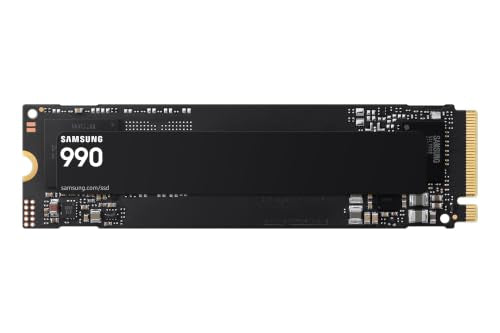
- Is the Samsung 990 compatible with PS5? Yes, but the heatsink is sold separately
- Is the Acer Predator GM7 compatible with PS5? Yes, with a heatsink you buy separately
Sources
- PlayStation: How to add M.2 SSD storage to PS5 consoles - manufacturer page (playstation.com)
- Crucial: P310 PCIe Gen4 NVMe 2280 M.2 SSD - manufacturer page (crucial.com)
- StorageReview: Crucial P310 2TB review, NVMe SSD with heatsink - industry article (storagereview.com)
- Wccftech: Crucial P310 2 TB (2280) with heatsink review - industry article (wccftech.com)
- KitGuru: Crucial P310 2280 2TB SSD review - industry article (kitguru.net)
- Tom's Hardware: Crucial P310 SSD with heatsink - industry article (tomshardware.com)
- Tom's Hardware: The best PS5 SSDs - industry article (tomshardware.com)
- GamesRadar: Best PS5 heatsink - industry article (gamesradar.com)
- Tom's Hardware: PlayStation 5 update adds support for 8TB SSDs - industry article (tomshardware.com)
- Rockstar Games Newswire: Grand Theft Auto VI pre-load begins on November 10 - manufacturer page (rockstargames.com)
- Dexerto: GTA 6 file size revealed - industry article (dexerto.com)

Leave a comment
This site is protected by hCaptcha and the hCaptcha Privacy Policy and Terms of Service apply.