









As an Amazon Associate I earn from qualifying purchases.
Quick answer: our top pick is Samsung 990 PRO 2 TB (2TB · M.2 2280 · PCIe 4.0 · no heatsink).
Best SSD for MSI Claw 8 EX AI+? Short answer
Buy an M.2 2280 NVMe PCIe 4.0 drive, without a heatsink. The most sensible capacity is 2 TB, and if you have a large game library, go for 4 TB.
The factory drive is 1 TB in the CG3EM version or 512 GB in the cheaper CG3M. For most gamers that quickly becomes too little, because a few large titles can fill the entire drive.
The good news: in this model, replacing the drive is easy and requires no special tools. Below you will find what to choose and how to do it step by step.
What slot the Claw 8 EX AI+ has and what to watch out for
According to MSI's specifications, inside there is one M.2 2280 slot for an NVMe PCIe Gen4 drive. It is the standard, full-size format you know from laptops and desktop computers. So the choice is wide.
Fun fact: The Claw 8 EX AI+ is the first Claw with a full-size M.2 2280 slot. The earlier Claw 8 AI+ accepted only short 2230 drives (information from Notebookcheck).
PCIe 4.0, not 5.0
The slot works in the PCIe Gen4 standard. A PCIe 5.0 drive will work, but it won't be faster, so you would overpay for a feature the device can't use. Look for PCIe 4.0 drives.
The factory Micron 2500 is also a PCIe 4.0 x4 drive, without DRAM and with QLC memory (data from the TechPowerUp teardown). So a better PCIe 4.0 drive is a real change for the better.
Why without a heatsink
There is little space under the back cover. A drive with a thick heatsink may simply not fit there, or it will press against the cover. Choose models sold without a heatsink, in the bare version.
We selected M.2 2280 drives with PCIe 4.0 in capacities of 1, 2 and 4 TB, and where the manufacturer offers a version without a heatsink, we chose exactly that one.
Recommended SSDs for MSI Claw 8 EX AI+

1. Samsung 990 PRO 2 TB
2TB · M.2 2280 · PCIe 4.0 · no heatsink
One of the most popular NVMe drives, here in the 2TB version with no heatsink. PCIe 4.0 and reads up to 7,450 MB/s according to Samsung, which is what the Claw's PCIe Gen4 slot can use. Twice the space of the stock 1TB drive.

2. Lexar EQ790 2 TB (M.2 2280)
2 TB · M.2 2280 · PCIe 4.0 · no heatsink
A second 2 TB option. No heatsink, PCIe 4.0, and reads up to 7,000 MB/s according to Lexar.
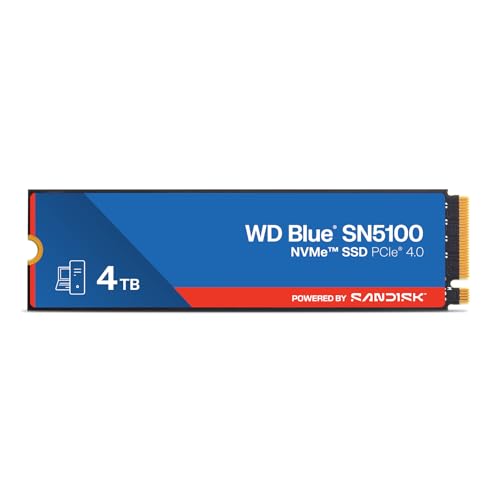
3. SanDisk WD Blue SN5100 4 TB
4TB · M.2 2280 · PCIe 4.0 · up to 6,900 MB/s
For a game library that won't fit in 2TB: 4TB in the M.2 2280 size on PCIe 4.0, with reads up to 6,900 MB/s according to SanDisk. Four times the space of the stock drive.

4. WD_BLACK SN7100 4 TB
4TB · M.2 2280 · PCIe 4.0 · up to 7,000 MB/s
A second 4TB option from the gaming line: M.2 2280, PCIe 4.0 and reads up to 7,000 MB/s according to the maker. No heatsink, so it fits under the back cover.

5. Crucial P310 1 TB (M.2 2280)
M.2 2280 · PCIe 4.0 · no heatsink · up to 7,100 MB/s
A solid seller among M.2 2280 drives. No heatsink, PCIe 4.0, and reads up to 7,100 MB/s according to Crucial. 1 TB makes sense on the cheaper CG3M with a 512 GB drive. The CG3EM already has 1 TB, so pick 2 TB or more there.
How many TB to choose for the Claw 8 EX AI+
Start with what you have. The CG3EM version has 1 TB, while the CG3M has only 512 GB. With 512 GB, upgrading to 1 TB already helps, but it is a half measure. With 1 TB, it makes sense to jump straight to a larger capacity.
2 TB: the sweet spot
Two terabytes is a good choice if you play several large titles at once and delete something from time to time. You get twice as much space as the factory drive and do not have to shuffle games around every week. Samsung 990 PRO 2 TB and Lexar EQ790 2 TB belong to this class.
4 TB: for a large library
If you keep dozens of games installed and do not want to uninstall any of them, go for 4 TB. Such a drive gives you four times more space than the factory one. From our list, SanDisk WD Blue SN5100 4 TB and WD_BLACK SN7100 4 TB fit here.
The 512 GB version
If you have the cheaper CG3M version, a good starting point is 1 TB, for example the Crucial P310. It is clearly more space without a big expense.
microSD Express as a supplement
The Claw also has a microSD Express reader. The card is useful for older games or less demanding titles, but it will not replace the drive in the M.2 slot for the biggest games.
Fun fact: the microSD Express reader in the Claw 8 EX AI+ reaches over 800 MB/s (data from Notebookcheck).
How to replace the drive step by step
The whole operation is simple. Windows Central reports that all you need to do is remove six standard Phillips screws from the back cover, and swapping the drive takes less than five minutes.
- Back up your data. Copy your cloud game saves, important files and settings to an external drive or to the cloud.
- Turn off the console and unplug the charger and all accessories.
- Remove the six Phillips screws from the back cover and carefully take the cover off.
- Remove the screw that holds the drive, take out the old one and insert the new one. Just one screw is needed.
- Put the cover back on and tighten the six screws.
Cloning or a fresh install
The new drive is empty, so you need to either transfer the system or install it from scratch. You have two options.
The first is cloning. Tom's Hardware put a 2 TB drive into the Claw and transferred the system by cloning over Thunderbolt. This way you get everything just as it was.
The second is a clean system installation. It takes more time, but you start with a tidy system, without old clutter. Remember that afterwards you install games and drivers from scratch.
Most common questions about the drive for the Claw 8 EX AI+
Which SSD fits the MSI Claw 8 EX AI+?
An M.2 2280 NVMe drive with the PCIe 4.0 standard fits. Choose a version without a heatsink, because there is little space under the cover.
Does the MSI Claw 8 EX AI+ have an M.2 2280 slot?
Yes. According to the MSI specification, there is one M.2 2280 slot for a PCIe Gen4 NVMe drive. In the older Claw 8 AI+ it was the shorter M.2 2230.
Is it worth buying a PCIe 5.0 drive for the Claw 8 EX AI+?
No. The slot is PCIe Gen4, so a PCIe 5.0 drive will not give you higher speeds. It is better to choose a good PCIe 4.0 drive and put the difference toward larger capacity.
How do I replace the drive in the MSI Claw 8 EX AI+?
Back up your data, remove the six Phillips screws from the back cover and remove one screw by the drive. After inserting the new one, clone the system or install it from scratch. The installation itself takes less than five minutes.
How many TB should I choose for the MSI Claw 8 EX AI+?
For most gamers, 2 TB will be the best. With a large library, go for 4 TB, and with the 512 GB version, even 1 TB will be a noticeable change. A microSD Express card can add space for less demanding games.
See also
- Best SSD for Lenovo Legion Go 2 - 2242 or 2280 and the 2 TB limit
- Best SSD for Steam Machine - M.2 2280 or 2230 and how much storage
- Best SSD for ROG Xbox Ally and Ally X - M.2 2280, capacity and the thermal cover
Sources
- MSI: Claw 8 EX AI+ specification - manufacturer page (msi.com)
- Notebookcheck: MSI Claw 8 EX AI+ review - industry article (notebookcheck.net)
- Windows Central: MSI Claw 8 EX AI+ review - industry article (windowscentral.com)
- Tom's Hardware: Upgrading the MSI Claw 8 EX AI+ with a 2TB SSD - industry article (tomshardware.com)
- TechPowerUp: MSI Claw 8 EX AI+ disassembly - industry article (techpowerup.com)

Leave a comment
This site is protected by hCaptcha and the hCaptcha Privacy Policy and Terms of Service apply.