








As an Amazon Associate I earn from qualifying purchases.
Quick answer: our top pick is Dell 27 Plus S2725QS (27-inch · 4K · 120 Hz · HDMI and DisplayPort).
Best monitor for Mac mini M4? The short answer
For office work, coding, and video, a 27-inch 4K display connected via HDMI or USB-C is enough. It's a sensible compromise between sharpness and budget, and the Mac mini M4 handles it with ease.
If you read and write on screen a lot, consider 5K at 27 inches. Text is noticeably sharper, but these monitors cost more.
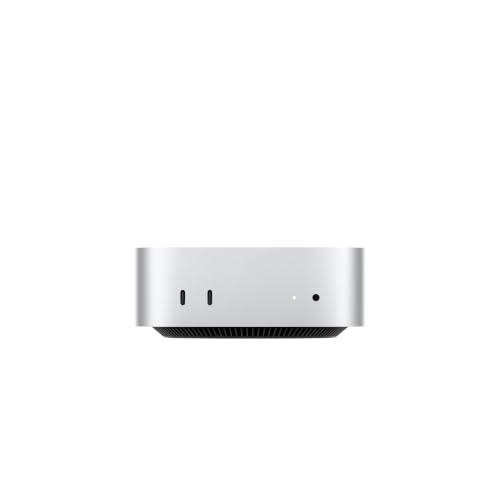
Want to get your whole desk setup in one purchase? Apple's original 5K monitor has a built-in camera and speakers. The Mac mini has no camera of its own, and the box contains only the computer and a 1.8 m (about 6 ft) power cable, with no monitor, keyboard, or mouse.
We cover monitors for the newer Mac mini with M6 in a separate article.

How many monitors you can connect and at what resolution
The Mac mini with M4 supports up to three monitors. Two can be up to 6K 60 Hz over Thunderbolt, and the third up to 5K 60 Hz over Thunderbolt or 4K 60 Hz over HDMI.
There is also a two-display option: one up to 5K 60 Hz over Thunderbolt, and the other with a higher resolution or refresh rate over Thunderbolt or HDMI. In practice, that leaves you plenty of headroom for office use.
The M4 Pro version gives you more freedom. You can connect three monitors up to 6K 60 Hz over Thunderbolt or HDMI. With two, one can be up to 6K 60 Hz and the other an even higher resolution.
Put simply: two 4K or 5K monitors are no problem for either chip. The difference starts with three screens at the highest resolution, or with very fast panels.
Fun fact: the small Mac mini with M4 can drive an 8K 60 Hz monitor or a 4K 240 Hz one.
Below, we've collected 4K and 5K monitors that suit the Mac mini, chosen by resolution, available video inputs, and USB-C support.

Monitors for Mac mini M4 we recommend
1. Dell 27 Plus S2725QS
On sale27-inch · 4K · 120 Hz · HDMI and DisplayPort
The best seller in this list. You connect the Mac mini with a regular HDMI cable, and the 4K IPS panel at 120 Hz is plenty for work and movies. It has no USB-C, but the Mac mini does not need it for power.
2. Dell 27 Plus S2725QC
On sale27-inch · 4K · 120 Hz · USB-C and USB ports
The same 4K 120 Hz screen as the S2725QS, with USB-C added. One cable carries picture and data, and the USB ports are right on the monitor. The 65 W charging only helps a laptop, because the Mac mini has its own power.

3. Apple Studio Display (2026)
27-inch · 5K · 600 nits · Thunderbolt 5
Apple's own monitor: 27-inch 5K, 600 nits, two Thunderbolt 5 ports, a 12 MP camera and six speakers. It is all in one body, so you need no separate webcam or speakers on the desk.

4. LG UltraFine 27UP850K
On sale27-inch · 4K · 95% DCI-P3 · USB-C and HDMI
A middle ground between the Dell and the Apple: 27-inch 4K, 95% DCI-P3 and DisplayHDR 400. It has HDMI and USB-C, so the Mac mini connects either way.
HDMI, Thunderbolt, or USB-C, and What About Charging Power
On the back, the Mac mini M4 has three Thunderbolt 4 ports (up to 40 Gb/s), HDMI, and 1 Gb Ethernet, with 10 Gb optional. The M4 Pro has three Thunderbolt 5 ports (up to 120 Gb/s) instead. On the front, both versions have two USB-C ports with USB 3 at up to 10 Gb/s and a 3.5 mm headphone jack.
For a 4K 60 Hz monitor, a standard HDMI cable is enough. If your monitor has USB-C, you can use a single cable for video and data, and the monitor's USB ports will work as a hub. That's handy, because the Mac mini has no USB-A ports.
For 5K and 6K, Thunderbolt is the best choice. Apple lists 5K and 6K at 60 Hz for this connection.
USB-C charging power on a monitor (65 W, 90 W) does nothing for a Mac mini. The computer has its own power cable and doesn't draw power through the monitor. That feature only helps a laptop sitting on the same desk.
So don't pay extra for higher charging power if you'll only use a Mac mini. Video inputs and resolution matter more.
4K or 5K at 27 Inches
Macs look best on Retina displays with high pixel density. According to TechRadar and Cult of Mac, these include 5K monitors at 27 inches. Such monitors cost more.
According to the same sources, 4K at 27 inches is a sensible compromise for work. Text is readable, and you can also pick a panel with a high refresh rate and connect it with regular HDMI.
Choose 5K if you spend your days on text, code, or photos and care about sharpness. Choose 4K if price and a wider choice of models matter more.
For color work, look for a 4K monitor with good DCI-P3 coverage. For everyday office use, a regular IPS panel is enough.
Fun fact: A 27-inch 5K monitor has 218 PPI, the same as the original Apple display.
Frequently Asked Questions About Monitors for the Mac mini M4
Which monitor for the Mac mini M4?
For most uses, a 27-inch 4K monitor with HDMI or USB-C is enough. If text sharpness matters, choose 5K. Want a camera and speakers in one device? Look at Apple's 5K monitor.
How many monitors does the Mac mini M4 support?
Up to three. Two can run at up to 6K 60 Hz over Thunderbolt, and the third at up to 5K 60 Hz over Thunderbolt or 4K 60 Hz over HDMI. The M4 Pro supports three monitors at up to 6K 60 Hz over Thunderbolt or HDMI.
Does the Mac mini M4 support a 5K monitor?
Yes, up to 5K 60 Hz over Thunderbolt. You can connect it as one of two or three displays. The M4 Pro version even supports 6K 60 Hz.
Does a monitor for the Mac mini M4 need USB-C?
No. The Mac mini has its own power supply, and you can send video over HDMI. USB-C makes setup easier because one cable carries video and data, but it isn't required.
Does the Mac mini M4 support a monitor over HDMI?
Yes. Over HDMI you get 4K 60 Hz as a third monitor, and with two displays even 4K 240 Hz or 8K 60 Hz. The M4 Pro supports up to 6K 60 Hz over HDMI.
See also
- Best Keyboard for Mac mini M4 - Touch ID or Logitech
- Best SSD for Mac mini M4 - which port gives full speed
- Best webcam for Mac mini M4 - USB-C or iPhone
Sources
- Apple Support: Mac mini (2024) tech specs - manufacturer page (support.apple.com)
- TechRadar: Best monitors for the Mac mini - industry article (techradar.com)
- Cult of Mac: Best monitor for Mac - industry article (cultofmac.com)
- Macworld: M4 Pro Mac mini review - industry article (macworld.com)

Leave a comment
This site is protected by hCaptcha and the hCaptcha Privacy Policy and Terms of Service apply.