








As an Amazon Associate I earn from qualifying purchases.
Quick answer: our top pick is UGREEN FineCam Lite 4K (4K 30fps · autofocus · 2 mics · privacy cover).
Best webcam for Mac mini M4? Short answer
For everyday calls, a 4K webcam with a USB-C cable and autofocus is enough. You can plug it straight into the port on the front or back of the Mac mini, no adapters needed.
If you walk around your desk during meetings, gesture a lot, or often stand up, choose a webcam with auto-framing. It keeps you in the center of the picture, so you don't have to sit perfectly still.
There is also a free option: your iPhone. Apple lets you use it as a Mac webcam, so if you already have a compatible phone, you can start taking calls today without spending anything.
You need a webcam because the Mac mini doesn't have one.

iPhone as a webcam: Apple's requirements and when it gets in the way
The feature is called Continuity Camera. According to Apple's documentation, you need:
- an iPhone XR or later with iOS 16 or later,
- a Mac with macOS Ventura 13 or later,
- the same Apple Account on both devices, with two-factor authentication,
- Bluetooth and Wi-Fi turned on.
The Mac mini with M4 has Wi-Fi 6E and Bluetooth 5.3, so you don't need to buy anything extra on the computer side.
The camera setup gives you several features: Center Stage, Portrait mode, Studio Light, and Desk View. The last one shows your face and your desk surface at the same time, which is handy when you are demonstrating something.
Apple recommends that the iPhone be stable, locked, and have its rear cameras facing you. In practice, you need a mount or stand that holds the phone at eye level. Without one, the picture will be crooked or shot from below.
Where does it get in the way? Mainly when you need your phone during a call, for example for notifications, codes, or notes. The second downside is mounting and removing it every day. If you have several meetings a day, a permanent webcam on your monitor is simply more convenient.
Shotkit notes that a separate webcam is for Mac mini owners who find Continuity Camera isn't enough.
Fun fact: every iPhone from the XR onward can work as a Mac mini webcam thanks to Continuity Camera, so an older phone from a drawer will do too.
Below we've gathered 4K webcams for the Mac mini, chosen for video calls and desk work, with and without auto-framing.

Best webcams for Mac mini M4 we recommend
1. UGREEN FineCam Lite 4K
4K 30fps · autofocus · 2 mics · privacy cover
A lower-cost 4K webcam at 30 fps with autofocus, two mics and automatic light correction. It has a privacy cover to close when you're not on a call.
2. Logitech Brio 4K
4K · autofocus · 5x zoom · 2 mics
A popular 4K webcam with autofocus, 5x digital zoom and two noise-reducing mics, aimed at video meetings.

3. Logitech MX Brio
4K · 1080p 60fps · 2 mics · USB-C
A 4K webcam with a USB-C cable, so it plugs straight into the Mac mini without an adapter. Calls run at 1080p and 60 fps, with two beamforming mics and Show Mode for showing things on your desk.

4. Insta360 Link 2C
4K · 1/2" sensor · auto framing · gestures
A 4K webcam with a large 1/2-inch sensor, HDR and auto framing that keeps you centered as you move. You control it with gestures, and the mic cuts noise with AI.

5. OBSBOT Meet 2
4K · 1/2" sensor · AI framing · lightweight
A small, light 4K webcam with a 1/2-inch sensor, AI framing, autofocus and HDR. A good fit if you want auto framing in a smaller body.
USB-C vs. USB-A: why the cable matters
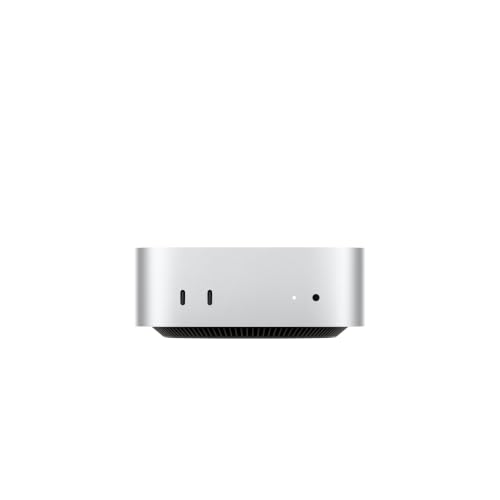
On the back, the M4 has three Thunderbolt 4 ports, and the M4 Pro has three Thunderbolt 5 ports. There are also HDMI and 1 Gb Ethernet ports.
A camera with a USB-C cable plugs straight into any of these ports. It is most convenient to use one on the front, because it is easy to unplug and move.
A camera with a USB-A plug will need an adapter. It works, but the adapter takes up a port, and the cable gets longer and less tidy. So when buying, check whether the camera's cable ends in a USB-C plug. If it is detachable, a USB-C to USB-C cable can be the solution.
Fun fact: The Mac mini with M4 has no USB-A port at all, but it does have two USB-C ports on the front.
1080p or 4K, microphone, lens cover and a monitor with a camera
4K makes sense with a large monitor and good lighting, while 1080p is enough for ordinary calls. Some 4K cameras switch to 1080p at 60 frames per second during calls, which gives smoother motion.
The microphone in the camera is enough for meetings in a quiet room. If the room has an echo, it is better to wear a headset with a microphone. The Mac mini has a 3.5 mm jack on the front that supports high-impedance headphones.
A lens cover is a small detail that changes how comfortable the camera feels. When you are not on a call, you cover the camera in one move and don't have to wonder whether someone has turned it on.
Also pay attention to autofocus and light correction. A desk by a window can change the lighting a lot during the day, and a good camera evens out the image on its own.
If you are still choosing a display, consider a monitor with a built-in camera. The Apple Studio Display has one, so you don't need a separate camera with it. Choosing a monitor is covered in a separate article about monitors for the Mac mini M4.
Frequently asked questions about a webcam for the Mac mini M4
Which webcam for the Mac mini M4?
The best choice is a 4K camera with a USB-C cable and autofocus that you can plug straight into a port on the Mac mini. If you move around a lot, choose a model with automatic framing. To start, you can also use an iPhone.
Does the Mac mini M4 have a built-in camera?
No. The Mac mini with M4 and M4 Pro has no camera. You need to buy a camera separately or use an iPhone or a monitor with a built-in camera.
Can an iPhone be a camera for the Mac mini M4?
Yes, thanks to Continuity Camera. You need an iPhone XR or newer with iOS 16, macOS Ventura 13 or later, the same Apple Account with two-factor authentication, and Bluetooth and Wi-Fi turned on. Place the phone steadily, locked, with the rear cameras facing you.
Will a USB-A camera work with the Mac mini M4?
It will, but with an adapter, because the Mac mini has no USB-A ports. It is simpler to buy a camera with a USB-C cable and connect it without extras.
Is it worth buying a 4K camera for the Mac mini?
For calls, usually yes, because 4K gives you extra image headroom for cropping and zooming. If you talk rarely and in good light, a good 1080p camera is enough too. Autofocus, the microphone and the lens cover are often more important than resolution.
Sources
- Apple Support: Mac mini (2024) tech specs - manufacturer page (support.apple.com)
- Apple Support: Use iPhone as a webcam for your Mac (Continuity Camera) - manufacturer page (support.apple.com)
- iGeeksBlog: Best webcams for Mac - industry article (igeeksblog.com)
- Shotkit: Best webcam for Mac - industry article (shotkit.com)
- CleanMyMac: Best web cameras for Mac - industry article (cleanmymac.com)

Leave a comment
This site is protected by hCaptcha and the hCaptcha Privacy Policy and Terms of Service apply.