








As an Amazon Associate I earn from qualifying purchases.
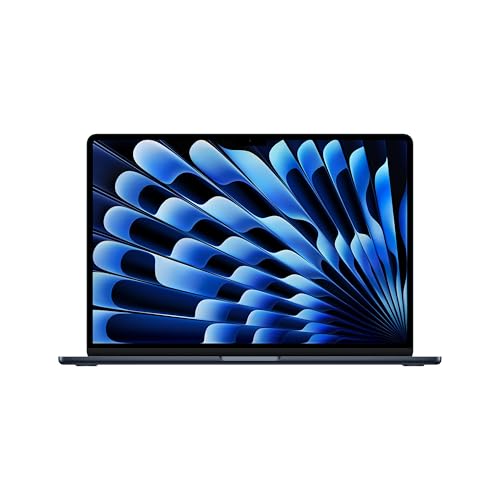
Quick answer: Which charger for Apple MacBook Air 15 M5? The simplest choice is Apple 70W USB-C Power Adapter 70 W - full charging speed (from 70 W USB-C PD). Cheaper alternatives below.

Which charger for Apple MacBook Air 15 M5? A 40 W adapter in the box, and 70 W is the full-speed mark
In the US, the MacBook Air 15 M5 comes with a 40W Dynamic Power Adapter (60W max) and a 2 m USB-C to MagSafe 3 cable.
Apple does not publish a minimum power, and full-speed charging starts at 70 W of USB-C PD. PD (Power Delivery) is the standard that lets a charger and a laptop agree on how much power to send. Apple's own rule is to fast charge with a 70 W or higher USB PD adapter.
The laptop charges through MagSafe 3 and also through its two USB-C Thunderbolt 4 ports. This guide is for you if you got the laptop without an adapter, or if you want a second one for work or travel.

Specs and charging
The Apple MacBook Air 15 M5 specs that matter when choosing an adapter:
- Battery: 66.5 Wh
- Full charging speed: from 70 W USB-C PD
Original Apple adapter or a cheaper alternative?
You don't have to buy the Apple adapter. It is the simplest choice, because the Apple 70W USB-C Power Adapter is made for this laptop and there is nothing to compare or double-check. For a single laptop on a single desk, that peace of mind is a fair reason to pay for it.
A good USB-C PD adapter with the right wattage charges just as fast. The Anker Nano Charger 70W 3-Port (B121A) and the Baseus Enerfill 100W are both listed at about 70 W with this laptop, which is the realistic maximum, the same as the Apple adapter.
An alternative makes more sense when you want one adapter for the laptop and your phone, when you travel, or when price matters. Both the Anker and the UGREEN have several ports, so one plug in the wall can power more than one device.

Will the charger you already own do the job?
Maybe, but check the wattage printed on it first. Apple does not publish a minimum power, and fast charging starts at 70 W. A weaker charger still charges, only more slowly. Here is how common chargers fit:
- iPhone charger (20 W): this is too weak for comfortable work while charging, so don't count on it to run and charge the MacBook Air at the same time.
- Android phone charger: it will charge the laptop, but slowly. Only a USB-C PD charger rated at 70 W or more gives fast charging.
- Older USB-C laptop charger: a weaker unit still charges, but it is slow. A 70 W or stronger USB PD unit gives you full speed.
- Weaker chargers in general: in an independent Notebookcheck stress test, a 35 W adapter limited the laptop for a few seconds, then it settled at about 30.5 W. So a 35 W adapter still charges the laptop, but you give up the fast charging.
Which adapter to put in your basket
If you want the original, take the Apple 70W USB-C Power Adapter: it is rated at 70 W, which is full speed for this laptop. If you simply want the cheapest way to get full speed, the Anker Nano Charger 70W 3-Port (B121A) does it at 70 W and has three ports.
If you want one adapter for the laptop and your other gadgets, the Anker Nano Charger 70W 3-Port (B121A) has three ports. With this laptop it is listed at about 70 W, the same realistic maximum as the others. For a compact travel adapter, the Anker 70 W is the one from this list to look at first.
| Charger | Power | Estimated speed |
|---|---|---|
| Apple 70W USB-C Power Adapter | 70 W | 100% |
| Apple 96W USB-C Power Adapter | 96 W | 100% |
| Baseus Enerfill 100W | 100 W | 100% |
| Anker Nano Charger 70W 3-Port (B121A) | 70 W | 100% |
| Baseus Enerfill 140W | 140 W | 100% |

1. Apple 70W USB-C Power Adapter (70W GaN)
Original Apple charger
70W GaN charger. With the Apple MacBook Air 15 M5 it charges at up to about 70 W via USB PD (100% of the laptop's full charging speed, estimate based on specs and protocols).

2. Apple 96W USB-C Power Adapter (96W)
Original Apple charger
96W charger. With the Apple MacBook Air 15 M5 it charges at up to about 70 W via USB PD (100% of the laptop's full charging speed, estimate based on specs and protocols).

3. Baseus Enerfill 100W (100W GaN)
Cheapest at full speed · 3 ports - several devices at once
100W GaN charger. With the Apple MacBook Air 15 M5 it charges at up to about 70 W via USB PD (100% of the laptop's full charging speed, estimate based on specs and protocols).

4. Anker Nano Charger 70W 3-Port (B121A) (70W GaN)
3 ports - several devices at once
70W GaN charger. With the Apple MacBook Air 15 M5 it charges at up to about 70 W via USB PD (100% of the laptop's full charging speed, estimate based on specs and protocols).

5. Baseus Enerfill 140W (140W GaN)
4 ports - several devices at once
140W GaN charger. With the Apple MacBook Air 15 M5 it charges at up to about 70 W via USB PD (100% of the laptop's full charging speed, estimate based on specs and protocols).
Where the MacBook Air 15 M5 can charge slower than you expect
The first trap is going well below 70 W. With a 35 W adapter, Notebookcheck measured a maximum of 37.4 W at the wall under load. That is the entire budget, so a lot of the power goes into running the laptop rather than filling the 66.5 Wh battery.
The second is confusing the threshold with a limit. Apple does not publish a maximum input power. The 70 W figure is the point where fast charging starts, so don't assume the laptop draws exactly 70 W or that every port charges equally fast.
The third is a multi-port adapter. When you plug a phone or tablet into the other ports of the Anker or the UGREEN, the adapter may share its power between them. If speed matters, give the laptop its own port while it charges.
The last one is the adapter in the box. A new US unit comes with the 40W Dynamic Power Adapter, but a second-hand or imported unit may come with no adapter at all, so check before you rely on it.
Fun fact: the 40 W Dynamic adapter in the US box can deliver up to 60 W, which is still below the 70 W that Apple says you need for fast charging.
MacBook Air 15 M5 power questions, answered quickly
Does the MacBook Air 15 M5 come with a charger?
Yes, in the US: the box has the 40W Dynamic Power Adapter (60W max) and a 2 m USB-C to MagSafe 3 cable. For fast charging you need a 70 W or stronger adapter.
Which charger for Apple MacBook Air 15 M5 if I want full speed?
Choose a USB-C PD adapter rated at 70 W or higher. The Apple 70W USB-C Power Adapter, the Anker Nano Charger 70W 3-Port (B121A) and the Baseus Enerfill 100W are all listed at about 70 W with this laptop.
Is my iPhone charger enough for the MacBook Air 15 M5?
Not really. Apple does not publish a minimum power, but an iPhone charger is 20 W, which is too weak for comfortable work with simultaneous charging. Use it only in an emergency, not as your everyday adapter.
Can a more powerful charger harm the MacBook Air 15 M5?
No, 70 W is the point where fast charging starts, not a cap. The Baseus Enerfill 140W is listed at about 70 W with this laptop, so a higher rating on the label does not mean more power forced in.
Is a non-Apple charger fine for the MacBook Air 15 M5?
Yes, if it is a USB-C PD adapter with enough wattage. The Anker 70 W and the UGREEN 100 W are both listed at the same realistic maximum for this laptop as the original Apple adapter.
See also
- Which charger for Apple MacBook Air 13 M5 - the adapter that is not in the box
- Best docking station for MacBook Air M5 - two monitors without the traps
- Best monitor for MacBook Air M5 - two screens with the lid open
- Which charger for Apple MacBook Pro 14 M5 - original and cheaper alternatives
- Which charger for Apple MacBook Pro 14 M5 Pro - 5 recommended USB-C adapters
Sources
- Apple MacBook Air 15 M5 - apple.com - official manufacturer specifications (apple.com)
- Apple MacBook Air 15 M5 - notebookcheck.net - industry article (notebookcheck.net)
- Apple MacBook Air 15 M5 - expertreviews.co.uk - industry article (expertreviews.co.uk)
- Apple MacBook Air 15 M5 - 9to5mac.com - industry article (9to5mac.com)
- Apple MacBook Air 15 M5 - macrumors.com - industry article (macrumors.com)


Leave a comment
This site is protected by hCaptcha and the hCaptcha Privacy Policy and Terms of Service apply.