








As an Amazon Associate I earn from qualifying purchases.
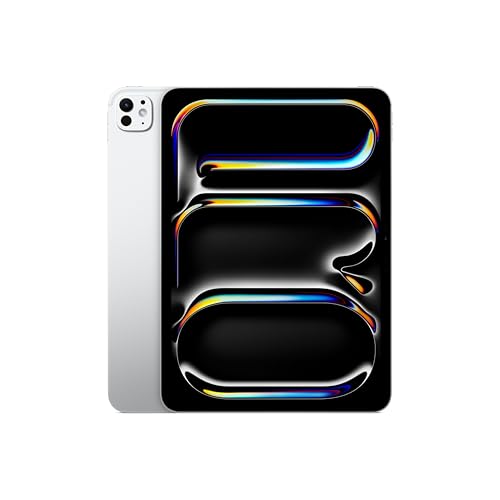
Quick answer: Which charger for Apple iPad Pro M5? The best choice is Apple 40W Dynamic Power Adapter (60W Max) 60 W - about 100% of the maximum charging speed (tablet: max 60 W). A regular USB-PD charger also delivers full power.
Which charger for Apple iPad Pro M5 will unlock its full 60W speed?
Picture your desk right now: your tablet sits next to your phone and laptop, serving as a second display for work or a sketchpad for winding down in the evening. With that setup, nobody wants three different wall warts cluttering the floor. It is tempting to grab just one plug to run everything.
If you are wondering which charger for Apple iPad Pro M5 makes the most practical sense, you need a USB-C block supporting standard USB Power Delivery (USB PD) that delivers at least 60W. That 60W figure is the hard ceiling for this model. Standard fixed-voltage USB PD handles the full power delivery smoothly without needing specialized PPS protocols.
Depending on where you bought your tablet, what is inside the packaging changes. In the EU, Apple only includes a 1-meter USB-C cable in the box and leaves out the plug entirely. If you bought your device in the US, Apple supplies a modest 20W power adapter. Either way, that included 20W brick leaves two-thirds of the tablet's potential speed on the table.
Specs and charging
The key Apple iPad Pro M5 specs that matter when choosing a charger:
- Battery: 31.29 Wh (11-inch; 13: 38.99 Wh)
- Wired charging: 60 W
- On a standard USB PD charger: ~60 W
- Declared charging time: Apple: do 50% w ok. 30 min z zasilaczem 60 W lub mocniejszym
Can you just use your existing phone or laptop charger?
Before you spend money on new gear, check the small print printed on the back of the plugs you already own. Look for the wattage rating and the label "PD" (Power Delivery). Here is what to expect from the chargers currently in your drawers:
- A 20W to 25W phone brick: It will charge your tablet safely, but it takes noticeably longer. A 20W plug supplies only a third of what the device can actually pull, meaning you miss out on Apple's rapid charging.
- An old 10W or 12W USB-A plug: Basic plugs without modern fast-charging protocols fall back to roughly 5W to 10W. That trickle will barely keep up if you are working with the screen brightness turned up.
- A 65W or higher USB-C laptop adapter: This works perfectly. Standard laptop chargers use universal USB PD protocols and will automatically feed the iPad Pro M5 its maximum 60W rate without any issues.
Charging speeds in daily use: what the test numbers mean
Apple states that pairing this tablet with a 60W or higher power adapter delivers up to a 50% charge in about 30 minutes. That speed makes a huge difference if you only have a short break between meetings to plug in.
Independent test data from ChargerLAB confirms that the iPad Pro M5 pulls up to 60W (operating at 20V and 3A). In third-party evaluations, Tech Advisor recorded a 43% charge in 30 minutes using a 96W adapter. Meanwhile, Engadget logged a run from 23% to 70% in 35 minutes using Apple's 40W Dynamic charger.
Keep your specific screen size in mind when timing a refill. The 11-inch model carries a 31.29 Wh battery, while the 13-inch edition holds a larger 38.99 Wh capacity. Because both versions share the exact same 60W charging ceiling, the 13-inch variant takes slightly longer to hit 100%.
Matching the right power adapter to your daily routine
If you want the cheapest route to the tablet's top charging speed, the INIU 65W 3-Port Charger provides the full 60W and packs plenty of juice to run a portable laptop as well.
For those who prefer a single bedside or desk plug for several gadgets, multi-port models are the smartest pick. The UGREEN Nexode 65W and INIU 65W 3-Port Charger both feature three output ports and hit 100% of the tablet's real maximum from their primary USB-C slot.
| Charger | Power | Estimated speed |
|---|---|---|
| Apple 40W Dynamic Power Adapter (60W Max) | 60 W | 100% |
| Apple 70W USB-C Power Adapter | 70 W | 100% |
| INIU 65W 3-Port Charger | 65 W | 100% |
| UGREEN Nexode 65W | 65 W | 100% |
| Anker 735 (Nano II 65W) | 65 W | 100% |

1. Apple 40W Dynamic Power Adapter (60W Max)
Original Apple charger
60W charger. With the Apple iPad Pro M5 it charges at up to about 60 W via USB PD (100% of the tablet's maximum power, estimate based on specs and protocols).

2. Apple 70W USB-C Power Adapter (70W GaN)
Original Apple charger · Enough power for a USB-C laptop
70W GaN charger. With the Apple iPad Pro M5 it charges at up to about 60 W via USB PD (100% of the tablet's maximum power, estimate based on specs and protocols).

3. INIU 65W 3-Port Charger (65W GaN)
Cheapest at full speed · 3 ports - several devices at once · Enough power for a USB-C laptop
65W GaN charger. With the Apple iPad Pro M5 it charges at up to about 60 W via USB PD (100% of the tablet's maximum power, estimate based on specs and protocols).

4. UGREEN Nexode 65W (65W GaN)
3 ports - several devices at once · Enough power for a USB-C laptop
65W GaN charger. With the Apple iPad Pro M5 it charges at up to about 60 W via USB PD (100% of the tablet's maximum power, estimate based on specs and protocols).

5. Anker 735 (Nano II 65W) (65W GaN)
3 ports - several devices at once · Enough power for a USB-C laptop
65W GaN charger. With the Apple iPad Pro M5 it charges at up to about 60 W via USB PD (100% of the tablet's maximum power, estimate based on specs and protocols).
Charging pitfalls to avoid with the iPad Pro M5
Buying an ultra-high-wattage brick will not speed things up. The tablet's internal charging controller hardware-limits incoming power to 60W, so a 140W power supply will still charge at the same pace as a 60W unit.
Multi-port adapters share their total wattage across active connections. If you plug your phone into a secondary slot on a 65W brick, the main port will drop its output, taking the tablet out of its fastest 60W tier.
Do not expect snappy top-ups from older iPad power supplies. Apple's fast charge mode strictly requires a 60W or higher source; older 20W or 30W units charge significantly slower across the entire cycle.
Frequently Asked Questions
Does the Apple iPad Pro M5 come with a charger in the box?
It depends on where you buy it. In the EU, Apple only includes a 1-meter USB-C cable and no charging adapter. In the US, Apple packs a basic 20W power adapter alongside the cable.
Which charger for Apple iPad Pro M5 do I need for the fastest speed?
You need a USB-C Power Delivery (USB PD) charger rated at 60W or higher. That wattage unlocks the tablet's maximum 60W intake, refilling up to 50% in approximately 30 minutes.
Will using a 100W laptop charger damage the tablet battery?
No, it is completely safe. Modern USB-C devices communicate with the charger and only pull the power they need, so the tablet safely caps incoming energy at 60W.
Can I charge this iPad using an old 20W phone plug?
Yes, but it will charge significantly slower than it could. A 20W adapter cannot trigger the fast-charging mode and delivers under half of the tablet's 60W ceiling.
Which Apple Pencil is compatible with the iPad Pro M5?
The iPad Pro M5 works exclusively with the Apple Pencil Pro and Apple Pencil (USB-C). Older styluses like the first-generation and second-generation Apple Pencil are not supported.
See also
- Which keyboard for iPad Pro M5 - the M4 one fits, older ones don't
- Which Apple Pencil for iPad Pro M5 - Pro for drawing or USB-C
- Which charger for Apple iPad A16 - how many watts you really need
- Which charger for Apple iPad Pro M4 - will your phone charger do?
- Which charger for Apple iPad Air M3 - recommended USB-C chargers
Sources
- Apple iPad Pro M5 - apple.com - official manufacturer specifications (apple.com)
- Apple iPad Pro M5 - support.apple.com - official manufacturer specifications (support.apple.com)
- Apple iPad Pro M5 - techadvisor.com - industry article (techadvisor.com)
- Apple iPad Pro M5 - engadget.com - industry article (engadget.com)
- Apple iPad Pro M5 - idownloadblog.com - industry article (idownloadblog.com)


Leave a comment
This site is protected by hCaptcha and the hCaptcha Privacy Policy and Terms of Service apply.