









Updated: 26.09.2026
As an Amazon Associate I earn from qualifying purchases.
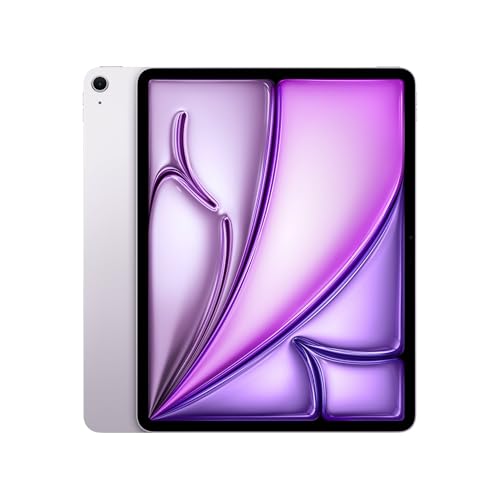
Quick answer: Which charger for Apple iPad Air M3? The best choice is Google 45W USB-C Charger 45 W - about 100% of the maximum charging speed (tablet: max 31 W). A regular USB-PD charger also delivers full power.

Which charger for Apple iPad Air M3? The practical guide
You are sitting in a lecture or a busy cafe, taking notes on your tablet, and the battery warning suddenly flashes. You only have a quick 20-minute break before the next class, so every percent you can pump into the battery counts.
If you are wondering which charger for Apple iPad Air M3 will get you moving fastest, the tablet tops out at a real-world peak of around 31W using standard USB Power Delivery (USB PD). In the US, Apple still includes a 20W adapter and a 1-meter USB-C cable in the box, whereas buyers in the EU receive only the cable. While a 20W brick works fine, stepping up to a 30W or higher plug unlocks the tablet's true maximum speed.
Specs and charging
The key Apple iPad Air M3 specs that matter when choosing a charger:
- Battery: 28.93 Wh (11-inch; 13: 36.59 Wh)
- Wired charging: 31 W
- On a standard USB PD charger: ~31 W

Can you use the charger you already own?
Before spending money on a new plug, check what you already have plugged into your walls at home:
- Phone charger (20W to 25W): If you have an official 20W Apple plug or a typical phone charger, it will deliver around 18.5W to this tablet. It works reliably, but filling the battery takes roughly two hours.
- USB-C laptop power supply (45W, 65W, or more): You can safely use this. Independent test data shows that a 65W laptop adapter pushes the iPad Air M3 to its maximum measured intake of 31.3W.
- Old rectangular USB-A plug: Older bricks lack USB Power Delivery handshakes. Your tablet will drop back to a sluggish 5W to 10W trickle, which is only practical for overnight charging.
Take a quick look at the tiny print on your adapter. If you spot "USB PD" and an output offering 15V or 20V, you are good to go.
Real-world charging speeds from independent tests
Independent measurements reveal exactly what to expect from different power levels. With the standard Apple 20W adapter, the tablet pulls 18.45W and takes about two hours to hit a full charge.
Stepping up to a stronger adapter gives you faster top-ups during short pauses. In tests with a Lenovo 65W charger, the iPad Air M3 reached 31.3W, while Apple's 70W charger pulled 29.5W. That proves an expensive 70W brick offers zero advantage over a quality 35W unit.
Battery size also plays a direct role. The 11-inch model has a 28.93 Wh battery, while the 13-inch variant holds a larger 36.59 Wh cell. Both accept the exact same 31W ceiling, which means the 13-inch version simply takes proportionally longer to fill completely.
Which charger should you pick for your iPad Air M3?
If your goal is reaching peak speeds at the lowest price, the Google 45W USB-C Charger hits the full 31W limit with zero fuss. Another reliable single-port choice is the Samsung 45W Power Adapter EP-T4511, which also delivers that 31W maximum intake.
If you prefer charging your tablet and phone at the same time, multi-port plugs are much more versatile. The UGREEN Nexode 65W and Anker 735 (Nano II 65W) both feature three ports, giving you enough output to run your iPad at full speed alongside other gear. If you want a single heavy-duty brick that can also handle a full-sized work laptop, the Motorola TurboPower 68W easily covers both needs.
| Charger | Power | Estimated speed |
|---|---|---|
| Google 45W USB-C Charger | 45 W | 100% |
| Samsung 45W Power Adapter EP-T4511 | 45 W | 100% |
| Motorola TurboPower 68W | 68 W | 100% |
| UGREEN Nexode 65W | 65 W | 100% |
| Anker 735 (Nano II 65W) | 65 W | 100% |

1. Google 45W USB-C Charger (45W GaN)
Cheapest at full speed
45W GaN charger. With the Apple iPad Air M3 it charges at up to about 31 W via USB PD (100% of the tablet's maximum power, estimate based on specs and protocols).

2. Samsung 45W Power Adapter EP-T4511 (45W)
45W charger. With the Apple iPad Air M3 it charges at up to about 31 W via USB PD (100% of the tablet's maximum power, estimate based on specs and protocols).

3. Motorola TurboPower 68W (68W GaN)
Enough power for a USB-C laptop
68W GaN charger. With the Apple iPad Air M3 it charges at up to about 31 W via USB PD (100% of the tablet's maximum power, estimate based on specs and protocols).

4. UGREEN Nexode 65W (65W GaN)
3 ports - several devices at once · Enough power for a USB-C laptop
65W GaN charger. With the Apple iPad Air M3 it charges at up to about 31 W via USB PD (100% of the tablet's maximum power, estimate based on specs and protocols).
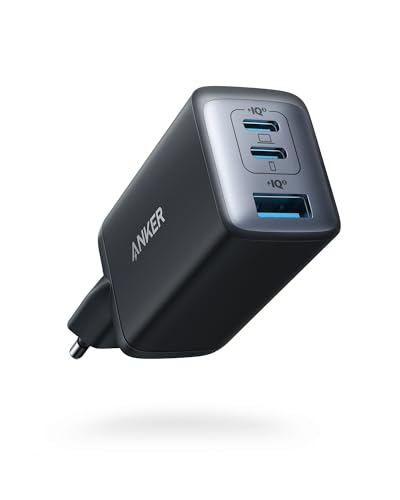
5. Anker 735 (Nano II 65W) (65W GaN)
3 ports - several devices at once · Enough power for a USB-C laptop
65W GaN charger. With the Apple iPad Air M3 it charges at up to about 31 W via USB PD (100% of the tablet's maximum power, estimate based on specs and protocols).
Common charging traps to avoid with this tablet
Do not buy a massive 70W or 100W charger thinking it will cut your charging time in half. Independent tests confirm that Apple's 70W adapter reaches around 29.5W, which is functionally identical to a compact 35W brick because the tablet's hardware limits power to 31W.
Keep in mind how multi-port adapters behave when sharing juice. If you plug a phone into a second port on a 65W charger, the main port might throttle down to 45W or 30W. That is still enough to keep the iPad Air M3 near full speed, but you should check port ratings if you connect power-hungry gear.
Finally, standard USB Power Delivery is completely sufficient for this tablet. A basic USB PD charger gives you the full 31W without needing specialized PPS support, but legacy plugs without USB PD will leave you stranded at 5W to 10W.
Frequently asked questions about charging Apple iPad Air M3
Which charger for Apple iPad Air M3 gives the fastest charging speed?
Any USB-C power adapter rated at 30W, 35W, or higher with standard USB Power Delivery will give you the maximum charging speed. The iPad Air M3 hardware maxes out at roughly 31W, so buying anything higher than 35W will not make it charge any faster.
Does the Apple iPad Air M3 come with a charger in the box?
It depends on your region. In the United States, Apple includes a 20W USB-C power adapter and a 1-meter USB-C cable in the box. In the European Union, you only receive the 1-meter USB-C cable and must provide your own plug.
Can I safely charge my iPad Air M3 with a 65W or 100W laptop charger?
Yes, it is entirely safe. USB Power Delivery uses digital communication between the charger and the tablet, so the iPad only takes the 31W it can handle, no matter how powerful the wall brick is.
How long does it take to fully charge the iPad Air M3?
Using a 20W charger, a full charge takes approximately two hours. A 30W or stronger charger speeds up mid-day top-ups, though the 13-inch model (36.59 Wh battery) takes longer to hit 100% than the 11-inch model (28.93 Wh battery) due to its larger capacity.
Which Apple Pencil works with the iPad Air M3?
The iPad Air M3 only works with the Apple Pencil Pro and the Apple Pencil (USB-C). Older models, such as the first-generation and second-generation Apple Pencil, are not compatible with this tablet.
Sources
- Apple iPad Air M3 - support.apple.com - official manufacturer specifications (support.apple.com)
- Apple iPad Air M3 - chargerlab.com - industry article (chargerlab.com)
- Apple iPad Air M3 - techadvisor.com - industry article (techadvisor.com)
- Apple iPad Air M3 - tomsguide.com - industry article (tomsguide.com)
- Apple iPad Air M3 - trustedreviews.com - industry article (trustedreviews.com)

Leave a comment
This site is protected by hCaptcha and the hCaptcha Privacy Policy and Terms of Service apply.