









Updated: 27.09.2026
As an Amazon Associate I earn from qualifying purchases.
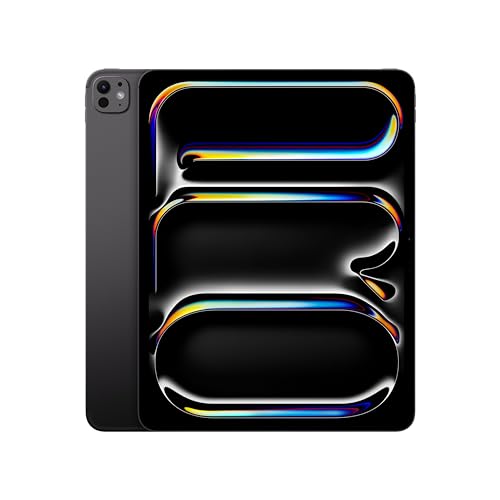
Quick answer: Which charger for Apple iPad Pro M4? The best choice is Google 45W USB-C Charger 45 W - about 100% of the maximum charging speed (tablet: max 30 W). A regular USB-PD charger also delivers full power.

Which charger for Apple iPad Pro M4? What you need to know
You plug your new tablet into that spare phone brick you had lying in a drawer, sit down to work, and two hours later the battery has barely crawled forward. It is easy to wonder if something is wrong with the device or if the battery is just massive.
If you are wondering which charger for Apple iPad Pro M4 you actually need, the target number is 30 W over standard USB Power Delivery (USB PD). That is the maximum speed the tablet can draw. Box contents also depend on where you bought it: in the US, Apple includes a basic 20 W adapter, but in Europe and the UK, you only get a 1-meter USB-C cable.
Specs and charging
The key Apple iPad Pro M4 specs that matter when choosing a charger:
- Battery: 31.29 Wh
- Wired charging: 30 W
- On a standard USB PD charger: ~30 W
- Declared charging time: GSMArena: 41% w 30 min, 100% w 106 min (model 11 cali)

Can you use the charger you already own?
Before spending money on a new wall plug, take a quick look at the power adapters already scattered around your home. The iPad Pro M4 charges via standard USB-C, meaning it can negotiate power with almost any modern adapter.
- Standard 5W to 10W USB-A phone plugs: These older bricks lack fast-charging protocols entirely. They will only feed roughly 5 W to 10 W into the tablet, meaning it could take five hours or more to fill up.
- 20W phone chargers (including the US bundled plug): This will get the tablet charged, but it leaves performance on the table. On a 20 W adapter, filling the 31.29 Wh battery takes nearly 3 hours.
- 30W to 45W USB-C phone or tablet adapters: This is the sweet spot. Any standard USB PD brick in this range lets the iPad draw its full 30 W speed.
- 65W or higher USB-C laptop power supplies: You can safely plug the tablet into a MacBook or PC charger. The tablet communicates with the plug and only draws up to its 30 W ceiling, leaving the rest untouched.
To check an adapter you already own, look closely at the tiny printed text on its base. You want to see "PD" (Power Delivery) and an output listing that reaches at least 30 W, such as 15V at 2A or 20V at 1.5A.

Real-world charging times: what to expect
The iPad Pro M4 features a 31.29 Wh battery pack. In independent lab testing by GSMArena on the 11-inch model, a 30 W charger brought the tablet from empty to 41% in 30 minutes, completing a full 100% charge in 106 minutes.
Independent power measurements from Tech Advisor confirm that the tablet sustains between 20 W and 30 W during the main charging phase. If you use a 30 W or 35 W adapter, a quick 30-minute top-up before leaving the house gives you enough power for several hours of screen time. Drop down to a basic 20 W charger, however, and the total charge time stretches out to almost 3 hours.
Which adapter fits your setup best?
If you need to purchase a plug, you do not need anything overly complex. Standard USB PD is all the iPad Pro M4 requires to reach its full 30 W intake.
The Google 45W USB-C Charger is the cheapest way to hit the tablet's full 30 W speed with a reliable, compact build. A solid alternative for a dedicated single-port desk setup is the Samsung 45W Power Adapter EP-T4511, which also delivers the tablet's full real-world maximum.
If you carry a laptop alongside your tablet, picking up a higher-output adapter saves bag space. The Motorola TurboPower 68W provides enough power to charge a USB-C laptop while maintaining full charging performance for your iPad. If you want one plug for everything on your desk, the UGREEN Nexode 65W and the Anker 735 (Nano II 65W) both feature 3 ports, letting you charge your phone, tablet, and accessories simultaneously.
| Charger | Power | Estimated speed |
|---|---|---|
| Google 45W USB-C Charger | 45 W | 100% |
| Samsung 45W Power Adapter EP-T4511 | 45 W | 100% |
| Motorola TurboPower 68W | 68 W | 100% |
| UGREEN Nexode 65W | 65 W | 100% |
| Anker 735 (Nano II 65W) | 65 W | 100% |

1. Google 45W USB-C Charger (45W GaN)
Cheapest at full speed
45W GaN charger. With the Apple iPad Pro M4 it charges at up to about 30 W via USB PD (100% of the tablet's maximum power, estimate based on specs and protocols).

2. Samsung 45W Power Adapter EP-T4511 (45W)
45W charger. With the Apple iPad Pro M4 it charges at up to about 30 W via USB PD (100% of the tablet's maximum power, estimate based on specs and protocols).

3. Motorola TurboPower 68W (68W GaN)
Enough power for a USB-C laptop
68W GaN charger. With the Apple iPad Pro M4 it charges at up to about 30 W via USB PD (100% of the tablet's maximum power, estimate based on specs and protocols).

4. UGREEN Nexode 65W (65W GaN)
3 ports - several devices at once · Enough power for a USB-C laptop
65W GaN charger. With the Apple iPad Pro M4 it charges at up to about 30 W via USB PD (100% of the tablet's maximum power, estimate based on specs and protocols).
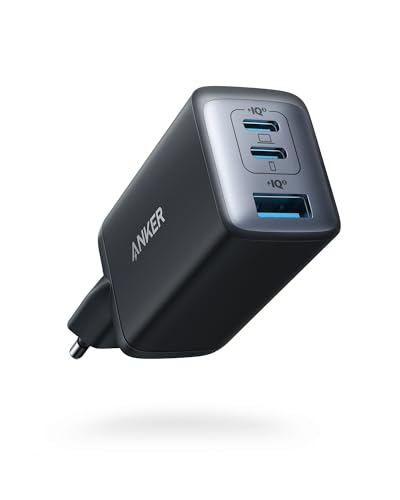
5. Anker 735 (Nano II 65W) (65W GaN)
3 ports - several devices at once · Enough power for a USB-C laptop
65W GaN charger. With the Apple iPad Pro M4 it charges at up to about 30 W via USB PD (100% of the tablet's maximum power, estimate based on specs and protocols).
Things to watch out for before buying
First, paying extra for an 80 W or 100 W single-port charger will not make the iPad Pro M4 charge any faster. The internal charging controller strictly caps input around 30 W, so extra headroom simply sits unused unless you are plugging in a laptop.
Second, keep port splitting in mind if you choose a multi-port charger. When you plug a phone into a secondary port on a 45 W or 65 W adapter, the charger splits its total wattage across both outputs. Make sure the primary port still provides at least 30 W so your tablet charging speed does not drop.
Finally, unlike some newer smartphones that require PPS (Programmable Power Supply) to unlock full charging speed, the iPad Pro M4 achieves its peak rate using standard fixed-voltage USB PD. Any standard USB PD brick rated at 30 W or higher will deliver full performance.
Frequently Asked Questions
Which charger for Apple iPad Pro M4 gives the fastest speed?
Any standard USB-C charger supporting USB Power Delivery (USB PD) with an output of 30 W or higher will charge the iPad Pro M4 at its full speed. Buying a charger with more than 30 W will not charge the tablet faster, as the hardware restricts intake to around 30 W.
Does the iPad Pro M4 include a charger in the box?
It depends on your region. In the United States, Apple includes a 20 W USB-C power adapter and a 1-meter USB-C cable. In the European Union and the UK, the box contains only the 1-meter USB-C to USB-C cable, meaning you must supply your own wall plug.
How long does the iPad Pro M4 take to charge?
When connected to a 30 W adapter, independent tests show the 11-inch model reaches 41% in 30 minutes and reaches 100% in roughly 106 minutes. Using a standard 20 W charger slows the process down significantly, requiring nearly 3 hours for a complete charge.
Can I safely charge the tablet with a 65W laptop adapter?
Yes, it is entirely safe. USB-C Power Delivery uses digital communication between the charger and the tablet, so the tablet draws only the 30 W it requires. The extra power capacity stays in reserve and will not harm the battery.
Which Apple Pencil works with the iPad Pro M4?
The iPad Pro M4 is compatible only with Apple Pencil Pro and Apple Pencil (USB-C). Older models, including the Apple Pencil 1st generation and Apple Pencil 2nd generation, do not work with this tablet.
Sources
- Apple iPad Pro M4 - support.apple.com - official manufacturer specifications (support.apple.com)
- Apple iPad Pro M4 - gsmarena.com - industry article (gsmarena.com)
- Apple iPad Pro M4 - techadvisor.com - industry article (techadvisor.com)
- Apple iPad Pro M4 - gsmarena.com - industry article (gsmarena.com)
- Apple iPad Pro M4 - macworld.com - industry article (macworld.com)

Leave a comment
This site is protected by hCaptcha and the hCaptcha Privacy Policy and Terms of Service apply.