








As an Amazon Associate I earn from qualifying purchases.
Quick answer: our top pick is SanDisk Extreme Portable SSD (USB-C · 10 Gb/s · IP65 · carabiner).
Best SSD for MacBook Air M5? Quick answer
Running out of space and not sure if a fast drive is worth the money? For Time Machine backups, photos, and documents, a 10 Gb/s portable SSD is plenty. For editing video straight from the drive, get a USB4 model.
The difference is simple. A 10 Gb/s drive handles everyday archives and backups without breaking a sweat. USB4 only pays off when you edit video and don't want to copy the footage to the internal drive first.
Picture coming home from a trip with a full card of footage. With a fast USB4 drive, you open the project right away and edit from the external drive. With a slower one, it's better to copy the files to the Mac first, and that takes time and space you're already short on.
Ports in the Air M5 and internal storage options
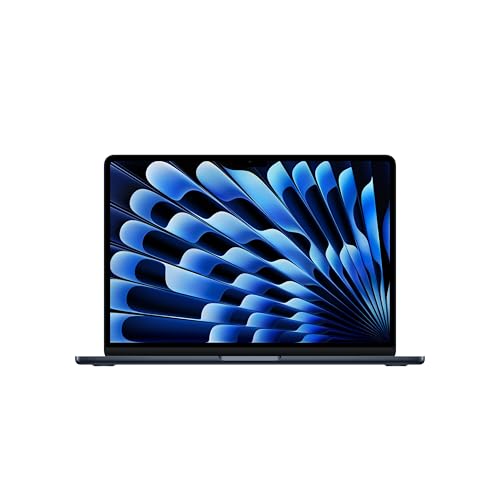
The 13-inch and 15-inch MacBook Air with M5 has two Thunderbolt 4 (USB-C) ports and MagSafe 3. There's no HDMI port or card reader, so camera cards and a monitor need separate accessories. A separate article covers a docking station for the MacBook Air M5.
Two USB-C ports isn't many, so drive size and cable length matter. A small drive with a short cable leaves the second port free for another accessory.
You choose the internal storage when you buy the Mac, up to 4 TB according to Apple, and you can't upgrade it later. If your Mac is already on your desk, an external SSD is the only way to get more space.
Fun fact: the base MacBook Air with M5 comes with a 512 GB drive, not 256 GB.
We picked the drives and enclosure below based on how much speed the Mac can actually use: a 10 Gb/s drive for backups and photos, USB4 options for video.
SSDs for MacBook Air M5 we recommend

1. SanDisk Extreme Portable SSD
On saleUSB-C · 10 Gb/s · IP65 · carabiner
Another of the best-selling external drives. Rubberized IP65 body and a carabiner loop, so it handles life in a bag well. On a Mac and iPad it runs at 10 Gb/s.
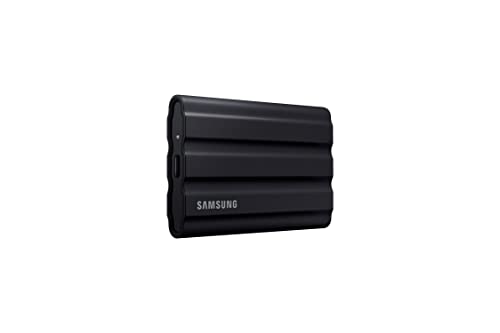
2. Samsung T7 Shield Portable SSD
On saleUSB-C · 10 Gb/s · IP65
Same speed as the regular T7, but in a rubberized body rated IP65 for dust and water resistance. A good fit when the drive travels in a bag instead of just sitting on a desk.

3. UGREEN 40Gbps USB4 M.2 NVMe enclosure
USB4 · 40 Gb/s · M.2 2280 · SSD not included
Enclosure for a standard NVMe M.2 2280 SSD, which you buy separately. You pop the SSD in without tools and get a fast external drive in whatever capacity you choose.
The 2000 MB/s Trap and Thunderbolt 5 on a Mac
You'll often see "2000 MB/s" on drive boxes. These drives use the USB 3.2 Gen 2x2 (20 Gb/s) standard, which Mac doesn't support. On a MacBook Air they run at about 1000 MB/s, the same as regular 10 Gb/s drives.
Paying for 2000 MB/s on a Mac makes no sense. If you want something that's actually faster, look for USB4 or Thunderbolt.
Thunderbolt 5 works the same way. According to OWC, Thunderbolt 5 enclosures and drives only run at full speed in Macs with Thunderbolt 5 ports. The Air M5 has Thunderbolt 4, so a drive like that won't go beyond 40 Gb/s.
Time Machine, Drive Format, Ready-Made Drive or Enclosure
A 10 Gb/s drive is enough for Time Machine backups. The backup runs in the background, so you won't notice any difference between 1000 MB/s and higher speeds. It's better to pick more capacity than a faster interface, because backups fill up the drive over time.
Format a Mac drive as APFS in Disk Utility. Choose ExFAT only if the drive also needs to work with Windows, for example at a friend's place or on a second computer.
A ready-made USB4 drive makes sense when you want to plug in and work, with nothing to assemble. It suits someone who edits video and values simplicity.
An M.2 drive enclosure gives you more freedom. You buy an NVMe M.2 2280 drive separately and choose the capacity yourself. Just remember that the enclosure has no storage of its own, so it's useless without a drive.
Fun fact: A Mac with Apple silicon can run macOS from an external NVMe drive connected via Thunderbolt or USB4.
If you're buying only one: get a portable 10 Gb/s USB-C SSD, because it covers backups, photos and documents. Add USB4 only if you edit video straight from the drive.
Frequently Asked Questions About Drives for the MacBook Air M5
Which SSD for MacBook Air M5?
For backups, photos and documents, pick a portable 10 Gb/s SSD. For working on video straight from the drive, a USB4 drive or enclosure is better. A Thunderbolt 5 drive won't give you more than 40 Gb/s.
Does the MacBook Air M5 have Thunderbolt?
Yes, it has two Thunderbolt 4 ports in the USB-C standard. There's also MagSafe 3 for charging. It has no HDMI port and no card reader.
Which drive for Time Machine on MacBook Air M5?
A 10 Gb/s drive is enough, because the backup runs in the background and doesn't need higher speeds. Format it as APFS in Disk Utility. Pick a capacity with room to spare, so your backups fit for longer.
Will a 2000 MB/s drive be faster on the MacBook Air M5?
No. Mac doesn't support USB 3.2 Gen 2x2 (20 Gb/s), so such a drive runs at about 1000 MB/s, like a 10 Gb/s drive. Only USB4 or Thunderbolt gives you faster speeds.
Can you upgrade the storage in the MacBook Air M5?
No. You choose the internal drive when you buy, and you can't replace or expand it later. You can add more space with an external SSD. If you prefer to pick your own capacity, buy a USB4 enclosure and a separate NVMe M.2 2280 drive.
See also
- Which charger for Apple MacBook Air 13 M5 - the adapter that is not in the box
- Which charger for Apple MacBook Air 15 M5 - an adapter for the desk and travel
- Best docking station for MacBook Air M5 - two monitors without the traps
- Best monitor for MacBook Air M5 - two screens with the lid open
- Best SSD for MacBook Pro M6 - Thunderbolt 4, USB4 and Time Machine
Sources
- Apple Newsroom: Apple introduces the new MacBook Air with M5 - manufacturer page (apple.com)
- Apple: MacBook Air - Tech Specs - manufacturer page (apple.com)
- Tom's Hardware: Apple MacBook Air 13-inch M5 review - industry article (tomshardware.com)
- OWC: Get the most out of the new M6 and M5 Pro Mac mini with these docks and drives - industry article (owc.com)
- Thewearify: Best external storage for Mac mini - industry article (thewearify.com)
- iThinkDifferent: Best external SSDs for the M6 Mac mini - industry article (ithinkdiff.com)

Leave a comment
This site is protected by hCaptcha and the hCaptcha Privacy Policy and Terms of Service apply.