








As an Amazon Associate I earn from qualifying purchases.
Quick answer: our top pick is Apple Magic Keyboard with Touch ID (Touch ID · Bluetooth · USB-C · compact).
Best keyboard for Mac mini M6? Short answer
If you want to unlock your Mac with your fingerprint, buy the Magic Keyboard with Touch ID. If you prefer backlighting and switching between several devices, get the Logitech MX Keys S.
You need to buy a keyboard separately, because Apple includes only a 1.8 m (6 ft) power cord with the Mac mini. There is no keyboard, mouse or trackpad in the box.
Cult of Mac names the MX Keys S as its top pick for its mix of features and reasonable price. The same site writes that the Magic Keyboard with Touch ID and Numeric Keypad suits Macs with Apple silicon, such as the Mac mini. So the choice comes down to whether you care about a fingerprint reader.
A separate article covers the monitor for the Mac mini M6, so here we focus only on the keyboard.

Touch ID on the Mac mini: what you need to know
The Mac mini has no fingerprint reader of its own. Touch ID is available only through an Apple keyboard with such a reader. Keyboards from other brands do not have one, so even an expensive Logitech model will not unlock your Mac with a fingerprint.
Apple states that the Magic Keyboard with Touch ID (USB-C) works with Macs with Apple silicon and macOS 15.1 or later. The Mac mini with M6 or M5 Pro is on the list of compatible computers. You set up Touch ID in System Settings, and pressing the reader locks the Mac.
Apple sells three versions of the Magic Keyboard: with a lock key (without Touch ID), with Touch ID, and with Touch ID and a numeric keypad. The first version looks similar but has no reader, which is easy to miss when buying. Make sure the product name includes "Touch ID".
The version with a numeric keypad is full-size and also has navigation keys. Choose it if you work a lot in spreadsheets or enter numbers. The compact version leaves more room on your desk.
Fun fact: after every restart of the Mac mini, you must first enter your password. Only then can you unlock it with your finger using Touch ID.
We chose the products below based on whether they have Touch ID, their size and how they connect to the Mac mini. They include two Apple keyboards and three Logitech ones.

Recommended keyboards for Mac mini M6
1. Apple Magic Keyboard with Touch ID
Touch ID · Bluetooth · USB-C · compact
The only way to unlock a Mac mini with your finger: the Touch ID sensor in the keyboard. Apple lists Mac mini (M6 or M5 Pro) with macOS 15.1 or later. It pairs on its own once you plug in the USB-C cable.
2. Logitech MX Keys S
backlit · Bluetooth · USB-C · Mac layout
The Mac version of Logitech's flagship keyboard: full size with a number pad, quiet low-profile backlit keys and Mac key labels. It connects over Bluetooth, so the Mac mini's lack of USB-A doesn't matter.

3. Apple Magic Keyboard with Touch ID and Numeric Keypad
Touch ID · numeric keypad · Bluetooth · USB-C
The same Apple keyboard with Touch ID, but full size, with a numeric keypad and navigation keys. For anyone who types a lot of numbers, in spreadsheets for example.
See Apple Magic Keyboard with Touch ID and Numeric Keypad on Amazon →

4. Logitech MX Keys Mini
compact · backlit · Bluetooth · USB-C
The smaller MX Keys without a number pad, backlit and charged over USB-C, in the for Mac version. It leaves more room for the mouse on a small Mac mini desk.

5. Logitech Pebble Keys 2 K380s
slim · Bluetooth · 3 devices · battery powered
A light, low-cost Bluetooth keyboard that switches between three devices and has custom shortcuts. Enough for email and browsing when you need neither Touch ID nor a backlight.
Bluetooth or USB receiver: what about ports
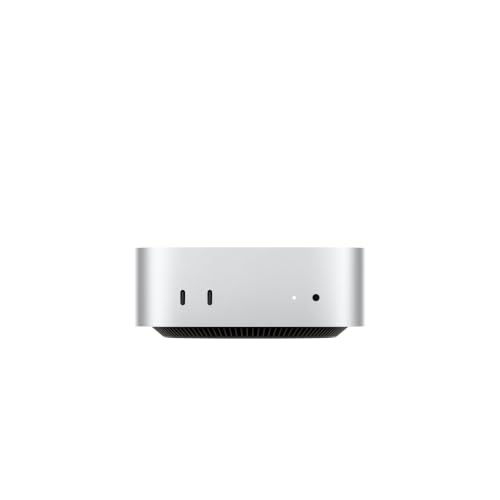
The Mac mini has no USB-A port. At the front there are two USB-C ports (USB 3 up to 10 Gb/s) and a headphone jack. At the back you will find three Thunderbolt 4 ports on the M6 or Thunderbolt 5 on the M5 Pro, plus HDMI and Ethernet.
A keyboard with a USB-A receiver therefore needs an adapter. It will take up one of your valuable ports, and on a small computer every one of them comes in handy. A Bluetooth keyboard needs no adapter.
The Mac mini has Bluetooth 6 with the Apple N1 chip. The Logitech MX Keys S, MX Keys Mini and Pebble Keys 2 K380s keyboards connect via Bluetooth, so you can buy them without any extra accessories. The MX Keys S and Pebble Keys 2 also support three devices, which is useful if you work on a Mac and a laptop or tablet.
The Magic Keyboard with Touch ID also works without a cable, and the USB-C cable is used for charging.
Fun fact: The Magic Keyboard with Touch ID pairs with the Mac mini automatically once connected with a USB-C cable, with no need to search in the Bluetooth settings.
Key layout and the for Mac versions
Keyboards come in different layouts. The keyboards we link are the US English versions, and Apple also sells other layouts, so a keyboard bought abroad may not match the keys you type.
The product name states the layout. Check it before you buy.
The Logitech picks here are the for Mac versions, the MX Keys S for Mac and the MX Keys Mini for Mac. They have Mac key labels and backlighting. The MX Keys Mini is a compact keyboard that works well on a small desk.
Frequently asked questions about a keyboard for the Mac mini M6
Which keyboard for the Mac mini M6 has Touch ID?
Touch ID is available on the Apple Magic Keyboard in the compact version and in the version with a numeric keypad. Both work with the Mac mini (M6 or M5 Pro) running macOS 15.1 or later. The version with a lock key but without Touch ID has no reader.
Does Touch ID work with a Logitech keyboard?
No. Keyboards from other brands do not have a Touch ID reader. The Mac mini does not have one either, so unlocking with a fingerprint is only possible with an Apple keyboard with Touch ID.
Does the Mac mini M6 come with a keyboard?
No. According to Apple's technical specifications, the box contains the Mac mini and a 1.8 m (6 ft) power cord. The keyboard, mouse or trackpad must be purchased separately.
Will a keyboard with a USB receiver work with the Mac mini M6?
Yes, but only with an adapter, because the Mac mini has no USB-A port. A simpler solution is a Bluetooth keyboard, which does not take up any port.
Which keyboard for the Mac mini has backlighting?
From our list, the Logitech MX Keys S and MX Keys Mini have backlighting. We link the for Mac versions, which have Mac key labels. The Pebble Keys 2 K380s is cheap, but it has no backlighting.
More Mac mini guides
- Best docking station for Mac mini M4 - front ports and an M.2 SSD
- Best docking station for Mac mini M6 - M4 docks fit too
- Best external SSD for Mac mini M6 - which port gives full speed
- Best monitor for Mac mini M6 - 4K or 5K, HDMI or Thunderbolt
- Best webcam for Mac mini M6 - 4K over USB-C or your iPhone
- Best speakers for Mac mini M6 - USB-C, Bluetooth or the 3.5 mm jack
See also
Sources
- Apple Support: Magic Keyboard with Touch ID for Mac models with Apple silicon - manufacturer page (support.apple.com)
- Apple: Mac mini technical specifications - manufacturer page (apple.com)
- Apple Support: Magic Keyboard (Mac mini User Guide) - manufacturer page (support.apple.com)
- iThinkDifferent: Best keyboards and mice for M6 Mac mini - industry article (ithinkdiff.com)
- Cult of Mac: Best keyboards for Mac mini - industry article (cultofmac.com)
- iMore: The best keyboards for Mac mini - industry article (imore.com)

Leave a comment
This site is protected by hCaptcha and the hCaptcha Privacy Policy and Terms of Service apply.