








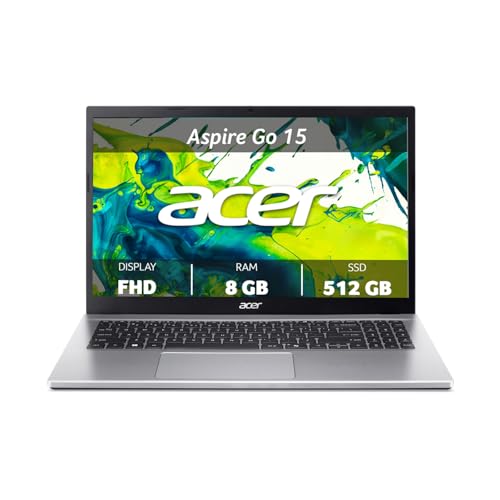
As an Amazon Associate I earn from qualifying purchases.
Quick answer: our top pick is Anker Nano 65W USB-C (65 W · 3 ports · GaN).
Best charger for Acer Aspire Go 15? Check your power adapter first
Which charger should you buy for the Aspire Go 15? If the adapter in the box ends in a USB-C plug, get a 65 W USB-C Power Delivery charger. If it ends in a thin round plug and says 19 V, you need a replacement with a 3.0 x 1.1 mm plug and the same or higher wattage.
Don't assume your unit charges over USB-C. What you should buy depends on the adapter you already have at home, not on the laptop's name.
A common worry: can a more powerful charger harm the battery? No, as long as the voltage and plug match. The laptop draws only as much current as it needs, and the wattage on the adapter is just an upper limit. A 65 W charger instead of a 45 W one won't "burn out" the battery. It just gives you some headroom when the laptop is under load.
How to check your Aspire Go 15 model and plug
Start with the sticker on the bottom of the laptop. You'll find a model code like AG15-xxP there. Type it into a search engine along with the Acer name, and you'll get the exact specs for your model.
Then pick up your old adapter. If the cable ends in a flat, oval USB-C plug, you need a USB-C PD charger. If it ends in a thin round plug, look for a replacement with a 3.0 x 1.1 mm plug. The adapter's housing usually also shows the voltage, in this case 19 V.
A USB-C port on the laptop doesn't settle anything by itself. For the Aspire Go Intel series, Acer lists two full-featured USB Type-C ports for connecting and charging devices. For the specific AG15-31P-32B4 version, though, Acer lists one USB-C port and an AC adapter in the box, and doesn't name the plug type. So in the end, what counts is what's in the box with your laptop.
Fun fact: the Aspire Go 15 name covers both models that charge over USB-C and models with a round plug (Acer, Notebookcheck). So it's best to base your purchase on the AG15-xxP code.
Below we've put together 65 W USB-C chargers and replacements with a 3.0 x 1.1 mm round plug. We picked them based on which adapter came with your laptop.
Chargers for Acer Aspire Go 15 we recommend
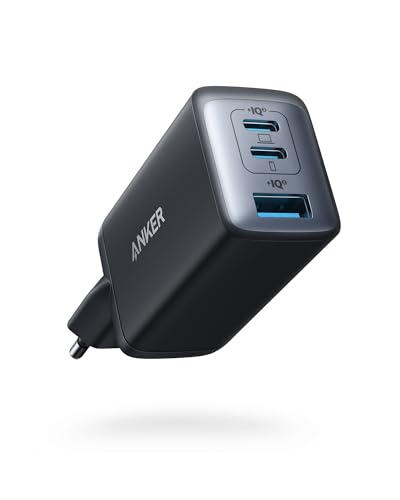
1. Anker Nano 65W USB-C
65 W · 3 ports · GaN
Anker charger with up to 65 W of power, one of the most popular picks. Three ports for a laptop, phone and headphones.

2. UGREEN Nexode 65W USB-C
65 W from one port · 3 ports · GaN
Compact GaN charger with up to 65 W from a single USB-C port, according to UGREEN. Charges a laptop over USB-C Power Delivery, plus your phone.

3. 65W charger for Acer laptops, 3.0 x 1.1 mm
65 W · 19 V · 3.42 A · 3.0 x 1.1 mm plug
65 W replacement charger with a 3.0 x 1.1 mm plug, listed by the manufacturer for Acer laptops. At 19 V and 3.42 A, it also has headroom for 45 W models.

4. 45W charger for Acer laptops, 3.0 x 1.1 mm
45 W · 19 V · 2.37 A · 3.0 x 1.1 mm plug
45 W replacement charger with a slim 3.0 x 1.1 mm plug, listed by the manufacturer for Acer Aspire laptops. Rated 19 V and 2.37 A.
45 W or 65 W for the Aspire Go 15
In practice, a 45 W charger will charge a laptop over USB-C. For everyday work like browsing, documents and video, you probably won't notice a difference. It's different when the laptop is under load, because the battery then charges more slowly.
In its AG15-51P review, Notebookcheck points out that USB-C with Power Delivery charging is a plus for this laptop. It also notes that under full load, the included adapter has no headroom left to charge the battery. So if you edit video, game or compile code on this laptop, 65 W gives you more breathing room.
For barrel-plug replacement adapters, sellers list two versions for the AG15-31P at 19 V. The 45 W version is rated 2.37 A, and the 65 W version is rated 3.42 A. An older, weaker charger won't damage the laptop, but the battery may seem to charge slower than you'd like.
In short: for USB-C, get 65 W. For a barrel plug, get 65 W if you want extra headroom, or 45 W if your original was the same and you mostly use the laptop for light work.
Which plugs not to buy
Don't buy an adapter with a 5.5 x 1.7 mm plug. That size is for older Acer laptops and doesn't fit the slim barrel jack on the Aspire Go 15. The thicker plug simply won't go in, and forcing it will only damage the port.
With replacement adapters, check three things: 19 V, a 3.0 x 1.1 mm plug, and power no lower than the original. If the seller's listing only says "for Acer laptops" and doesn't give the plug size, pick a different listing.
With USB-C chargers, look for explicit mention of Power Delivery and 65 W. Also check what's in the box in the seller's listing, because some chargers are sold without a cable.
Fun fact: in the Notebookcheck review, the Aspire Go 15 drew up to 68.3 W under full load. That means that during such a task, the included adapter wasn't charging the battery at all.
Common questions about the Aspire Go 15 charger
Does the Acer Aspire Go 15 charge over USB-C?
Some models do. Notebookcheck describes USB-C with Power Delivery in the AG15-51P and AG15-32P, and Acer lists USB Type-C ports for charging in the Aspire Go Intel series. Don't assume it, though. Check which plug the included adapter has.
How many watts is the charger for the Acer Aspire Go 15?
For versions with USB-C, get a 65 W USB-C PD charger. For versions with a barrel plug, sellers offer 45 W and 65 W replacements, both at 19 V. Choose the same wattage as the original or higher.
What plug does the Acer Aspire Go 15 AG15-31P use?
Sellers list replacements for the AG15-31P with a 3.0 x 1.1 mm barrel plug and 19 V. Acer doesn't state the plug type on the model's page, so look at your old adapter before buying. Don't get a 5.5 x 1.7 mm plug.
Is a 45 W charger enough for the Aspire Go 15?
For everyday work, usually yes, and a laptop with USB-C will also charge from a charger like that. Under heavier load, though, charging will be slower. If you often push the laptop with demanding tasks, 65 W is the better choice.
Where do I find my Acer Aspire Go 15 model?
The AG15-xxP designation is on the sticker on the bottom of the laptop. You can use it to match the specs and the adapter type. If the sticker has worn off, your old adapter can help too, since it has the voltage and plug size printed on it.
See also
- Which charger for HP OmniBook 3 17 - 5 recommended USB-C adapters
- Best charger for HP 15 - 4.5 mm round plug or USB-C
- Which charger for HP EliteBook 6 G1q 14 - original and cheaper alternatives
- Which charger for Lenovo IdeaPad Slim 3? Round tip or 65W USB-C
Sources
- Acer: Aspire Go (Intel) - manufacturer page (acer.com)
- Acer: Aspire Go 15 AG15-31P - manufacturer page (acer.com)
- Notebookcheck: Acer Aspire Go 15 review - industry article (notebookcheck.net)
- Notebookcheck: Acer Aspire Go 15 AG15-32P - industry article (notebookcheck.net)
- Tom's Guide: Acer Aspire Go 15 - industry article (tomsguide.com)
- TechRadar: Acer Aspire Go 15 review - industry article (techradar.com)
- ITPro: Acer Aspire Go review - industry article (itpro.com)

Leave a comment
This site is protected by hCaptcha and the hCaptcha Privacy Policy and Terms of Service apply.