








As an Amazon Associate I earn from qualifying purchases.
Quick answer: Which charger for HP OmniBook 3 17? The simplest choice is INIU 65W 3-Port Charger 65 W - full charging speed (from 45 W USB-C PD). Cheaper alternatives below.

Which charger for HP OmniBook 3 17? A 45 W USB-C adapter is all it needs
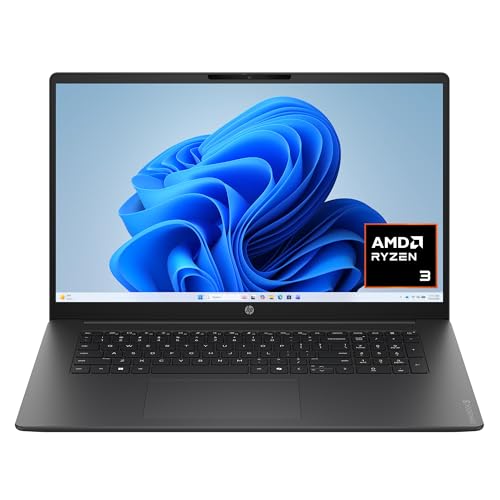
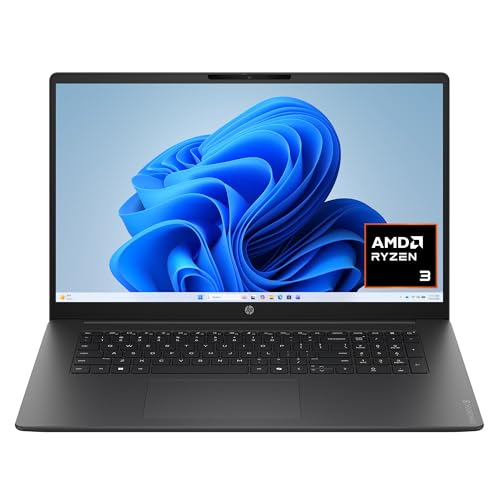
Which charger for HP OmniBook 3 17, and do you even need to buy one? You need a USB-C Power Delivery (PD) adapter rated at 45 W or more. That is the level where the laptop charges at full speed.
Whether an adapter is in the box depends on the SKU. HP's listing for the 17-dp0419nr includes a 45 W USB-C GaN adapter, but other SKUs may not. Check the seller's description of what ships in the box before you order.
The laptop charges over USB-C, through either of its two USB-C ports. This guide is for you if you bought an OmniBook 3 17 without an adapter, or if you want a second one for work or travel.
Specs and charging
The HP OmniBook 3 17 specs that matter when choosing an adapter:
- Battery: 41 Wh
- Full charging speed: from 45 W USB-C PD

HP-branded adapter or another brand: what actually changes?
HP lists a 45 W USB-C adapter for this laptop, and the original is the simplest choice. You don't have to compare anything, and it matches what the laptop was designed around.
It isn't the only route, though. Any good USB-C PD adapter with the right power charges the OmniBook 3 17 at the same full speed. HP doesn't publish a maximum input for this laptop, so 45 W is the full-speed threshold, not a ceiling. A 65 W adapter works too and still charges at full speed.
The original makes sense if the laptop is the only thing you charge and you want zero guesswork. A third-party adapter makes more sense if you want several ports, if you charge a phone alongside the laptop, or if you want something lighter for a bag. All three adapters further down have three ports and are rated 65 W or 70 W.

Got a charger in a drawer? What it can do for a 17-inch OmniBook
Full speed starts at 45 W over USB-C PD. HP doesn't publish a minimum for this laptop, so I can't promise how a weaker charger behaves while you work. Here is what that means for chargers you may already own:
- iPhone charger (20 W): well below 45 W, so you won't get full speed. It may be fine for topping up while the laptop sleeps, but don't count on it for a workday.
- iPad or Android phone charger: same logic. Unless it is rated 45 W or more with USB-C PD, expect slower-than-full-speed charging.
- Older USB-C laptop charger: if it says 45 W or more and supports PD, it should charge this laptop at full speed. Check the label on the adapter.
Before you buy anything, read three things on the charger you already have:
- Power: 45 W or more.
- Protocol: USB-C PD (Power Delivery).
- Port: USB-C, not a barrel plug or USB-A.
Desk, backpack or two devices at once: choosing your adapter
If you want the least thinking, get the original HP 45 W USB-C adapter. For a second adapter with full speed, any of the three below will do, since each delivers about 45 W to this laptop.
The INIU 65W 3-Port Charger (65 W) and the UGREEN Nexode 65W (65 W) suit a desk setup where the laptop, a phone and earbuds share one adapter. The Anker Nano Charger 70W 3-Port (B121A) (70 W) has the same three ports and a little more total output, which helps if you charge more than one device at once.
If you buy just one: pick the INIU 65W 3-Port Charger, which gives the laptop its full-speed 45 W and still leaves two ports for your phone and a tablet.
| Charger | Power | Estimated speed |
|---|---|---|
| INIU 65W 3-Port Charger | 65 W | 100% |
| UGREEN Nexode 65W | 65 W | 100% |
| Anker Nano Charger 70W 3-Port (B121A) | 70 W | 100% |

1. INIU 65W 3-Port Charger (65W GaN)
3 ports - several devices at once
65W GaN charger. With the OmniBook 3 17 it charges at up to about 45 W via USB PD, which is full speed. Saves an outlet when several devices charge overnight.

2. UGREEN Nexode 65W (65W GaN)
3 ports - several devices at once
65W GaN charger. With the OmniBook 3 17 it charges at up to about 45 W via USB PD, which is full speed. Handy when several devices share one power strip at home.
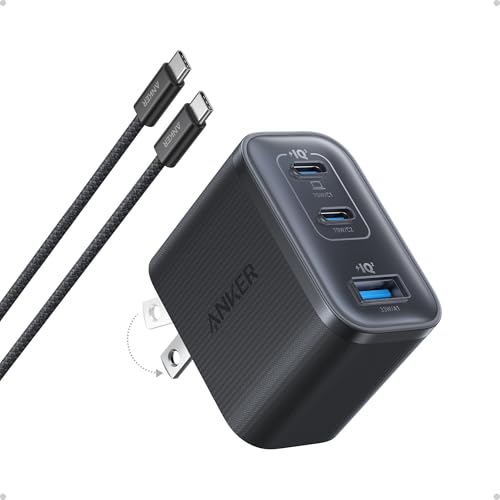
3. Anker Nano Charger 70W 3-Port (B121A) (70W GaN)
3 ports - several devices at once
70W GaN charger. With the OmniBook 3 17 it charges at up to about 45 W via USB PD, which is full speed. One charger for the desk: the OmniBook 3 17, earbuds and watch from a single outlet.
Two USB-C ports and a 41 Wh battery: where people trip up
First, don't assume the adapter is in the box. In the US it depends on the SKU, and HP's 17-dp0419nr is the one listed with a 45 W USB-C GaN adapter. Other offers may ship without one.
Second, a multi-port charger shares its total output when more than one port is in use. A 65 W or 70 W label doesn't mean the laptop gets all of it with a phone plugged in. Check the listing for what the USB-C port delivers when every port is busy, and make sure 45 W stays available for the laptop.
Third, both USB-C ports on the OmniBook 3 17 support PD and DisplayPort. If you connect a monitor to one, plug the charger into the other.
Fun fact: the USB Type-C connector was finalized in 2014. Its oval plug has no wrong way up, which is why the same adapter can now serve a laptop, a tablet and a phone.
What people ask before buying an OmniBook 3 17 adapter
Which charger for HP OmniBook 3 17 if my box has no adapter?
Buy a USB-C PD adapter rated at 45 W or more. That is the level where the laptop charges at full speed. A 65 W adapter also works and charges at full speed.
Does the OmniBook 3 17 come with a charger in the US?
It depends on the SKU. HP's listing for the 17-dp0419nr includes a 45 W USB-C GaN adapter, but other SKUs may not. Check what ships in the box in the seller's description.
Will my iPhone charger work with this laptop?
A 20 W iPhone charger is well below the 45 W needed for full speed. HP doesn't publish a minimum for this laptop, so I can't promise it keeps up while you work. Use a 45 W or stronger USB-C PD adapter for daily charging.
Is a 65 W charger too much for a 45 W laptop?
No. A 65 W USB-C PD adapter works with the OmniBook 3 17 and charges it at full speed. HP doesn't publish a maximum input, so 45 W is the full-speed threshold, not a ceiling.
Is a third-party charger okay, or do I need the HP original?
The HP 45 W USB-C adapter is the simplest choice. A good USB-C PD adapter with the right power charges just as fast. The INIU 65W 3-Port Charger, UGREEN Nexode 65W and Anker Nano Charger 70W 3-Port (B121A) all deliver about 45 W to this laptop.
See also
- Best charger for HP 15 - 4.5 mm round plug or USB-C
- Which charger for HP EliteBook 6 G1q 14 - original and cheaper alternatives
- Best Charger for Acer Aspire Go 15 - 65 W USB-C or Barrel Plug
Sources
- HP OmniBook 3 17 - hp.com - official manufacturer specifications (hp.com)
- HP OmniBook 3 17 - store-prodlive-us.hpcloud.hp.com - official manufacturer specifications (store-prodlive-us.hpcloud.hp.com)
- HP OmniBook 3 17 - notebookcheck.net - industry article (notebookcheck.net)
- HP OmniBook 3 17 - bestbuy.com - industry article (bestbuy.com)
- HP OmniBook 3 17 - laptopmedia.com - industry article (laptopmedia.com)


Leave a comment
This site is protected by hCaptcha and the hCaptcha Privacy Policy and Terms of Service apply.