









Updated: 30.09.2026
As an Amazon Associate I earn from qualifying purchases.
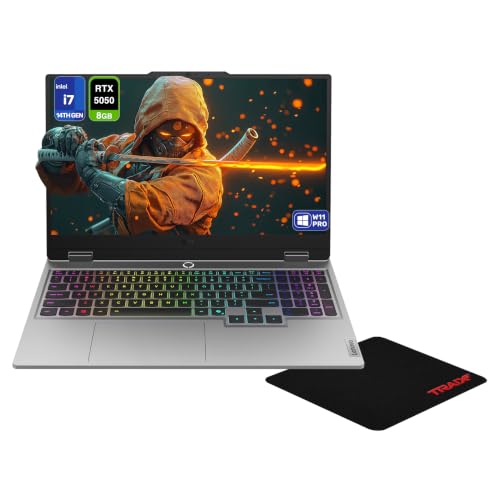
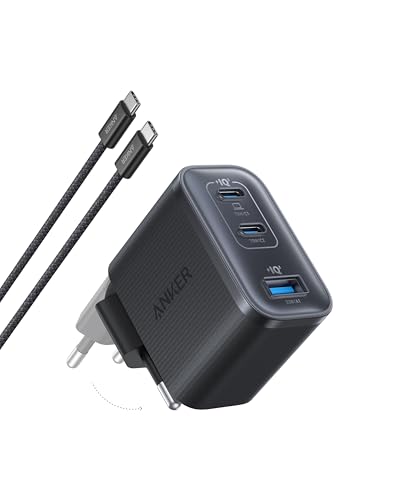
Quick answer: Which charger for Lenovo LOQ 15? The simplest choice is Anker Nano 100W (3 Ports, Smart Display) 100 W - the full 100 W the laptop accepts over USB-C; keep the bundled adapter for gaming. The minimum is 65 W - a weaker charger will not do. Cheaper alternatives below.

Which charger for Lenovo LOQ 15? Leaving the heavy power brick behind
If you are wondering which charger for Lenovo LOQ 15 makes sense for your backpack, the good news is simple: yes, this gaming machine charges over USB-C using standard USB Power Delivery (USB PD) between 65 W and 100 W. You just have to plug it into the single USB-C port wired for incoming power.
Keep in mind that USB-C power on this machine is built for mobility, lectures, and office productivity. When you want to fire up demanding games, you will still need the bundled slim-tip barrel adapter (up to 245 W), because USB-C simply cannot supply the peak wattage the graphics card requires.
This guide is for anyone tired of hauling a massive charging brick to work, school, or coffee shops, showing you exactly how to pick a compact secondary charger that works reliably.
Specs and charging
The Lenovo LOQ 15 specs that matter when choosing an adapter:
- Battery: 60 Wh
- USB-C charging (regular USB PD charger): 65-100 W
- Bundled barrel adapter (for gaming): up to 245 W

Office productivity versus gaming sessions on USB-C power
For standard daily productivity like drafting documents, browsing multiple tabs, and streaming video, a 100 W USB-C charger keeps the 60 Wh battery full without any hassle. You can easily charge the laptop while working or top it back up quickly while it is sleeping or shut down.
Demanding tasks tell a different story. In independent tests by Notebookcheck, the LOQ 15 pulled nearly 200 W under extreme load, which is why Lenovo includes a 170 W or 245 W slim-tip adapter in the box. PCWorld observed that USB-C Power Delivery only reaches 100 W on this model, which is not enough to fully power the laptop under full load.
Testing from GDGTME highlighted that the 245 W charger is necessary to keep gaming performance completely consistent over long sessions. If you try running heavy 3D titles on a 100 W USB-C connection, expect the system to throttle performance or steadily drain the battery while plugged in.

Will your current chargers work with the LOQ 15?
- Phone and tablet chargers (20 W - 45 W): These fall below the manufacturer-specified minimum threshold of 65 W. Lenovo specifies an input range of 65 W to 100 W for USB-C charging on this model.
- Laptop chargers from other notebooks (65 W): A 65 W USB PD plug meets Lenovo's baseline requirement. It will run normal office tasks and recharge the battery, though charging times will be noticeably slower than at 100 W.
- Standard 100 W USB-C power bricks: This is the ideal match for standard USB Power Delivery. It delivers the maximum 100 W that the LOQ 15 can draw from universal third-party chargers.
- High-output chargers (140 W or more): A standard 140 W USB PD charger will still cap out at 100 W with this machine. Lenovo lists 140 W USB-C charging exclusively when using Lenovo's proprietary charger and protocol.
Selecting the best travel adapter for your backpack
If you want the most affordable way to reach the maximum 100 W charging rate, the UGREEN Nexode 100W provides full speed and four ports to power other gear simultaneously.
If you prefer real-time feedback on how much power your laptop is pulling, the Anker Nano 100W (3 Ports, Smart Display) also hits the full 100 W ceiling while offering an integrated digital display.
For powering multiple devices on trips alongside your notebook, the Anker Charger 140W 4-Port PD 3.1 (A2697) caps out at the LOQ 15's 100 W limit while retaining extra capacity for your phone or accessories. Just remember that multi-port adapters divide their total power output when several cables are connected at once.
| Charger | Power | Estimated speed |
|---|---|---|
| Anker Nano 100W (3 Ports, Smart Display) | 100 W | 100% |
| Anker Charger 140W 4-Port PD 3.1 (A2697) | 140 W | 100% |
| UGREEN Nexode 100W | 100 W | 100% |

1. Anker Nano 100W (3 Ports, Smart Display) (100W GaN)
3 ports - several devices at once
100W GaN charger. With the Lenovo LOQ 15 it charges at up to about 100 W via USB PD (100% of the laptop's full charging speed, estimate based on specs and protocols).

2. Anker Charger 140W 4-Port PD 3.1 (A2697) (140W GaN)
4 ports - several devices at once
140W GaN charger. With the Lenovo LOQ 15 it charges at up to about 100 W via USB PD (100% of the laptop's full charging speed, estimate based on specs and protocols).
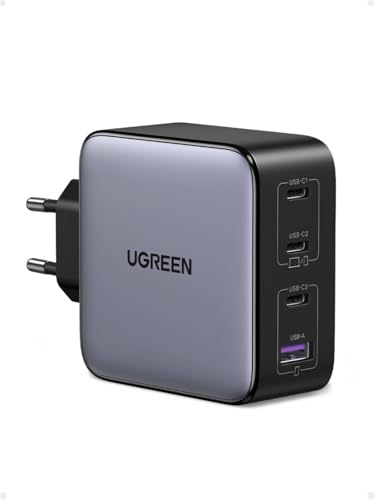
3. UGREEN Nexode 100W (100W GaN)
Cheapest at full speed · 4 ports - several devices at once
100W GaN charger. With the Lenovo LOQ 15 it charges at up to about 100 W via USB PD (100% of the laptop's full charging speed, estimate based on specs and protocols).
Crucial details to check before plugging in USB-C
Only one designated USB-C port accepts incoming charging. On Gen 10 machines (such as 15IRX10 or 15AHP10), this is a 10 Gbps port, while Gen 11 (15AHP11) features a USB4 40 Gbps port that supports 65-100 W input and 15 W output. The other ports do not charge the machine.
Do not buy a generic 140 W USB PD charger expecting 140 W speeds on this laptop. Lenovo reserves the 140 W profile for its proprietary hardware, meaning standard third-party USB-C units are limited to 100 W.
Compatibility across recent releases remains identical. Gen 9 (15IRX9), Gen 10, and Gen 11 all utilize the exact same 65 W to 100 W USB Power Delivery input specification.
Fun fact: In testing by PCWorld, the Lenovo LOQ 15 with its 60 Wh battery lasted just over five hours in standard battery runtime tests, making a compact 100 W USB-C plug a practical companion for extending your study or work sessions away from a wall outlet.
Lenovo LOQ 15 USB-C charging explained
Which charger for Lenovo LOQ 15 should I get for daily travel?
A compact 100 W USB Power Delivery charger is the best choice. It maxes out the laptop's 100 W USB-C charging limit, keeping the 60 Wh battery powered through web browsing, lectures, and office work without carrying the heavy stock brick.
Can I play heavy games while running on a 100 W USB-C charger?
No, 100 W is insufficient for heavy gaming loads. Testing shows the LOQ 15 can draw nearly 200 W under extreme stress, meaning gaming on USB-C will cause reduced performance or drain the battery during play. The stock 170 W or 245 W slim-tip adapter is required for full gaming performance.
Which specific port charges the Lenovo LOQ 15?
Only one USB-C port accepts charging power on the machine. On Gen 10 models it is a 10 Gbps port, while Gen 11 models feature a USB4 40 Gbps port supporting 65-100 W input. Other ports on the laptop do not support power input.
Will a generic 140 W USB-C charger charge this laptop at 140 W?
No, standard third-party 140 W USB Power Delivery chargers will cap at 100 W on the LOQ 15. The 140 W USB-C charging rate is only supported when paired with Lenovo's proprietary charger using Lenovo's custom protocol.
Can I use a 30 W or 45 W phone charger in an emergency?
A 30 W or 45 W adapter falls below Lenovo's specified input range of 65 W to 100 W for this laptop. To ensure reliable charging, you should stick to chargers that output at least 65 W over USB Power Delivery.
Sources
- Lenovo LOQ 15 - psref.lenovo.com - official manufacturer specifications (psref.lenovo.com)
- Lenovo LOQ 15 - psref.lenovo.com - official manufacturer specifications (psref.lenovo.com)
- Lenovo LOQ 15 - notebookcheck.net - industry article (notebookcheck.net)
- Lenovo LOQ 15 - pcworld.com - industry article (pcworld.com)
- Lenovo LOQ 15 - gdgtme.com - industry article (gdgtme.com)


Leave a comment
This site is protected by hCaptcha and the hCaptcha Privacy Policy and Terms of Service apply.