









Updated: 30.09.2026
As an Amazon Associate I earn from qualifying purchases.
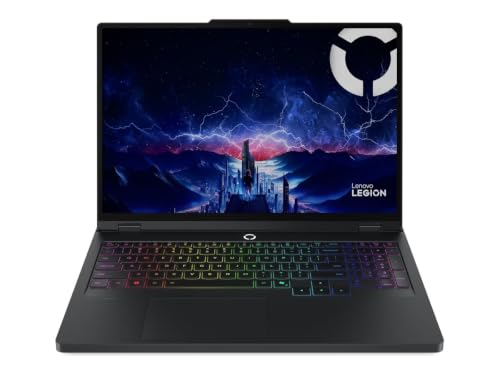
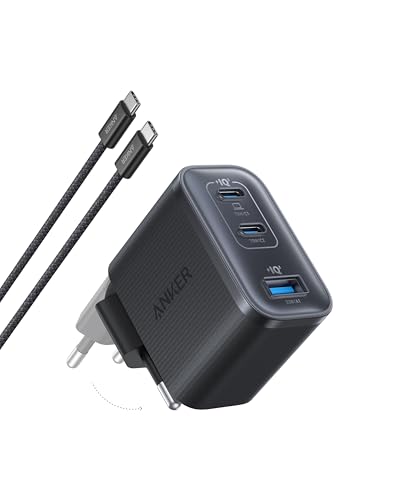
Quick answer: Which charger for Lenovo Legion Pro 5? The simplest choice is Anker Nano 100W (3 Ports, Smart Display) 100 W - the full 100 W the laptop accepts over USB-C; keep the bundled adapter for gaming. The minimum is 65 W - a weaker charger will not do. Cheaper alternatives below.

Which charger for Lenovo Legion Pro 5? Ditching the heavy power brick on the go
Yes, your Lenovo Legion Pro 5 supports USB-C charging, so you do not always have to carry the massive factory power brick. The laptop accepts standard USB Power Delivery (USB PD) chargers within the 65W to 100W range. Keep in mind that only one specific USB-C port takes in power, so plugging into the wrong socket simply will not charge the battery.
When you wonder which charger for Lenovo Legion Pro 5 works best, remember that USB-C is strictly meant for travel, office tasks, browsing, and lectures. For full-power gaming sessions, you still need the bundled 245W slim-tip barrel charger. This guide is for anyone tired of hauling a heavy power brick in their backpack every single day.
Specs and charging
The Lenovo Legion Pro 5 specs that matter when choosing an adapter:
- Battery: 80 Wh
- USB-C charging (regular USB PD charger): 65-100 W
- Bundled barrel adapter (for gaming): up to 245 W

What can you actually do on USB-C power, and where are the limits?
Connecting a compact USB PD charger gives you full freedom during everyday use. You can handle office work, browse dozens of browser tabs, stream high-resolution video, or let the machine recharge while closed or sleeping. For these tasks, a 65W to 100W adapter keeps the 80 Wh battery stable or steadily replenishes it.
Gaming under heavy load tells a completely different story. The factory power brick delivers 245W, which is more than double the maximum intake of any standard USB-C charger. Independent hardware reviews note that under gaming loads on USB-C power, the laptop will throttle performance or actively drain the battery to keep running.
Fun fact: Independent measurements from Lenovo PSREF show that the factory barrel adapter activates Super Rapid Charge, taking the 80 Wh battery from 0 to 30% in just 10 minutes, and reaching 70% in half an hour.

Will your current home adapters work with the Legion Pro 5?
- Phone adapters (20W to 45W): These compact plugs fall strictly below the 65W manufacturer minimum for USB Power Delivery on this machine. They sit outside the official supported operating range.
- Standard laptop adapters (65W to 70W): These meet the baseline requirement. The Legion Pro 5 accepts power starting at 65W, allowing smooth office work and steady charging while idle.
- 100W USB PD chargers: This is the sweet spot. A 100W unit delivers the absolute maximum power that this laptop can draw through universal USB Power Delivery standards.
- 140W or higher third-party chargers: A universal 140W USB PD 3.1 plug will still cap out at roughly 100W on this machine. Lenovo reserves higher USB-C charging rates specifically for its proprietary protocol and native Lenovo chargers.
Which power adapter should you pack into your bag?
If you want the simplest and most cost-effective solution at full speed, the UGREEN Nexode 100W provides the maximum 100W intake for this machine and features four ports to power smaller accessories simultaneously. Another excellent choice is the Anker Nano 100W (3 Ports, Smart Display), which reaches that same 100W ceiling while letting you monitor real-time output right on its built-in screen. If you carry several high-drain devices alongside your laptop, the Anker Charger 140W 4-Port PD 3.1 (A2697) delivers 100W to the Legion while retaining extra overhead for your phone and tablet.
| Charger | Power | Estimated speed |
|---|---|---|
| Anker Nano 100W (3 Ports, Smart Display) | 100 W | 100% |
| Anker Charger 140W 4-Port PD 3.1 (A2697) | 140 W | 100% |
| UGREEN Nexode 100W | 100 W | 100% |

1. Anker Nano 100W (3 Ports, Smart Display) (100W GaN)
3 ports - several devices at once
100W GaN charger. With the Lenovo Legion Pro 5 it charges at up to about 100 W via USB PD (100% of the laptop's full charging speed, estimate based on specs and protocols).

2. Anker Charger 140W 4-Port PD 3.1 (A2697) (140W GaN)
4 ports - several devices at once
140W GaN charger. With the Lenovo Legion Pro 5 it charges at up to about 100 W via USB PD (100% of the laptop's full charging speed, estimate based on specs and protocols).
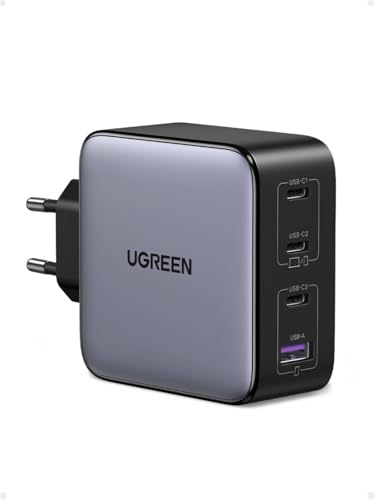
3. UGREEN Nexode 100W (100W GaN)
Cheapest at full speed · 4 ports - several devices at once
100W GaN charger. With the Lenovo Legion Pro 5 it charges at up to about 100 W via USB PD (100% of the laptop's full charging speed, estimate based on specs and protocols).
Things to keep in mind before plugging into USB-C
The biggest trap is port placement. The Legion Pro 5 features two USB-C ports, but only one accepts power. On Gen 10 models (such as 16IAX10, 16IRX10, and 16AFR10), you must plug into the USB-C 10 Gbps port that supports USB PD 65-100W (located next to the HDMI port according to Back2Gaming). The second port (Thunderbolt 4 or standard USB-C 10 Gbps, depending on configuration) does not support power input.
Do not get misled by reviews mentioning 140W charging over USB-C. Independent outlets like Back2Gaming and PowerUp reference this figure because Lenovo supports 140W solely through its proprietary power adapters. Standard third-party USB PD units will consistently cap out at 100W.
Lenovo Legion Pro 5 charging questions answered
Which charger for Lenovo Legion Pro 5 delivers the best portable performance?
A high-quality 100W USB Power Delivery charger is the optimal pick for travel and work. It supplies the full 100W maximum that this laptop accepts over universal USB-C standards, keeping the machine powered without the bulk of the factory brick.
Can you charge the Legion Pro 5 through both USB-C ports?
No, only one USB-C port accepts incoming power. As detailed by LaptopMedia and Back2Gaming, the USB Power Delivery port is positioned next to the HDMI connector, while the secondary USB-C port (Thunderbolt 4 on Intel models) cannot be used for charging.
Can you play demanding games while running on a USB-C charger?
You should not rely on USB-C for heavy gaming. A 100W USB-C supply cannot match the 245W output of the factory barrel adapter, causing the laptop to drop gaming performance or continuously drain the battery under load.
Does a 140W third-party USB-C charger make the laptop charge faster?
No, a standard 140W USB PD charger will cap out at 100W on the Legion Pro 5. Lenovo requires its own proprietary adapter and protocol to reach 140W over USB-C, so generic third-party chargers remain limited to 100W.
Will a 65W laptop charger keep the battery alive?
Yes, 65W is the official minimum threshold specified by Lenovo for USB PD input. It is fully sufficient for web browsing, office applications, and overnight charging, though recharging will take longer than on a 100W unit.
Sources
- Lenovo Legion Pro 5 - psref.lenovo.com - official manufacturer specifications (psref.lenovo.com)
- Lenovo Legion Pro 5 - psref.lenovo.com - official manufacturer specifications (psref.lenovo.com)
- Lenovo Legion Pro 5 - laptopmedia.com - industry article (laptopmedia.com)
- Lenovo Legion Pro 5 - back2gaming.com - industry article (back2gaming.com)
- Lenovo Legion Pro 5 - fiksas.lt - industry article (fiksas.lt)


Leave a comment
This site is protected by hCaptcha and the hCaptcha Privacy Policy and Terms of Service apply.