








As an Amazon Associate I earn from qualifying purchases.
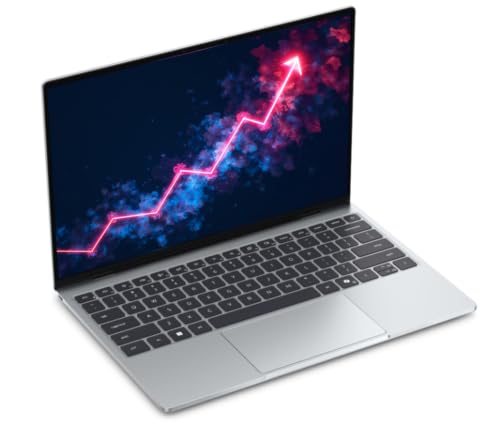
Quick answer: Which charger for Dell XPS 13 (2026)? The simplest choice is INIU 65W 3-Port Charger 65 W - full charging speed (from 65 W USB-C PD). Cheaper alternatives below.

Which charger for Dell XPS 13 (2026)? Start with 65 W USB-C and you're set
65 W is the number to remember. That is where the Dell XPS 13 (2026) charges at full speed, and a USB-C PD charger at that rating is all it needs. Which charger for Dell XPS 13 (2026)? A 65 W USB-C PD one, and in the US you get one in the box.
According to reviews, Dell ships the US version with a 65 W USB-C GaN adapter. The laptop charges through its two USB-C Thunderbolt 4 ports, and both support PD (Power Delivery), the USB standard that lets charger and laptop agree on how much power to send. The specs list only USB-C for charging, so there is no MagSafe-style port to think about.
This guide is for you if you want a second adapter for the office or your bag, or if you lost or damaged the first one.

Specs and charging
The Dell XPS 13 (2026) specs that matter when choosing an adapter:
- Battery: 52 Wh
- Full charging speed: from 65 W USB-C PD

Dell's own adapter or a third-party one: does it matter?
Dell's adapter is the simplest choice. You don't have to read a spec sheet, and you know it matches the laptop. If the XPS 13 is the only thing you charge, that is a perfectly good reason to stick with it.
Speed is not the difference. Dell doesn't publish a maximum input power for this laptop, so 65 W is the point where full-speed charging starts, not a ceiling. Any decent USB-C PD charger rated 65 W or more gets you there, with no loss against the original.
A third-party charger makes more sense when you want one brick for the laptop and your phone, or a spare that lives in your backpack. Several of the chargers below have 3 ports, so one wall outlet can feed everything at once. The battery is 52 Wh (TechRadar), so a spare adapter at work saves you from carrying one around.

Already own a USB-C charger? Here's what it will do
- Older laptop charger, USB-C PD, 65 W or more: this reaches the full-speed threshold. Check the label on the brick before you buy anything new.
- 45 W USB-C PD charger: it charges the laptop, just more slowly than 65 W. Fine for an overnight top-up, less fun when you are in a hurry.
- Phone and tablet chargers (an iPhone 20 W brick, an iPad charger, an Android phone charger): we have no figures for anything below 45 W on this model. Don't count on them as your main charger for the laptop.
Which adapter fits your day with the XPS 13?
Before you pick anything, check three things on the housing of the charger you are looking at:
- Power: 65 W or more for full speed. 45 W works but charges slower.
- Protocol: it should say USB PD (Power Delivery).
- Port: a USB-C output, since both ports on the laptop are USB-C Thunderbolt 4.
If you want the original, take the 65 W USB-C GaN adapter Dell includes in the US box. It isn't on our list below, but it is the zero-thinking option.
For a second adapter at full speed, the INIU 65W 3-Port Charger and the UGREEN Nexode 65W both give this laptop about 65 W, and both have 3 ports for other devices. If you want one charger for the laptop and your phone, the 100 W Anker Nano (3 ports, Smart Display) and the Baseus Enerfill 100W also deliver about 65 W to the XPS 13. The extra rating is headroom for the other ports.
For the road, the Anker Nano Charger 70W 3-Port (B121A) delivers about 65 W to this laptop with 3 ports. Check its dimensions in the listing against your bag.
If you buy just one: pick a 65 W 3-port charger such as the INIU 65W 3-Port Charger or the UGREEN Nexode 65W, so the laptop gets full speed and your phone can plug in too.
| Charger | Power | Estimated speed |
|---|---|---|
| INIU 65W 3-Port Charger | 65 W | 100% |
| UGREEN Nexode 65W | 65 W | 100% |
| Anker Nano 100W (3 Ports, Smart Display) | 100 W | 100% |
| Baseus Enerfill 100W | 100 W | 100% |
| Anker Nano Charger 70W 3-Port (B121A) | 70 W | 100% |

1. INIU 65W 3-Port Charger (65W GaN)
3 ports - several devices at once
65W GaN charger. With the XPS 13 (2026) it charges at up to about 65 W via USB PD, which is full speed. Saves an outlet when several devices charge overnight.

2. UGREEN Nexode 65W (65W GaN)
3 ports - several devices at once
65W GaN charger. With the XPS 13 (2026) it charges at up to about 65 W via USB PD, which is full speed. Handy when several devices share one power strip at home.

3. Anker Nano 100W (3 Ports, Smart Display) (100W GaN)
3 ports - several devices at once
100W GaN charger. With the XPS 13 (2026) it charges at up to about 65 W via USB PD, which is full speed. One charger for the desk: the XPS 13 (2026), earbuds and watch from a single outlet.

4. Baseus Enerfill 100W (100W GaN)
3 ports - several devices at once
100W GaN charger. With the XPS 13 (2026) it charges at up to about 65 W via USB PD, which is full speed. Saves an outlet when several devices charge overnight.
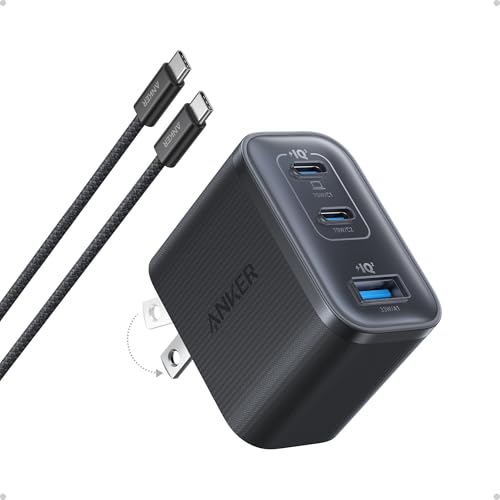
5. Anker Nano Charger 70W 3-Port (B121A) (70W GaN)
3 ports - several devices at once
70W GaN charger. With the XPS 13 (2026) it charges at up to about 65 W via USB PD, which is full speed. Handy when several devices share one power strip at home.
Easy mistakes when powering the XPS 13
Don't read 65 W as a hard limit on what the laptop can take. Dell doesn't publish a maximum input, so treat 65 W as the point where full speed starts. That also means a 100 W label does not make charging faster. The listed 100 W chargers give this laptop about 65 W.
Don't buy a 45 W charger expecting the same result. It charges the laptop, but more slowly.
With a 3-port charger, check what it delivers when all ports are in use. Multi-port chargers can share their output between devices, so the label's headline wattage may not all go to the laptop once you plug in a phone.
Fun fact: Thunderbolt started out under the codename Light Peak, when Intel planned it as an optical connection. The version that shipped used ordinary copper.
Quick answers on charging the Dell XPS 13 (2026)
Does the Dell XPS 13 (2026) come with a charger in the US?
Yes. In the US the laptop ships with a 65 W USB-C GaN adapter, according to reviews. If you buy from a reseller, glance at the listing to confirm the adapter is included.
Which charger for Dell XPS 13 (2026) if I lose the original?
Get a USB-C PD charger rated 65 W or more. That is the full-speed threshold for this laptop. A 45 W charger also works, only slower.
Will my iPhone or iPad charger power the laptop?
We have no figures for chargers below 45 W on this model, so we can't promise it works well. A 45 W USB-C PD charger is the lowest level with confirmed behavior: it charges, but slower.
Is a 100 W charger okay, or is 65 W enough?
65 W is enough for full speed. The 100 W chargers on our list, the Anker Nano 100W and the Baseus Enerfill 100W, deliver about 65 W to this laptop. Their extra capacity is for other devices on the other ports.
Which port should I charge through?
Either one. The laptop has two USB-C Thunderbolt 4 ports, and both support PD charging. The specs list no other charging port.
See also
- Which charger for Dell 16 Plus - 5 recommended USB-C adapters
- Best docking station for Dell Pro 14 Plus - WD25, WD22TB4 or a cheap hub
Sources
- Dell XPS 13 (2026) - dell.com - official manufacturer specifications (dell.com)
- Dell XPS 13 (2026) - techradar.com - industry article (techradar.com)
- Dell XPS 13 (2026) - tomsguide.com - industry article (tomsguide.com)
- Dell XPS 13 (2026) - engadget.com - industry article (engadget.com)
- Dell XPS 13 (2026) - tomshardware.com - industry article (tomshardware.com)


Leave a comment
This site is protected by hCaptcha and the hCaptcha Privacy Policy and Terms of Service apply.