









As an Amazon Associate I earn from qualifying purchases.
Quick answer: our top pick is Dell Pro Dock WD25 (official Dell · 100 W · up to 4 monitors).
Best docking station for Dell Pro 14 Plus?
For the Dell Pro 14 Plus, the best choice from the manufacturer's official lineup is the Dell Pro Dock WD25, or the Dell WD22TB4 if you connect Thunderbolt accessories. Dell officially confirms full compatibility of both devices with your laptop.
Your computer comes with a compact 65 W USB-C charger, so the WD25 dock will power it with plenty of headroom. The WD22TB4 model is useful if you regularly transfer files via fast external Thunderbolt drives. If you are looking for a simple dual-monitor home setup, even an affordable USB-C hub will be more than enough.

How to read the Dell compatibility chart and new dock naming
Dell provides an official docking station compatibility guide where the Dell Pro Plus PB14250 model is marked as fully compatible with both new and older hardware generations. It helps to understand what the individual symbols mean so you do not overpay for features you will not use at home.
The letters WD indicate standard docking stations designed for everyday office users. Meanwhile, the SD series was created for enterprise use, adding remote management tools for IT departments. The TB4 and TB5 designations indicate the use of the corresponding generation of Thunderbolt controller.
In Dell's chart, your model gets the green light with the new 100 W WD25, WD25Z, as well as the 130 W SD25, WD25TB4, and SD25TB4 docks. Also compatible are the WD25TB5 and SD25TB5 models, along with legacy options: WD22TB4, WD19S, WD19TB, and the universal UD22 dock.
Fun fact: In 2025, the Dell Pro series replaced the business Latitude line that had been popular for decades, introducing completely new naming conventions in stores for both computers and docking stations in the Dell Pro Dock family.

WD25 vs WD22TB4: port and power delivery comparison
The Dell Pro Dock WD25 is a modern USB-C dock that delivers up to 100 W of power to Dell laptops and 96 W to non-Dell devices. A laptop equipped with a 65 W charger does not require higher specs, so the WD25 will effortlessly charge your system during heavy workloads. On the chassis, you will find an HDMI 2.1 port, two DisplayPort 1.4 connectors, 2.5 Gbps fast Ethernet, and support for up to four WQHD monitors.
On the other hand, the Dell WD22TB4 is built around the Thunderbolt 4 interface and features a large 180 W power supply that delivers up to 130 W to Dell laptops. Its key advantage is the extra Thunderbolt ports, allowing you to daisy-chain additional demanding peripherals.
Choose the WD25 if you want the newer 2.5 Gbps network port and primarily connect standard office monitors and USB accessories. Go for the WD22TB4 only if your daily workflow demands substantial bandwidth for external SSDs or specialized Thunderbolt docks.
Below, we have compiled recommended Dell docking station models and popular hubs that work great on a desk with this laptop.

Recommended docks for Dell Pro 14 Plus

1. Dell Pro Dock WD25
official Dell · 100 W · up to 4 monitors
Dell's new official USB-C dock. It delivers up to 100 W to Dell laptops and has HDMI 2.1, two DisplayPort 1.4 outputs and 2.5 Gb Ethernet. Dell lists the Dell Pro 14 Plus as compatible.

2. Dell Thunderbolt Dock WD22TB4
Thunderbolt 4 · up to 130 W for Dell · best seller
Dell's best-selling Thunderbolt dock. It has Thunderbolt 4 ports for more devices and delivers up to 130 W to Dell laptops. Dell's compatibility table marks the Dell Pro 14 Plus "Yes" for it.

3. UGREEN Revodok Pro 210 10-in-1
2x HDMI · Ethernet · 100 W charging
Two HDMI outputs, Ethernet and a card reader. On Windows it extends the desktop to two monitors. On a Mac both HDMI ports show the same picture because macOS does not support MST (UGREEN says so in the listing).

4. UGREEN Revodok Pro dual HDMI 10Gbps
budget · 2x HDMI 4K 60 Hz · extends on Windows
A small hub with two 4K 60 Hz HDMI ports and 10 Gbps USB. On Windows it extends the desktop to two monitors. Over 4,000 reviews on Amazon.
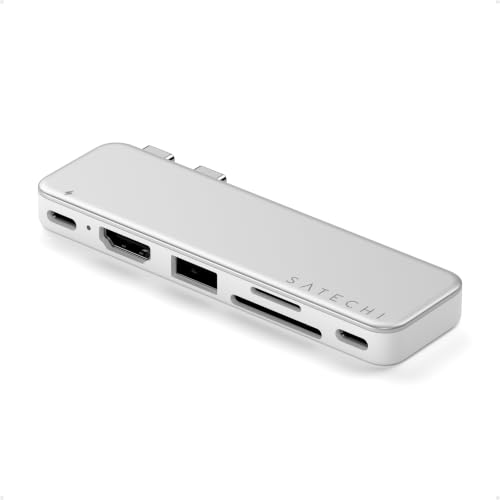
Affordable USB-C Hub Instead of a Large Dell Dock: What You Gain and What Is Missing
Dell Pro 14 Plus comes with very solid factory equipment: two 40 Gb/s Thunderbolt 4 ports supporting Power Delivery and DisplayPort 2.1, as well as an HDMI 2.1 output and a traditional USB-A connector. As a result, not every user needs to spend money on a large docking station with a bulky power adapter.
In Windows, an ordinary, cheaper hub can extend the desktop across two monitors without mirroring the display. This is thanks to full multi-stream transport support built into Microsoft's operating system. For example, the UGREEN Revodok series, including the 10-in-1 model that is among the best sellers on Amazon, handles this task effortlessly in a home office setup.
By choosing a smaller hub, you get a portable device that easily fits into your laptop bag. However, you need to keep its limitations in mind: hubs require plugging your factory 65 W charger into their power input port, and they typically lack fast 2.5 Gb/s networking as well as passthrough Thunderbolt ports found on professional Dell docks.
Frequently Asked Questions About Dell Pro 14 Plus Docking Stations
Does Dell WD22TB4 work with Dell Pro 14 Plus?
Yes, the Dell WD22TB4 dock works seamlessly with this laptop. The manufacturer officially confirmed full compatibility in its accessories matrix. The laptop will take advantage of the full Thunderbolt 4 bandwidth and drive connected displays.
Will the Dell WD25 dock charge Dell Pro 14 Plus?
Yes, the WD25 dock will easily power this computer during everyday work. The dock delivers up to 100 W of power to compatible Dell laptops. Your computer requires 65 W out of the box, so there is plenty of power headroom.
What is the difference between Dell WD25 and SD25?
The SD25 dock was designed for enterprise environments, adding remote management features for IT departments and offering up to 130 W power delivery. The WD25 model is a classic office version providing up to 100 W, which is more than enough for personal use or standard office work.
Do you need a Thunderbolt dock for Dell Pro 14 Plus?
No, Thunderbolt technology is not required for a docking station to function properly. Dell Pro 14 Plus works great with USB-C devices, such as the WD25 dock or smaller hubs. A more expensive Thunderbolt model only makes sense if you connect ultra-fast portable drives or daisy-chain additional devices.
Will a budget hub with dual HDMI work with Dell Pro 14 Plus?
Yes, a multiport hub with two HDMI ports can extend your desktop across two independent monitors. Windows fully supports this feature, so you will not be stuck with mirrored screens. Just remember to plug your factory 65 W USB-C charger into the power delivery port on the hub.
See also
Sources
- Dell: Docking compatibility guide (PDF) - manufacturer page (delltechnologies.com)
- LaptopMedia: Dell Pro 14 Plus (PB14250) review - industry article (laptopmedia.com)
- Notebookcheck: Dell Pro 14 Plus PB14250 - industry article (notebookcheck.net)
- Docking-Stations.info: Dell SD25TB4 vs Dell WD22TB4 - industry article (docking-stations.info)
- ByrdPilot: Dell Pro Dock WD25 review - industry article (byrdpilot.com)


Leave a comment
This site is protected by hCaptcha and the hCaptcha Privacy Policy and Terms of Service apply.