








As an Amazon Associate I earn from qualifying purchases.
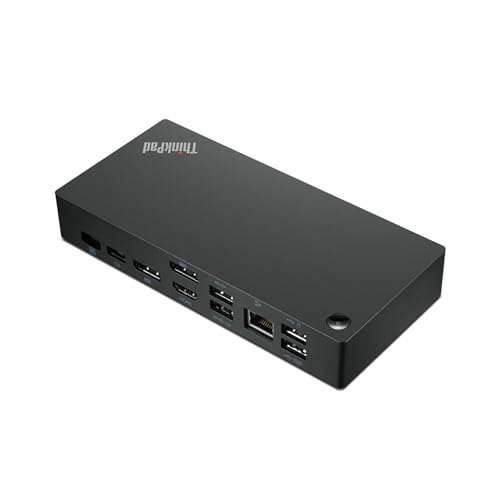
Quick answer: our top pick is Lenovo ThinkPad Universal USB-C Dock 40AY (official Lenovo · 90 W adapter · best seller).
Best docking station for ThinkPad T14 Gen 6?
You can safely connect both an official Lenovo docking station and a third-party universal USB-C hub to the ThinkPad T14 Gen 6. The laptop features two USB-C ports with Thunderbolt 4 and USB4 standards, ensuring full compatibility with the ThinkPad Universal USB-C Dock 40AY, the new ThinkPad USB4 Dock 5000, and multiport adapters.
The final choice depends on your desk setup needs. If you need an included power adapter and enterprise hardware management features, a Lenovo dock will be the better choice. For simple home use and connecting two screens, a more affordable hub is enough.
Both the AMD processor version and the Intel chip model have two Thunderbolt 4 and USB4 ports with 40 Gb/s bandwidth. Each of these ports supports USB PD 3.0 charging and DisplayPort 2.1 video output, so your choice of processor does not limit your accessory options.

Official Lenovo dock or an inexpensive USB-C hub
Official Lenovo docking stations, such as the ThinkPad Universal USB-C Dock 40AY, come in the box with their own 90 W power adapter. This allows the dock to continuously power your laptop, leaving your original 65 W charger permanently packed in your travel bag.
Dedicated Lenovo docks also provide automatic firmware updates. They offer support for corporate features such as PXE network boot and MAC address pass-through, which are essential in secure office networks.
Inexpensive USB-C hubs, such as the popular UGREEN Revodok models, lack corporate features and usually do not come with a power adapter included. They operate via pass-through power, which means you must plug your laptop charger into them, and the hub itself draws a few watts for its own operation.
The ThinkPad T14 Gen 6 requires 65 W of power to operate. Any dock with its own power adapter will charge it at full speed, whereas with a small hub, the laptop will receive slightly less power from the connected charger.

Dual desk monitors and display support in Windows
Windows fully supports MST technology, which allows transmitting two independent video signals over a single USB-C cable. Thanks to this, an inexpensive hub with two HDMI ports can easily extend your desktop across two different work monitors.
It is worth keeping in mind that Apple computers running macOS do not support this feature and only display the same mirrored image across dual HDMI ports. Working on a ThinkPad with Windows, you do not face this limitation and get full desktop workspace across two external screens.
The ThinkPad T14 Gen 6 itself features a full-size HDMI 2.1 port supporting resolutions up to 4K at 60 Hz, two 5 Gb/s USB-A ports, and a standard RJ45 Ethernet jack. This means you can connect one monitor directly to the laptop and another via a simple adapter, achieving a stable display without spending a fortune.
Fun fact: The red TrackPoint cap located in the center of ThinkPad keyboards has been a staple of the series since the launch of the first model in 1992.
The overview below includes the most popular Lenovo docking stations and USB-C hubs, selected based on Lenovo specifications and manufacturer data.
Recommended docks for ThinkPad T14 Gen 6

1. Lenovo ThinkPad Universal USB-C Dock 40AY
official Lenovo · 90 W adapter · best seller
Lenovo's best-selling official dock, sold with a 90 W power adapter. It works with ThinkPads over a standard USB-C port with video and supports automatic firmware updates.

2. Lenovo ThinkPad USB4 Dock 5000
official Lenovo · USB4 40 Gbps · up to 100 W
The successor to the Universal USB-C Dock, on a USB4 40 Gbps link. With the 135 W adapter it charges the laptop at up to 100 W. Lenovo lists the ThinkPad T14 Gen 6 among compatible models.

3. UGREEN Revodok Pro 210 10-in-1
2x HDMI · Ethernet · 100 W charging
Two HDMI outputs, Ethernet and a card reader. On Windows it extends the desktop to two monitors. On a Mac both HDMI ports show the same picture because macOS does not support MST (UGREEN says so in the listing).

4. UGREEN Revodok Pro dual HDMI 10Gbps
budget · 2x HDMI 4K 60 Hz · extends on Windows
A small hub with two 4K 60 Hz HDMI ports and 10 Gbps USB. On Windows it extends the desktop to two monitors. Over 4,000 reviews on Amazon.
New 2025 Lenovo docks and when they make sense
In 2025, Lenovo refreshed its docking station lineup and introduced the ThinkPad USB4 Dock 5000 model. The lineup also expanded with the USB4 Smart Dock 5500, as well as advanced Thunderbolt 4 and Thunderbolt 5 Smart Dock 7500 units.
The USB4 Dock 5000 is the direct successor to the popular Universal USB-C Dock 40AY. It uses a faster 40 Gb/s USB4 connection, and comes with a 135 W power supply that allows you to charge the laptop with up to 100 W. Lenovo explicitly lists the ThinkPad T14 Gen 6 among fully compatible devices.
The Smart Dock versions feature additional modules for remote management by corporate IT support teams. You will not use these features at home, so buying such models for a personal desk does not make much sense.
If you are looking for an official Lenovo accessory that will last for years, the basic ThinkPad USB4 Dock 5000 will be more than enough. It ensures full bandwidth for the laptop ports, seamless compatibility with peripherals, and plenty of power headroom from the power supply.
Questions about docking stations for ThinkPad T14 Gen 6
Does ThinkPad T14 Gen 6 have Thunderbolt?
Yes, ThinkPad T14 Gen 6 has two USB-C ports with Thunderbolt 4 and USB4 support at 40 Gb/s bandwidth. This applies to both AMD processor versions and Intel configurations. These ports support DisplayPort 2.1 video output and Power Delivery 3.0 charging.
Does the Lenovo Universal USB-C Dock work with T14 Gen 6?
Yes, the ThinkPad Universal USB-C Dock 40AY fully works with T14 Gen 6 via the video-enabled USB-C port. It is the most popular official Lenovo dock, coming bundled with a 90 W power adapter and supporting automatic firmware updates. It will easily handle your desktop peripherals and charge your computer.
What is the difference between ThinkPad USB4 Dock 5000 and Universal USB-C Dock?
The ThinkPad USB4 Dock 5000 model is the newer successor to the 40AY dock, utilizing a faster 40 Gb/s USB4 connection. Additionally, the new dock comes with a more powerful 135 W power adapter that can supply up to 100 W of power to the computer, whereas the older model features a 90 W adapter. Lenovo officially lists the ThinkPad T14 Gen 6 as compatible with the new dock.
Will a cheap hub with two HDMI ports support dual monitors on Windows?
Yes, on a Windows computer, an affordable hub with two HDMI ports will extend the desktop across two separate monitors. This is possible thanks to MST mode support in Microsoft's operating system. This limitation only applies to Mac computers, where the same hub will only mirror the display.
Will a docking station charge the ThinkPad T14 Gen 6?
Yes, the laptop requires a 65 W charger for power, which is included in the box with the computer. Official Lenovo docking stations come with their own 90 W or 135 W power supplies, so they easily power the laptop at full capacity. A budget hub without its own power supply will pass through power from a charger plugged into its USB-C port.
See also
- Which charger for Lenovo ThinkPad T14s Gen 6 - original adapter or alternative?
- Best docking station for Dell Pro 14 Plus - WD25, WD22TB4 or a cheap hub
Sources
- Lenovo PSREF: ThinkPad T14 Gen 6 (AMD) specifications - manufacturer page (psref.lenovo.com)
- Notebookcheck: Lenovo ThinkPad T14 Gen 6 review - industry article (notebookcheck.net)
- Notebookcheck: Lenovo shows off three new ThinkPad docks - industry article (notebookcheck.net)
- ThunderboltLaptop: Best docking stations for ThinkPad - industry article (thunderboltlaptop.com)


Leave a comment
This site is protected by hCaptcha and the hCaptcha Privacy Policy and Terms of Service apply.