









Updated: 02.10.2026
As an Amazon Associate I earn from qualifying purchases.
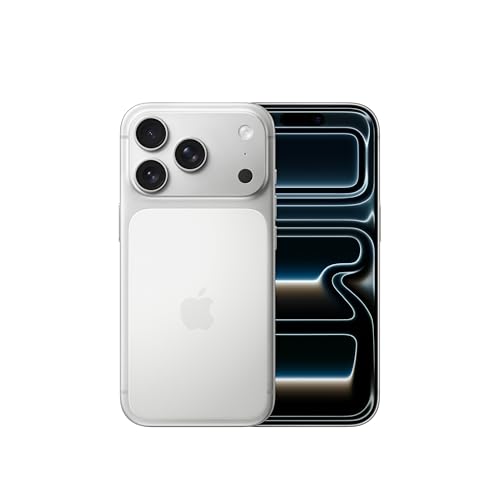
Quick answer: Which charger for Apple iPhone 17 Pro? The best choice is Google 45W USB-C Charger 45 W - about 100% of the maximum charging speed (phone: max 35 W). A regular USB-PD charger also delivers full power.

Which charger for Apple iPhone 17 Pro? The real wattage you need
If you are wondering which charger for Apple iPhone 17 Pro will give you the quickest battery boost, the short answer is simple: you need a power adapter that supports USB Power Delivery (USB PD) and offers at least 35W to 45W. With that setup, the phone reaches its full charging speed of around 35W, bringing you to roughly half capacity in just twenty minutes.
Unlike earlier generations that were locked to lower limits, this phone takes full advantage of standard USB PD profiles. You do not need any special proprietary tech or even PPS (Programmable Power Supply) to get the maximum speed, as standard USB PD fixed voltages deliver the full 35W easily.
Apple only includes a USB-C cable in the box, leaving the charging brick up to you. Whether you have a drawer full of older plugs or are shopping for a new one, this guide breaks down exactly what works and what will slow you down.
Fun fact: The USB Power Delivery specification was originally introduced back in 2012, designed to create a universal standard so that one single cable could safely negotiate power for phones, tablets, and even workstations.
Specs and charging
The key Apple iPhone 17 Pro specs that matter when choosing a charger:
- Battery: 3998 mAh, litowo-jonowa
- Wired charging: 35 W (USB-C Power Delivery)
- On a standard USB PD charger: ~35 W
- Wireless charging: 25 W (MagSafe / Qi2)

Got an older power brick in your drawer? Check these specs
Before you spend money on a brand new adapter, take a close look at the small text printed on the plugs you already own. Here is what you can expect when plugging the iPhone 17 Pro into different common adapters:
- An older 20W Apple USB-C plug: This will charge your phone safely and relatively quickly, but it maxes out at 20W. You will miss out on the top 35W peak speeds during the first half of charging.
- A USB-C laptop charger (45W, 65W, or higher): If your laptop uses a standard USB-C brick, you are in luck. The iPhone 17 Pro safely draws up to its 35W peak, making laptop chargers an ideal all-in-one solution.
- A standard 45W+ USB PD adapter: Any third-party plug supporting standard USB PD will deliver the full 35W capability. Standard USB PD delivers full power without needing PPS support.
- A basic USB-A wall plug: Plugs with an older rectangular USB-A port generally lack modern fast charging standards. They drop speeds down to just 5-10W, which means charging will feel noticeably slow.
Real-world charging speed: What the numbers actually mean
Knowing the wattage is helpful, but what really matters is how fast the battery fills up during your daily routine. According to Apple, using an official 40W adapter gets you to 50% in just 20 minutes, which is plenty of juice if you forgot to plug in overnight.
Independent testing by GSMArena shows that any standard USB PD adapter rated at 45W or higher achieves that same top performance, peaking at around 35W. In daily use, plug the phone in for 15 minutes while getting ready and you will reach 40% capacity. After 30 minutes, the battery sits comfortably at 70%.
Reaching a complete 100% charge takes 1 hour and 18 minutes. The final stretch slows down naturally as the battery nears full capacity, which is normal behavior designed to protect overall battery longevity.
Choosing a new adapter: The best models for your desk and bag
If you need to pick up a new plug, you do not need to overspend to get top speeds. The Google 45W USB-C Charger hits the full 35W limit and stands out as the cheapest way to get 100% of the phone's maximum speed. Another great single-port alternative is the Samsung 45W Power Adapter EP-T4511, which also unlocks the full 35W potential.
If you want one single plug to power both your iPhone and a laptop, consider the Motorola TurboPower 68W. It supplies the full 35W for your phone while leaving plenty of capacity for a modern ultraportable computer.
For those who travel with multiple gadgets, multi-port chargers are the way to go. The UGREEN Nexode 65W and the Anker 735 (Nano II 65W) each feature three ports, easily running your iPhone 17 Pro at full 35W speed while keeping headphones and tablets powered up at the same time.
| Charger | Power | Estimated speed |
|---|---|---|
| Google 45W USB-C Charger | 45 W | 100% |
| Samsung 45W Power Adapter EP-T4511 | 45 W | 100% |
| Motorola TurboPower 68W | 68 W | 100% |
| UGREEN Nexode 65W | 65 W | 100% |
| Anker 735 (Nano II 65W) | 65 W | 100% |

1. Google 45W USB-C Charger (45W GaN)
Cheapest at full speed
45W GaN charger. With the Apple iPhone 17 Pro it charges at up to about 35 W via USB PD (100% of the phone's maximum power, estimate based on specs and protocols).

2. Samsung 45W Power Adapter EP-T4511 (45W)
45W charger. With the Apple iPhone 17 Pro it charges at up to about 35 W via USB PD (100% of the phone's maximum power, estimate based on specs and protocols).

3. Motorola TurboPower 68W (68W GaN)
Enough power for a USB-C laptop
68W GaN charger. With the Apple iPhone 17 Pro it charges at up to about 35 W via USB PD (100% of the phone's maximum power, estimate based on specs and protocols).

4. UGREEN Nexode 65W (65W GaN)
3 ports - several devices at once · Enough power for a USB-C laptop
65W GaN charger. With the Apple iPhone 17 Pro it charges at up to about 35 W via USB PD (100% of the phone's maximum power, estimate based on specs and protocols).
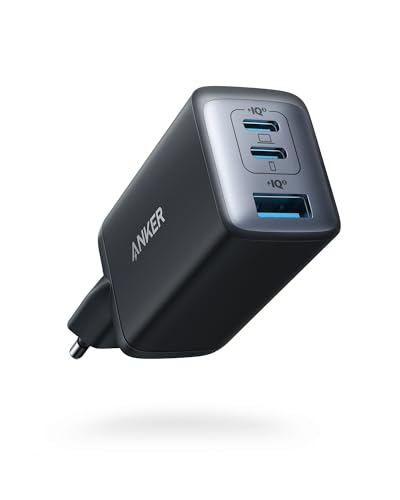
5. Anker 735 (Nano II 65W) (65W GaN)
3 ports - several devices at once · Enough power for a USB-C laptop
65W GaN charger. With the Apple iPhone 17 Pro it charges at up to about 35 W via USB PD (100% of the phone's maximum power, estimate based on specs and protocols).
Common charging traps that slow down your iPhone 17 Pro
The biggest trap is relying on older multi-port USB-A power stations. Without USB Power Delivery, the iPhone drops back to baseline charging rates between 5W and 10W, turning a 30-minute top-up into an hours-long wait.
Another common mistake involves using proprietary charging bricks from certain Android brands that do not support open USB PD standards. If an adapter relies solely on a custom protocol and lacks standard PD negotiation, your phone defaults to low-power charging.
Lastly, keep in mind that while a 20W adapter is fine for overnight bedside charging, it cannot reach the rapid 40% in 15 minutes seen in tests. If quick morning refills are important to you, a 45W or higher USB PD adapter is well worth the upgrade.
Fun fact: During the initial connection, your phone and charger perform a digital "handshake" in a fraction of a second, agreeing on the safest voltage and amperage before sending higher current.
Frequently asked questions about charging Apple iPhone 17 Pro
Which charger for Apple iPhone 17 Pro gives the fastest charge?
Any charger supporting standard USB Power Delivery (USB PD) with an output of 45W or higher will deliver the fastest possible charge. The iPhone 17 Pro peaks at roughly 35W, reaching 50% in about 20 minutes and 70% in 30 minutes.
Is there a charging adapter included in the iPhone 17 Pro box?
No, Apple does not include a power adapter in the box. You only receive a USB-C to USB-C charging cable, so you will need to use a compatible USB-C charger you already own or buy a new one.
Can I safely charge the iPhone 17 Pro with a 65W laptop charger?
Yes, it is completely safe. Modern USB PD devices communicate directly with the adapter to draw only the power they need, so the iPhone 17 Pro will simply take its maximum of around 35W and ignore the rest.
Does the iPhone 17 Pro need a charger with PPS support?
No, PPS is not required to hit maximum charging speeds. Standard USB PD with fixed voltages delivers the full ~35W peak power without any performance penalty.
How long does a full charge take from empty?
Using a 45W+ USB PD adapter, the iPhone 17 Pro charges from zero to 100% in approximately 1 hour and 18 minutes, reaching 40% in the first 15 minutes.
Chargers for the other models in this series
Sources
- Apple iPhone 17 Pro - support.apple.com - official manufacturer specifications (support.apple.com)
- Apple iPhone 17 Pro - gsmarena.com - industry article (gsmarena.com)
- Apple iPhone 17 Pro - 9to5mac.com - industry article (9to5mac.com)
- Apple iPhone 17 Pro - gsmarena.com - industry article (gsmarena.com)
- Apple iPhone 17 Pro - 9to5mac.com - industry article (9to5mac.com)

Leave a comment
This site is protected by hCaptcha and the hCaptcha Privacy Policy and Terms of Service apply.