









Best wheel for ETS2 and Farming Simulator 25?
In Euro Truck Simulator 2 on PC, popular models such as the Logitech G29, Logitech G920, and Thrustmaster T248 perform exceptionally well. The same applies to Farming Simulator 25 on PC, while on PlayStation 5 and Xbox consoles, the safest choice is the Thrustmaster T128 SimTask Pack set dedicated to your platform, as its compatibility with this game is officially confirmed by the manufacturer.
| Wheel | ETS2 (PC only) | FS25 on PC | FS25 on PS5 | FS25 on Xbox |
|---|---|---|---|---|
| Logitech G29 Driving Force | yes | yes | not confirmed | no |
| Logitech G920 Driving Force | yes | yes | no | not confirmed |
| Thrustmaster T248 (PlayStation/PC) | yes | yes | not confirmed | no |
| Thrustmaster T128 SimTask Pack (PS5/PC) | yes | yes | yes | no |
| Thrustmaster T128 SimTask Pack (Xbox/PC) | yes | yes | no | yes |
ETS2 is PC only (Windows, macOS, Linux). PC: Brian Koponen's settings guides (G29/G920, T248) and Thrustmaster (T128 SimTask). Consoles: Thrustmaster. "Not confirmed" means neither the wheel maker nor the developers confirm it works on that console.
ETS2 is only available on PC (Windows, macOS, Linux). PC: settings guides by Brian Koponen (G29/G920, T248) and Thrustmaster (T128 SimTask). Consoles: Thrustmaster. "No confirmation" means that neither the wheel manufacturer nor the game developers confirm compatibility on this console.
In the table above, you can check the compatibility of individual models with both games and hardware platforms. This will allow you to quickly confirm whether your chosen model will work smoothly on your PC or console.
Fun fact: Euro Truck Simulator 2 debuted on October 18, 2012, exclusively on personal computers. To date, it has gathered over 146 thousand player reviews on Steam, with as many as 97 percent of them being positive.
The specifics of driving a tractor and a truck on a virtual wheel
Driving agricultural machinery or a large semi-truck differs significantly from racing games. In work simulators, you do not need tight, sporty steering angles, but rather a full 900-degree rotation that allows for precise trailer maneuvering and accurate equipment operation.
Force feedback should be lighter than on a race track so that multi-hour trips do not fatigue your hands. In Farming Simulator 25, force feedback is actually very simplified, behaving in practice mostly like a centering spring for the wheel.
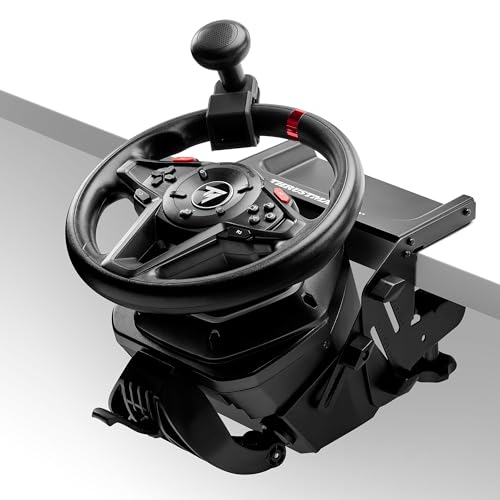
In a tractor, the wheel rim position itself is also crucial. The dedicated metal SimTask mount allows you to install the wheel almost flat, just like in the cabin of a real tractor. The included steering knob allows you to comfortably turn the wheel with one hand, leaving your other hand free to operate a shifter or joystick.
H-pattern shifter and manual gear shifting
You will only feel the true atmosphere of driving a truck in Euro Truck Simulator 2 when you pair your steering wheel with a dedicated gear shifter. H-pattern accessories, such as the Logitech Driving Force Shifter made of steel and leather, allow you to shift through six gears, plus reverse by pushing down the stick.
ETS2 features a gearbox grinding effect when a gear shift fails. This force feedback effect works exclusively when you use a physical H-pattern shifter rather than sequential paddle shifters.
Below you will find the steering wheels and accessories we recommend, selected for their seamless compatibility with simulators.
Recommended wheels for ETS2 and Farming Simulator 25
As an Amazon Associate I earn from qualifying purchases.

1. Logitech G29 Driving Force
PS5 · PS4 · PC · 900° rotation · force feedback
Dual-motor force feedback with helical gearing, 900° rotation, a leather rim and stainless steel paddles. PlayStation version that also works on PC.

2. Logitech G920 Driving Force
Xbox Series X|S · Xbox One · PC · 900° rotation
The G29's twin for Xbox: dual-motor force feedback with helical gearing, 900° rotation and stainless steel paddles. Works on PC too.

3. Thrustmaster T128 SimTask Pack (PS5/PC)
PS5 · PC · tractor-style mount · 900° rotation
T128 force feedback wheel, T2PM pedals and a metal SimTask mount that sets the wheel flat like in a tractor cab. A spinner knob for one-handed steering is included.

4. Thrustmaster T128 SimTask Pack (Xbox/PC)
Xbox · PC · tractor-style mount · 900° rotation
The same pack for Xbox Series X|S and PC: T128 with force feedback, T2PM pedals, the flat SimTask mount and a spinner knob. Thrustmaster names it as a wheel for FS25 on Xbox.

5. Logitech Driving Force Shifter
6-speed H-pattern · for G29, G920, G923
H-pattern shifter with 6 gears and push-down reverse, made of steel and leather. In ETS2 it is worth it if you want to shift like in a real truck.
Optimal steering wheel settings to get started
Right after connecting your equipment to the PC, set the rotation range to 900 degrees in the configuration software, such as Logitech G Hub. Select the identical angle value in the controller settings menu in Euro Truck Simulator 2.
Farming Simulator 25 does not have a built-in software rotation limiter, also known as a soft lock mechanism. For this reason, you need to set the 900-degree angle permanently in the wheel software.
Make sure to also go into the Farming Simulator 25 options and reduce the steering deadzone to zero. By default, it is set to a very high value, giving the false impression that the game handles the controller poorly or has significant input lag.
In Euro Truck Simulator 2 for the Logitech G29 and G920 models, it is best to set the overall force feedback gain to 120 percent, which provides light, relaxing truck handling. If you are using the Thrustmaster T248, authors of verified setups suggest setting the Overall Gain parameter to 200 percent.
In Farming Simulator 25, it is worth increasing the force feedback strength in the menu to 100 percent. Since the game mainly generates basic centering resistance, lower values will make the wheel feel too loose, and you will not feel any resistance on the rim.
Frequently Asked Questions
Do you need an H-pattern shifter for ETS2?
It is not required to play, as the game supports automatic transmissions and wheel paddle shifters. However, a standalone shifter is essential if you care about full realism and want to feel the gear grinding effect on the wheel when you make a mistake.
What steering wheel rotation angle should you set in ETS2 and Farming Simulator 25?
In both titles, a full 900-degree rotation angle works best. This is recommended by setup guides because trucks have a wide turning angle, and FS25 lacks its own rotation limiter.
Does the Logitech G29 work with Farming Simulator 25 on PS5?
Farming Simulator 25 on consoles has a very limited list of supported controllers, and there is no official confirmation of Logitech G29 working on PS5. The only fully reliable solution with manufacturer-confirmed plug and play support on this console is the Thrustmaster T128 SimTask kit.
Is Euro Truck Simulator 2 available on PS5 or Xbox?
Euro Truck Simulator 2 was developed exclusively for personal computers running Windows, macOS, and Linux. The game has never received an official release on PlayStation or Xbox consoles.
Does force feedback do anything in Farming Simulator 25?
The feedback effects in the farming game are very basic and practically come down to a centering spring for the steering wheel. It is worth setting this option to 100 percent so the rim provides noticeable resistance and automatically returns to the center position.
Sources
- Thrustmaster: T128 SimTask Pack - manufacturer page (thrustmaster.com)
- Thrustmaster: T128 SimTask Farming Pack - manufacturer page (thrustmaster.com)
- Thrustmaster: SimTask FarmStick X - manufacturer page (thrustmaster.com)
- Logitech G: G29 / G920 Driving Force - manufacturer page (logitechg.com)
- Logitech G: Driving Force Shifter - manufacturer page (logitechg.com)
- Steam: Euro Truck Simulator 2 - industry article (store.steampowered.com)
- Brian Koponen: Euro Truck Simulator 2 settings for Logitech G29 / G920 - industry article (briankoponen.com)
- Brian Koponen: Euro Truck Simulator 2 settings for Thrustmaster T248 - industry article (briankoponen.com)
- Brian Koponen: Farming Simulator 25 settings for Logitech G29 / G920 - industry article (briankoponen.com)


Leave a comment
This site is protected by hCaptcha and the hCaptcha Privacy Policy and Terms of Service apply.