









Best PSU for RX 9070 XT?
For the Radeon RX 9070 XT graphics card, you need a power supply of at least 750 W, as this is the official minimum recommended by AMD. Choose a higher 850 W model when pairing this card with a CPU that consumes more power in games than the Ryzen 7 9850X3D, such as the Core Ultra 9 285K, Ryzen 9 9950X3D, Ryzen 9 9950X, Core i9-14900K, or Core i7-14700K.
| CPU | CPU while gaming | GPU + CPU while gaming | Our PSU pick |
|---|---|---|---|
| Ryzen 7 7800X3D | 58 W | 362 W | 750 W |
| Ryzen 5 9600X | 75 W | 379 W | 750 W |
| Ryzen 7 9700X | 77 W | 381 W | 750 W |
| Ryzen 7 9800X3D | 80 W | 384 W | 750 W |
| Core Ultra 7 265K | 93 W | 397 W | 750 W |
| Ryzen 7 9850X3D | 102 W | 406 W | 750 W |
| Core Ultra 9 285K | 111 W | 415 W | 850 W |
| Ryzen 9 9950X3D | 126 W | 430 W | 850 W |
| Ryzen 9 9950X | 132 W | 436 W | 850 W |
| Core i9-14900K | 166 W | 470 W | 850 W |
| Core i7-14700K | 178 W | 482 W | 850 W |
CPU power: TechPowerUp, average of 14 games, CPU only. GPU: board power from the manufacturer (RX 9070 XT: 304 W). Motherboard, memory, drives and fans draw extra, hence the headroom in the pick.
CPU power consumption: TechPowerUp, 14-game average, CPU only. Card power consumption: manufacturer rated board power (RX 9070 XT: 304 W). The motherboard, memory, drives, and fans consume additional power, hence the buffer in the recommendation.
In the table above, you will find the suggested power supply wattage matched to a specific processor. Simply find your CPU to know immediately whether to stick with the base 750 W or invest in an 850 W unit.
AMD itself lists a typical board power of 304 W for the card, but does not specify which CPU was used to establish the 750 W recommendation. Therefore, for more power-hungry processors, a PSU one tier higher is the safer choice.
Is 750 W enough and what about lower-wattage units
A 750 W power supply will easily handle a standard gaming build based on most popular processors. TechPowerUp measurements show that the RX 9070 XT draws an average of 314 W in gaming, slightly above the 304 W stated by AMD.
You also need to keep in mind short transient power spikes, which reach 390 W in 20 ms bursts with this card. ATX 3.1 power supplies are designed specifically to handle such momentary loads.
If you plan on overclocking your components, power requirements increase noticeably. According to MSI guidelines, when overclocking with Core Ultra 7, Ryzen 7, and X3D series processors, an 850 W power supply is recommended, while for overclocking a Core Ultra 9 or Ryzen 9, the manufacturer recommends a 1000 W unit.
A 650 W power supply falls below AMD's official minimum, and we do not recommend this approach. Under load in modern games and during sudden power spikes, such a power supply may prove insufficient.
Power connectors and the 12V-2x6 cable
Before making a purchase, make sure to check the exact specifications of your chosen card model. The type and number of power connectors depend on the manufacturer and vary across custom board partner designs.
If your card features a 12V-2x6 connector, it is best to buy a power supply with a native 600 W cable.
A native cable eliminates the need for extra adapters and makes cable management inside the case easier. Always ensure that the plug is fully seated into the card's connector.
Fun fact: in some power supplies, such as the MSI MAG GLS, the ends of the 12V-2x6 cable are yellow, making it easier to visually verify that the plug is fully pushed in all the way.
Below are power supplies from 750 W upwards, compliant with ATX 3.1 and equipped with a 600 W 12V-2x6 cable.
Recommended PSUs for the RX 9070 XT
As an Amazon Associate I earn from qualifying purchases.

1. Corsair RM750e (2025)
750 W · Cybenetics Gold · ATX 3.1 · 12V-2x6 600 W
Fully modular, with a native 12V-2x6 cable rated up to 600 W and Zero RPM mode. A solid choice if you want headroom for a more powerful processor or your next GPU upgrade. 7-year warranty.

2. Corsair RM850e (2025)
850 W · Cybenetics Gold · ATX 3.1 · 12V-2x6 600 W
Fully modular, featuring a native 12V-2x6 cable rated up to 600 W and Zero RPM mode where the fan stops completely under light loads. 7-year warranty.

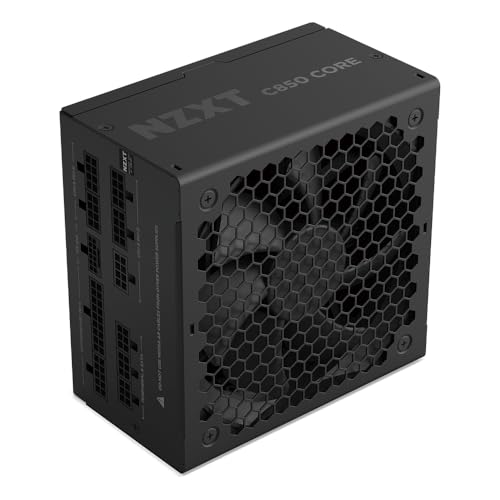
3. NZXT C850 Gold Core
850 W · 80 PLUS Gold · Cybenetics Platinum · 12V-2x6 600 W
Fully modular, with a 600 W 12V-2x6 cable and three 6+2-pin cables. 135 mm fan with Zero RPM mode and a 7-year warranty.

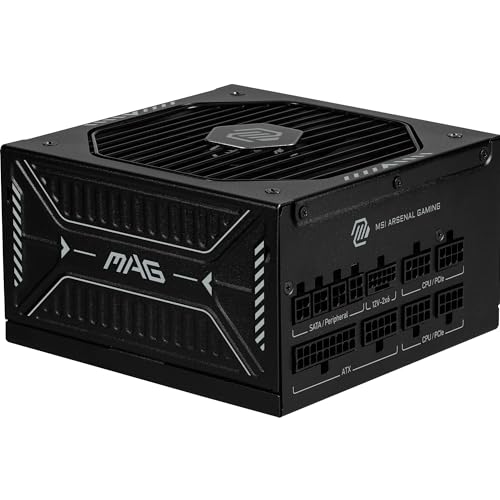
4. MSI MAG A850GLS PCIE5
850 W · 80 PLUS Gold · ATX 3.1 · 12V-2x6 600 W
Native 12V-2x6 cable rated up to 600 W with yellow connectors that make it easy to spot if it is not seated all the way. 135 mm fan with an FDB bearing.
What to look for when choosing a power supply
When choosing a power supply for a new graphics card, look for designs compliant with ATX 3.1 and PCIe 5.1 standards. Modern models are factory-prepared for large power spikes: be quiet! Pure Power 12 units handle power excursions up to twice their rated wattage, and MSI specifies power excursion tolerance of up to 220% for its units.
Pay attention to high energy efficiency confirmed by an 80 PLUS Gold or Cybenetics Gold or Platinum certification. This translates to lower energy losses converted into heat, resulting in quieter fan operation under load.
Also check the length of the manufacturer warranty, which is typically 7 or 10 years for modern power supplies.
Consider the ease of installation inside the PC case as well. Fully modular cabling allows you to connect only the cables you actually need, whereas with fixed-cable models you have to manage space to tuck away unused leads.
Questions and answers
Is a 750 W power supply enough for the RX 9070 XT?
Yes, 750 W is the official minimum recommended by AMD and is completely sufficient for typical gaming builds. It will easily handle processors such as Ryzen 5, Ryzen 7, Core Ultra 5, and Core Ultra 7 at stock clock speeds. However, if you plan on heavier component overclocking, an 850 W unit is a better choice.
Is a 650 W power supply enough for the RX 9070 XT?
We do not recommend a 650 W power supply for this graphics card. This wattage is below the official 750 W minimum stated in AMD's specifications. The RX 9070 XT can generate brief power spikes of up to 390 W, which means a 650 W unit may not guarantee stability during demanding gaming moments.
Which power supply for RX 9070 XT and Ryzen 7 7800X3D?
A solid 750 W power supply is more than enough for a build with the Ryzen 7 7800X3D processor. This CPU draws an average of just 58 W in games, so the entire platform maintains safe headroom alongside the card drawing an average of 314 W. Your best choice is a reputable ATX 3.1 model with an 80 PLUS Gold certification.
Which power supply for RX 9070 XT and Ryzen 7 9800X3D?
For a setup with the Ryzen 7 9800X3D processor at stock settings, a 750 W power supply will be fully sufficient. This CPU draws an average of 80 W on the EPS 12 V connector during gaming, which easily fits within MSI's recommendations for 750 W power supplies. You should consider stepping up to an 850 W model if you plan to overclock this CPU.
When is it worth choosing an 850 W power supply for the RX 9070 XT?
An 850 W unit is worth choosing when pairing the card with a CPU that draws more power in games than the Ryzen 7 9850X3D, such as the Core Ultra 9 285K, Ryzen 9 9950X3D, Ryzen 9 9950X, Core i9-14900K, or Core i7-14700K. This wattage is also useful if you intend to overclock Ryzen 7 or Core Ultra 7 processors. A larger power supply also provides comfortable headroom for future PC upgrades.
Sources
- AMD: Radeon RX 9070 XT - specifications - manufacturer page (amd.com)
- TechPowerUp: NVIDIA GeForce RTX 5060 8 GB review - power consumption - industry article (techpowerup.com)
- TechPowerUp: AMD Ryzen 7 9850X3D review - power consumption and efficiency - industry article (techpowerup.com)
- MSI: Recommended PSU table for NVIDIA 30/40/50 series - industry article (msi.com)
- Corsair: Evolving standards - 12VHPWR and 12V-2x6 - industry article (corsair.com)
- be quiet!: Pure Power 12 - manufacturer page (bequiet.com)
- Corsair: RMe Series 2025 - manufacturer page (corsair.com)
- NZXT: C Series Gold Core (2025) specs - manufacturer page (support.nzxt.com)
- MSI: MAG A1000GLS PCIE5 - manufacturer page (msi.com)

Leave a comment
This site is protected by hCaptcha and the hCaptcha Privacy Policy and Terms of Service apply.