








As an Amazon Associate I earn from qualifying purchases.
Quick answer: our top pick is Edifier MR3 (2.0 monitors · Bluetooth 5.4 · Hi-Res · TRS).
Best speakers for Mac Studio M5? Short answer
For music and editing, get active studio monitors, connected by cable to the 3.5 mm jack or over Bluetooth. For a small desk, compact speakers powered from the computer's port are enough, with no separate power adapter.
The Mac Studio has a built-in speaker, but it is a stopgap. iMore writes that Mac speakers are quite decent, but computer speakers sound much better.
A separate article covers the monitor for Mac Studio M5, so here we focus only on sound.

How to connect speakers to Mac Studio
You have four options, and each one works without any fuss. Pick the one that fits what is on your desk.
3.5 mm jack
The headphone jack is on the back of the case, so you will run the cable behind the computer. It works with any active speakers that have an AUX input. This is the simplest and most reliable connection, with no pairing and no settings.
Bluetooth 6
The Mac Studio has an Apple N1 chip and Bluetooth 6, so you can pair wireless speakers without any adapters. It is handy when you don't want a cable running across the whole desk. If the speakers have both Bluetooth and a wired input, you get two options in one device.
USB
The back has two USB-A ports (up to 5 Gb/s) and four Thunderbolt 5 ports with USB-C. Unlike the Mac mini, you can connect speakers or a receiver with a USB-A plug without an adapter. Small speakers powered from the computer's port draw their power from here.
HDMI to monitor speakers
If your monitor has built-in speakers, you can use sound over HDMI 2.1. This is a solution for getting started or for watching movies, but the sound from monitor speakers is usually worse than separate speakers.
Fun fact: the HDMI port on the Mac Studio sends multichannel audio, so you can connect an AV receiver over the same cable too.
Below we have gathered speakers chosen by connection type and desk size: active studio monitors and small 2.0 sets for a smaller desktop.
The Mac Studio M5 speakers we recommend
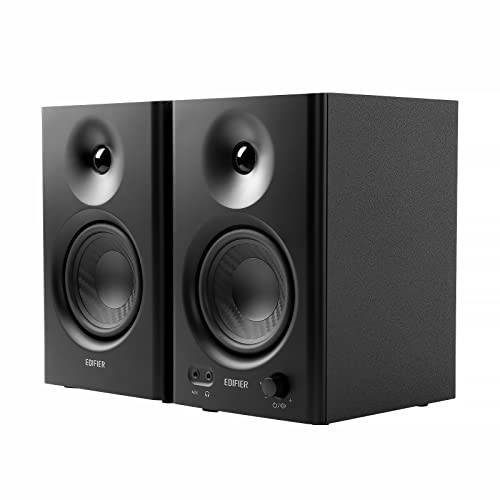
1. Edifier MR3
2.0 monitors · Bluetooth 5.4 · Hi-Res · TRS
The best-selling powered monitors in this roundup. They have Bluetooth 5.4, Hi-Res certification, a TRS input and a headphone output on the front.
2. Edifier MR4
4" monitors · 42 W · 2 sound modes
Studio monitors with a 4-inch woofer and 1-inch silk dome tweeter, 42 W and two sound modes. For anyone who listens to music or edits video at a desk.

3. PreSonus Eris 3.5 Gen 2
3.5" monitors · powered · desktop
Small powered studio monitors with a 3.5-inch driver, made for close-up listening at a desk. They sound neutral, so they suit podcasts and voice recording.
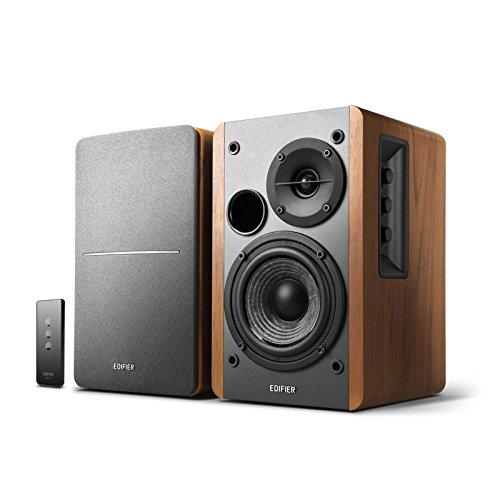
4. Edifier R1280T
bookshelf 2.0 · 42 W RMS · RCA inputs
Popular 2.0 powered bookshelf speakers with 42 W RMS in a wooden cabinet. You connect them with a cable to the headphone jack on the back of the Mac Studio.

5. Creative Pebble V3
On sale2.0 · USB powered · Bluetooth 5.0
Small speakers powered from the computer's port, with no separate power adapter. They have Bluetooth 5.0 and a Clear Dialog mode for calls. Good for a small desk.
Active or passive speakers
For Mac Studio, look for active speakers. They have a built-in amplifier, so you plug them into an outlet (or a USB port, if they are small) and connect them to the computer with a single audio cable. They usually also have a volume knob on the cabinet.
You can't connect passive speakers directly to Mac Studio without an amplifier. The headphone jack delivers a signal for headphones, not power for speakers. If you have old passive speakers, you need a separate amplifier or receiver for them.
Fun fact: the Mac Studio headphone jack supports high-impedance headphones, so you can plug not only speakers but also demanding studio headphones into the same port.
With active monitors, also check the inputs. A TRS input and a headphone output on the front of the cabinet are practical extras, because you can plug in headphones without reaching behind the computer.
Desk size and distance from the speakers
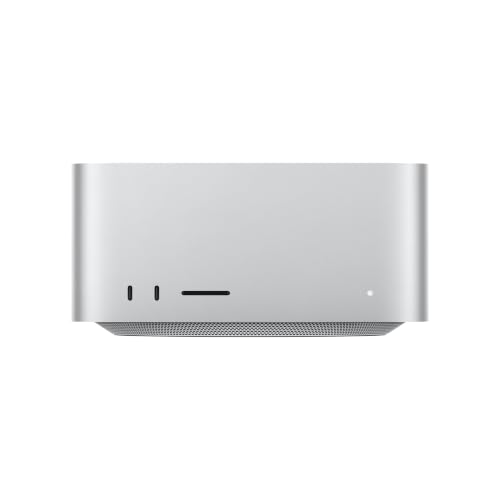
Mac Studio measures 7.8 x 7.8 inches and is 3.7 inches tall, so the computer itself takes up little space. Speakers take up more, so choose them to fit your desk, not your ambitions.
For a small desk, choose small speakers powered by the computer. They sit close to the monitor, don't need an outlet, and are enough for movies, calls, and background music. A call mode, if included, improves voice clarity.
If your desk is bigger and you listen to music or edit, go for studio monitors. Small models with a 3.5-inch driver are made for close-range listening and sound neutral, which helps with podcasts and voice recordings. Larger monitors give fuller bass, but they need more space and distance from your ear.
Place them on both sides of the monitor, at ear height, at a similar distance from you and from each other. If you have a shelf above your desk, consider bookshelf speakers in a wooden cabinet.
Most common questions about speakers for Mac Studio
Which speakers for Mac Studio M5?
For music and editing, active studio monitors with a 3.5 mm jack or Bluetooth. For a small desk, small speakers powered from the computer's USB port work well. Any active speakers with an AUX input will work.
How do I connect speakers to Mac Studio?
With a 3.5 mm cable to the jack on the back, over Bluetooth 6, over USB-A or USB-C, or over HDMI to the speakers in your monitor. The simplest option is a cable to the headphone jack. Choose Bluetooth if you don't want a cable on your desk.
Does Mac Studio have a built-in speaker?
Yes, it has a built-in speaker. It is enough for everyday use, but external computer speakers sound clearly better, as iMore also notes.
Where is the headphone jack on Mac Studio?
On the back of the case, next to the USB-A, HDMI, and Ethernet ports. So you run the speaker cable behind the computer. On the front you will find only USB-C or Thunderbolt 5 ports and an SDXC card reader.
Can I connect speakers through an HDMI monitor?
Yes, the HDMI port on Mac Studio sends audio to the speakers in your monitor or to a receiver. If the monitor has an audio output, you can plug speakers into it. Separate active speakers usually give better sound than the speakers in a monitor.
See also
- Best Keyboard for Mac Studio M5 - Touch ID or Logitech MX Keys
- Best Mouse for Mac Studio M5 - Magic Mouse or Logitech MX Master 4
- Best webcam for Mac Studio M5 - USB-A, USB-C or iPhone
- Best monitor for Mac Studio M5 - 5K or 6K and how many displays
Sources
- Apple Support: Mac Studio (M5 Max or M5 Ultra) tech specs - manufacturer page (support.apple.com)
- iThinkDifferent: Best speakers for M6 Mac mini - industry article (ithinkdiff.com)
- Gear Patrol: The coolest new desktop speakers of 2026 - industry article (gearpatrol.com)
- iMore: Best computer speakers for Mac - industry article (imore.com)

Leave a comment
This site is protected by hCaptcha and the hCaptcha Privacy Policy and Terms of Service apply.