








As an Amazon Associate I earn from qualifying purchases.
Quick answer: our top pick is Logitech MX Master 4 for Mac (haptics · Bluetooth · up to 70 days · USB-C).
Best mouse for Mac Studio M5? Quick answer
For long, everyday work, choose a mouse with a contoured shell and a large battery, meaning a productivity model with a thumb panel. For macOS gestures, the original Apple mouse with its touch surface is best. If you mostly work on a MacBook and like its trackpad, get the Apple trackpad.
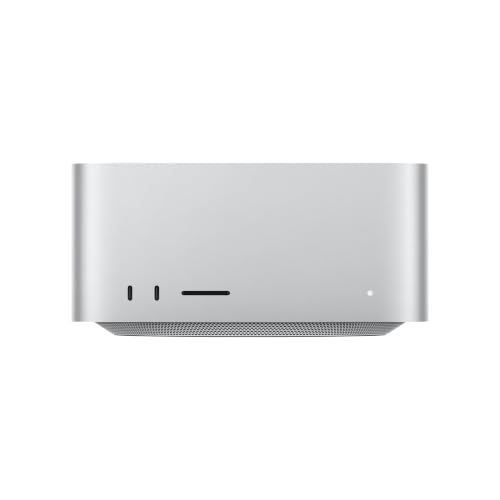
You will need to buy a mouse separately. According to Apple's technical specifications, the Mac Studio box contains only the computer and a power cord, with no keyboard, mouse, camera, or display.
Below we compare the most popular options based on Macworld's mouse roundup from June 2026. A separate article covers choosing a display for the Mac Studio M5.
Apple mouse or Logitech: gestures, shape, battery
Macworld names the Apple mouse the best for gestures. You scroll with a finger vertically and horizontally, and you open Mission Control with a touch. The mouse requires macOS 15.1 or later, which is not a problem with a new Mac Studio.
It does have downsides. According to Macworld, it is less comfortable for large hands, and the battery lasts about a month. If you hold the mouse in your whole hand for eight hours a day, the shape will start to bother you.
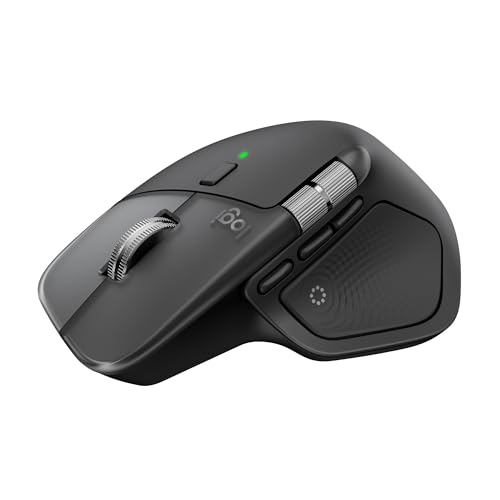
The Logitech productivity mouse is contoured for the right hand and, according to Macworld, is the best for work. It has a haptic panel under the thumb that gives a short click-like feel, and the battery lasts about 70 days. It is for right-handed users only, so left-handed users need to look elsewhere.
If you value a small size, look at the smaller Logitech mouse from the Anywhere series. Macworld lists up to 70 days of battery life and quick charging. It suits people with smaller hands and desks where space is tight.
In practice, the choice comes down to this: for gestures and a clean look, get the Apple mouse. For comfort during long work sessions and infrequent charging, get the Logitech.
Fun fact: the Apple mouse has its charging port on the bottom, so you can't use it while it charges. It's a good idea to plug it in overnight, before the battery runs out completely.
We chose the models that Macworld lists in its roundup as the best in their categories and that have versions for the Mac.

Mice for Mac Studio M5 we recommend
1. Logitech MX Master 4 for Mac
haptics · Bluetooth · up to 70 days · USB-C
A mouse built for long work sessions, shaped for the right hand, with a haptic panel under the thumb and a battery that lasts about 70 days according to Macworld. The for Mac version connects over Bluetooth, no receiver needed.
2. Apple Magic Mouse (USB-C)
Multi-Touch gestures · Bluetooth · USB-C · lightweight
The Apple mouse with a touch surface for macOS gestures and scrolling in both directions. Macworld rates it the best for gestures. Requires macOS 15.1 or later.
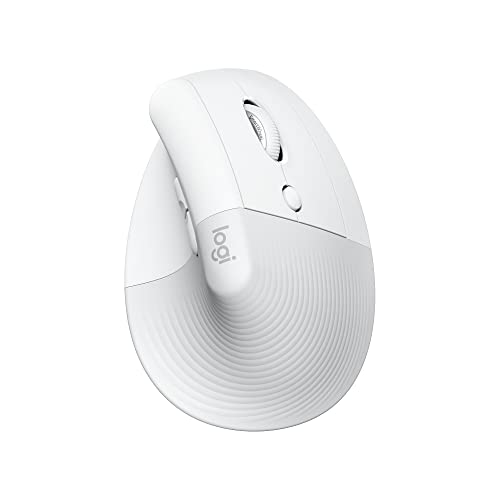
3. Logitech Lift for Mac
vertical · 57 degrees · Bluetooth · quiet clicks
A vertical mouse tilted at 57 degrees, for people whose wrist gets tired with a regular mouse. It connects over Bluetooth and has quiet clicks.

4. Logitech MX Anywhere 3S for Mac
compact · 8K DPI · works on glass · Bluetooth
A smaller mouse with an 8K DPI sensor that works even on glass, plus fast MagSpeed scrolling. It pairs with three devices over Bluetooth.

5. Apple Magic Trackpad (USB-C)
Force Touch · gestures · Bluetooth · USB-C
A trackpad instead of a mouse, with the same gestures as on a MacBook and Force Touch. The charging port is on the back, so you can keep working while it charges.
Bluetooth or USB receiver
The Mac Studio has two USB-A ports, four Thunderbolt 5 (USB-C) ports on the back, and supports Bluetooth. So a Bluetooth mouse, a mouse with a USB-A receiver, and a mouse with a USB-C receiver will all work. Unlike the Mac mini, you don't need an adapter for older accessories.
You plug the receiver into the back of the case, which usually sits deep on the desk, often under the monitor, so it ends up far from the mouse. A Bluetooth mouse doesn't take up any port.
Fun fact: The Mac Studio with M5 has Bluetooth 6 thanks to the Apple N1 chip, which also handles Wi-Fi 7.
One note when buying. The standard version of the Logitech productivity mouse comes with a Logi Bolt receiver with a USB-C plug, while the version for Mac has no receiver and connects only via Bluetooth. With a Mac that's a sensible setup, since it doesn't take up a port anyway.
A receiver makes sense when you share the same device with a Windows computer, or when Bluetooth in your environment is heavily congested. In other cases, choose Bluetooth.
Vertical mouse and trackpad: who they're for
A vertical mouse puts your hand at an angle that takes the strain off your wrist. The Logitech version for Mac has a 57-degree angle and connects only via Bluetooth. Get it if you feel pain in your wrist or forearm after a long day with a regular mouse.
The Apple trackpad gives you the same multi-touch gestures as on a MacBook. Macworld rates it the best for multi-touch. It has a charging port on the back, so you can keep working while it charges, which is its advantage over the Apple mouse.
A trackpad works well for people who mostly work in a browser, in documents, and in macOS apps day to day.
You can also combine both devices. The trackpad sits in front of the keyboard for gestures, and the mouse sits beside it for precise work. The Mac Studio has Bluetooth and plenty of ports, so that won't be a problem.
Most common questions about a mouse for the Mac Studio
Which mouse for Mac Studio M5?
For long work sessions, choose a Logitech mouse with a contoured shape and a battery that lasts about 70 days. For macOS gestures, go with the Apple mouse. If you like the trackpad on a MacBook, buy the Apple trackpad.
Does the Mac Studio come with a mouse?
No. You need to buy the keyboard, mouse, camera, and monitor separately. The Mac Studio also has no built-in camera, so for video calls you'll want a camera with a USB-C cable.
Magic Mouse or Logitech MX Master 4 for the Mac Studio?
The Apple mouse wins on gestures, but its shape is less comfortable for large hands and its battery lasts about a month. The Logitech is more comfortable for long work sessions, has a haptic panel and a battery that lasts about 70 days, but it's for right-handed users only. Choose based on how many hours a day you work with a mouse.
Will a mouse with a USB receiver work with the Mac Studio?
Yes. The Mac Studio has two USB-A ports on the back, so you can connect a receiver with a USB-A plug without an adapter. A receiver with a USB-C plug fits into one of the Thunderbolt 5 ports. Bluetooth is more convenient, because the receiver on the back is often far from the mouse.
Is a trackpad or a mouse better for the Mac Studio?
It depends on your habits. A trackpad gives you the gestures you know from a MacBook and can be charged while you work. A mouse is usually more comfortable for precise graphics work and for all-day use.
Sources
- Apple Support: Mac Studio (M5 Max or M5 Ultra) tech specs - manufacturer page (support.apple.com)
- Macworld: Best mouse for MacBook and Mac - industry article (macworld.com)
- Macworld: Logitech MX Master 4 review - industry article (macworld.com)
- iMore: Best Magic Mouse alternatives - industry article (imore.com)
- Macworld: Mac Studio (M5 Max) review - industry article (macworld.com)

Leave a comment
This site is protected by hCaptcha and the hCaptcha Privacy Policy and Terms of Service apply.