








As an Amazon Associate I earn from qualifying purchases.
Quick answer: our top pick is KYY 15.6 inch FHD portable monitor (15.6 inch · Full HD · USB-C and mini HDMI).
Best portable monitor for MacBook Pro M6? Pick 15.6 or 16 inches with USB-C
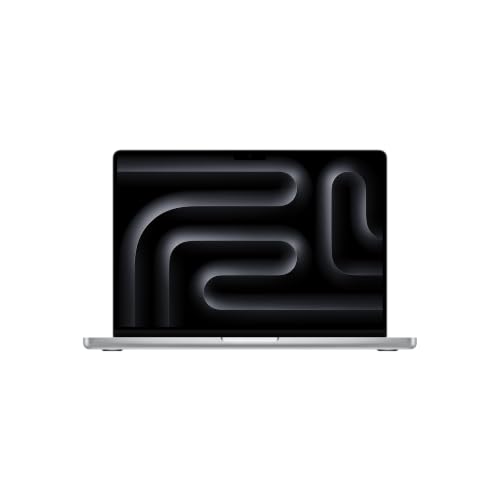
The MacBook Pro with M6 has three Thunderbolt 4 ports. That's three places to plug in a screen with a single cable. For travel or a small desk, get a portable monitor with a USB-C input, 15.6 or 16 inches. The same cable carries video and power, so you don't need a separate plug.
Full HD is enough for documents and email. If you read and write a lot, 2.5K gives sharper text, closer to the MacBook's own screen. A separate article covers regular desktop monitors for the MacBook Pro M6.
How the single cable works: video and power from the laptop
The Thunderbolt ports on the MacBook Pro M6 support video over USB-C. When a laptop port supports DisplayPort Alt Mode or is a Thunderbolt port, one USB-C cable powers the monitor and sends it the picture. The bandwidth of up to 40 Gb/s on Thunderbolt 4 / USB 4 ports is headroom that usually goes unused here.
The cable has to be a full-featured one that carries video and data. Picture this: you're on a train, you pull a cable out of your backpack that used to charge your headphones, plug it into the monitor, and the screen stays dark. A charge-only cable won't carry video, so use the one from the box or one marked as supporting video.
Powering the monitor from the laptop comes at a cost: it shortens the MacBook's battery life. At a desk, the fix is a second USB-C port on the monitor. You plug a charger into it, and some monitors then pass the power through to the laptop. Check the manufacturer's description to see whether a specific model does this.
Some portable monitors also have a mini HDMI input. It comes in handy when you want to connect a device that can't send video over USB-C.
Fun fact: Apple says the MacBook Pro with M6 supports up to two external monitors at once. You can connect them through Thunderbolt and HDMI in any combination.
We picked the monitors below based on what matters for working on a single cable: a size of 15.6 to 16 inches, plus USB-C and mini HDMI inputs according to the manufacturers' descriptions.
Portable monitors for MacBook Pro M6 we recommend

1. KYY 15.6 inch FHD portable monitor
15.6 inch · Full HD · USB-C and mini HDMI
Full HD portable monitor with USB-C and mini HDMI inputs according to the manufacturer. Ranks high in portable monitor sales.

2. ARZOPA 16 inch 2.5K portable monitor
2560 x 1600 · IPS · USB-C and mini HDMI
16-inch portable monitor with a 2560 x 1600 resolution according to the manufacturer. Sharper text than Full HD, with USB-C and mini HDMI inputs.
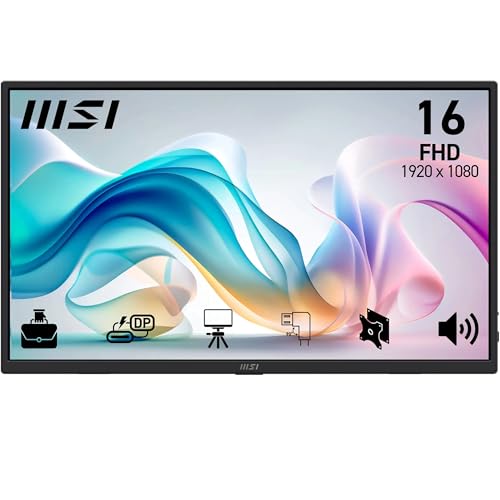
3. MSI PRO MP165 E6 portable monitor
15.6 inch · Full HD · IPS · USB-C and mini HDMI
Lightweight 15.6-inch Full HD portable monitor. According to MSI, it has USB-C and mini HDMI inputs.

4. ASUS ZenScreen MB169CK
15.6 inch · Full HD · IPS · two USB-C and mini HDMI
15.6-inch Full HD portable monitor from a well-known brand. According to ASUS, it has two USB-C ports and a mini HDMI input.

5. ASUS ZenScreen MB16AHV / MB16AHVE
15.6 inch · Full HD · IPS · USB-C and mini HDMI · stand
15.6-inch Full HD portable monitor with a fold-out stand. According to ASUS, it has USB-C and mini HDMI inputs.
Full HD or 2.5K, touch and stand
Full HD is a sensible pick if the screen is for email, documents, chat and a notes preview. The picture is sharp enough, and the monitor is usually simpler in design. For everyday work on the road, it's plenty.
2.5K makes sense if you spend many hours on the second screen and read small text. Letters are crisper, so your eyes get less tired. You'll notice the difference most when you move from a MacBook screen to a Full HD monitor.
Be careful with touch. On portable monitors it only works to a limited extent on macOS, so don't pay extra for it unless you really need it. It's better to spend the money on something you'll use every day.
Pay attention to the stand and the weight. A fold-out stand lets you set the monitor on a train tray table or a small desk without an extra case. The lighter the model, the more readily you'll toss it in your backpack with your laptop.
If you're buying just one: a 16-inch monitor with two USB-C ports and mini HDMI, in Full HD if the screen is for email and documents, and in 2.5K if you read and write for long stretches.
Two portable monitors at once, and why not through one hub
Two screens next to a MacBook is a realistic setup, for example documents on one side, and messaging and email on the other. Connect each monitor to its own Thunderbolt port. The three ports on the laptop leave enough room for that.
Don't try to plug both into one cheap USB-C hub. It seems more convenient because it uses just one port, but the result won't be what you expect.
Fun fact: macOS doesn't support MST, which means sending several independent video streams over one connection. That's why two monitors on one cheap hub will show the same image.
Frequently asked questions about a portable monitor for a MacBook
Which portable monitor for MacBook Pro M6?
Choose a 15.6-inch or 16-inch model with a USB-C input. Full HD is enough for office work, and 2.5K gives you crisper text. Pay attention to the stand and the weight.
Does a portable monitor work with a MacBook over a single USB-C cable?
Yes, because the Thunderbolt ports on the MacBook Pro M6 support video over USB-C. One cable carries both video and power. The cable has to be a full-featured one, not a charge-only cable.
Does a portable monitor drain the MacBook's battery?
Yes, a monitor powered by the laptop shortens battery life. If you have an outlet nearby, plug the charger into the monitor's second USB-C port. Some monitors then pass power through to the laptop.
Can I connect two portable monitors to a MacBook Pro M6?
Yes. Connect each monitor to its own Thunderbolt port on the laptop.
Full HD or 2.5K in a portable monitor for a MacBook?
Full HD is enough for documents and email. Go for 2.5K if you read or write a lot and want sharper text, closer to the MacBook screen.
See also
- Best portable monitor for Nintendo Switch 2 - only via dock and HDMI
- Best monitor for MacBook Pro M6 - two 4K screens at 165 Hz and USB-C charging
- Best power bank for MacBook Pro M6 - from 60 W, fast from 96 W
- Best docking station for MacBook Pro 14 M6 - two monitors and Thunderbolt 4
Sources
- Apple: MacBook Pro technical specifications - manufacturer page (apple.com)
- Tom's Hardware: Best portable monitors 2026 - industry article (tomshardware.com)
- XDA: The best portable monitors for Mac - industry article (xda-developers.com)
- TechRadar: Best portable monitor - industry article (techradar.com)
- Creative Bloq: The best portable monitors - industry article (creativebloq.com)
- Plugable: External display support on Apple silicon - industry article (kb.plugable.com)

Leave a comment
This site is protected by hCaptcha and the hCaptcha Privacy Policy and Terms of Service apply.