








As an Amazon Associate I earn from qualifying purchases.
Quick answer: our top pick is Anker Power Bank 25000mAh 165W (25,000 mAh · up to 100 W from one port · 2 built-in cables).
Best power bank for MacBook Pro M6? Short answer
Will the power bank you use for your phone work with a MacBook Pro 14 with M6? No. A laptop needs a power bank that delivers at least 60 W from a single USB-C port.
If you want fast charging, look for a model that gives 100 W from one port. A capacity of 20,000-25,000 mAh is a sensible range for a laptop. It holds plenty of energy, and you can still take the power bank on a plane.

How many watts does the MacBook Pro 14 with M6 need
You charge the MacBook Pro 14 with M6 through MagSafe 3 or any of the three Thunderbolt 4 USB-C ports. A power bank plugs into USB-C.
Apple recommends at least 60 W. A 60-65 W power bank charges this MacBook just fine, so it's plenty for a trip, a coffee shop, or a long journey.
Fast charging kicks in when the power bank delivers 100 W or more from a single port. In its review of a 100 W 25,000 mAh power bank, Macworld says a model like this charges a laptop at full speed.
Fun fact: according to Apple's specs, fast charging on the MacBook Pro 14 with M6 only starts at 96 W.
A power bank under 60 W charges slowly. Under heavy load, such as video editing, it may only slow down the battery drain instead of topping it up.
Look at the power from a single port, not the total power printed on the box. The big number on the front often describes the sum of all outputs, and your laptop only gets what a single USB-C port can deliver.
Here's a real-life example. You sit down on a train, open your laptop, and work on something demanding. With a power bank under 60 W, the battery bar keeps dropping, just more slowly, so you arrive with less in reserve. With a model that gives 100 W from one port, the same laptop charges at full speed while you travel.
Our advice: if the MacBook is going to be the main device you charge, pick a power bank with 100 W or more from a single port, and treat 60-65 W as a reasonable minimum.
We chose the power banks below based on the output of a single USB-C port and a capacity that fits within the carry-on limit.
Power banks for MacBook Pro M6 we recommend
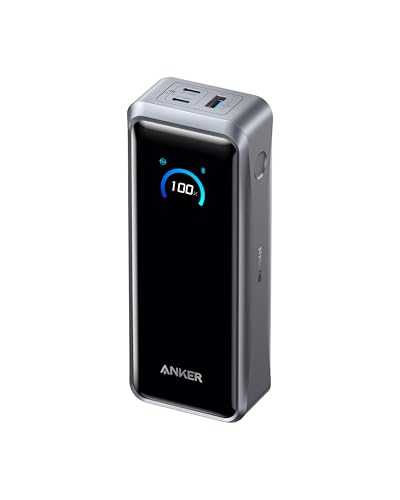
1. Anker Power Bank 25000mAh 165W
On sale25,000 mAh · up to 100 W from one port · 2 built-in cables
A power bank for heavy users: 165 W total, up to 100 W from one port, and two built-in cables (one retracts out to 70 cm). At 90 Wh it fits the carry-on limit.
2. Anker Prime Power Bank 26,250mAh 300W
Up to 140 W per port · 300 W total · display
The most powerful on the list: up to 140 W from a single USB-C port, so it has headroom even for bigger laptops. The display shows power and time remaining. About 99 Wh, which is within the carry-on limit.

3. Anker Power Bank 20000mAh 87W
20,000 mAh · up to 65 W from one port · built-in cable
87 W total and up to 65 W for one device, so there is headroom for more demanding phones and a laptop. Anker says the built-in cable survives over 10,000 bends.
How many mAh you need, and why your laptop gets less than the label says
For a MacBook, aim for 20,000-25,000 mAh. iGeeksBlog recommends the same range, along with high-power USB PD power banks.
Power bank capacity is rated at 3.7 V cell voltage. Converted, 20,000 mAh is about 74 Wh, and 25,000 mAh is about 90 Wh.
Only about three quarters of that energy reaches your device (Anker data). The rest is lost to voltage conversion and heat, so don't expect your laptop to get the full number printed on the case.
Fun fact: Apple says the MacBook Pro 14 with M6 runs up to 24 hours on battery, the longest of any Mac.
Power banks on planes and the 100 Wh limit
Power banks up to 100 Wh can usually go in carry-on bags only. Don't pack them in checked luggage.
Models from 20,000 to 26,250 mAh fit under that limit, so 25,000 mAh shouldn't be a problem. Check your airline's rules before you fly, since carriers may have extra requirements of their own.
Cable for your power bank and MacBook
You need a USB-C to USB-C cable rated for 100 W or more. If the power bank has a built-in cable, you're covered.
Leave thinner cables with no power rating for headphones and phones. For a laptop, buy only a cable the manufacturer rates at 100 W.
If you also want a wall charger, a separate article covers the charger for the MacBook Pro 14 M6. For what comes in the laptop's box, check the seller's listing.
Questions before you buy a power bank for your MacBook
Which power bank for the MacBook Pro M6?
One that delivers at least 60 W from a single USB-C port and has 20,000-25,000 mAh. If fast charging matters to you, pick a model that gives 100 W from one port. You can take it on a plane in your carry-on.
How many watts does a power bank for the MacBook Pro M6 need?
Apple recommends at least 60 W. You get faster charging from 100 W on a single port, and a model below 60 W will charge slowly.
Will a 65 W power bank charge the MacBook Pro M6?
Yes, it charges normally, just without fast charging. Check the listing to make sure the 65 W applies to a single port and not to the total of all outputs.
Can I take a 25,000 mAh power bank on a plane?
Yes. 25,000 mAh is about 90 Wh, which is under the 100 Wh limit. Carry it in your hand luggage, and take a quick look at your airline's rules before you fly.
Which cable should I use to charge a MacBook Pro from a power bank?
A USB-C to USB-C cable rated for 100 W or more. If the power bank has a built-in cable, you don't need a separate one.
See also
- Best monitor for MacBook Pro M6 - two 4K screens at 165 Hz and USB-C charging
- Best docking station for MacBook Pro 14 M6 - two monitors and Thunderbolt 4
- Best SSD for MacBook Pro M6 - Thunderbolt 4, USB4 and Time Machine
- Which charger for Apple MacBook Pro 14 M6 - an adapter for the desk and travel
- Best Mouse for MacBook Pro M6 - Bluetooth Instead of a USB Receiver
Sources
- Apple: MacBook Pro 14-inch (M6), tech specs - manufacturer page (apple.com)
- 9to5Mac: Apple unveils new 14-inch MacBook Pro powered by M6 - industry article (9to5mac.com)
- MacRumors: 14-inch MacBook Pro with M6 chip - industry article (macrumors.com)
- iGeeksBlog: Best USB-C power banks for MacBook - industry article (igeeksblog.com)
- Macworld: INIU 25,000mAh 100W power bank review - industry article (macworld.com)
- PetaPixel: The 14-inch MacBook Pro with M6 has the best battery life of any Mac - industry article (petapixel.com)

Leave a comment
This site is protected by hCaptcha and the hCaptcha Privacy Policy and Terms of Service apply.