








As an Amazon Associate I earn from qualifying purchases.
Quick answer: our top pick is Apple Magic Mouse (USB-C) (Original Apple · Multi-Touch gestures · USB-C charging).
Best mouse for MacBook Pro M6? Bluetooth is best
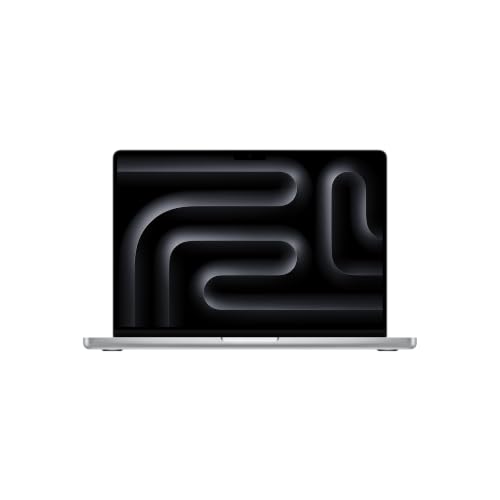
Get a Bluetooth mouse for the 14-inch MacBook Pro with M6. The laptop has no USB-A port, so a mouse with a USB-A receiver would take up a USB-C port and need an adapter.
The new MacBook has Bluetooth 6, so pairing is simple and you don't need any extras. All that's left is picking a mouse shape that fits how you work: at a desk, on the road, or for long hours without tiring your hand.


Bluetooth or USB receiver, and what about ports
The MacBook Pro 14 with M6 has three USB-C Thunderbolt 4 ports, HDMI, an SDXC card reader, a headphone jack and MagSafe 3. There's no USB-A at all. A mouse with a USB-A receiver only works here through an adapter or a hub.
Is that bad for the laptop? No, it's just inconvenient. An adapter takes one of the three USB-C ports you'll want for a drive, a monitor or charging your phone. A Bluetooth mouse doesn't use any port, and you don't have to keep track of a tiny receiver in your bag that's easy to lose.
If you work at a desk with a monitor, a drive and a tangle of cables, you'll also want a docking station. A separate article covers the docking station for the MacBook Pro 14 M6.
We picked mice that connect to a Mac over Bluetooth, so none of them needs a USB port.

Mice for MacBook Pro M6 we recommend
1. Apple Magic Mouse (USB-C)
Original Apple · Multi-Touch gestures · USB-C charging
The best for macOS gestures: you scroll and switch desktops with a finger on the mouse surface. The charging port is on the bottom, so charge it during a break.
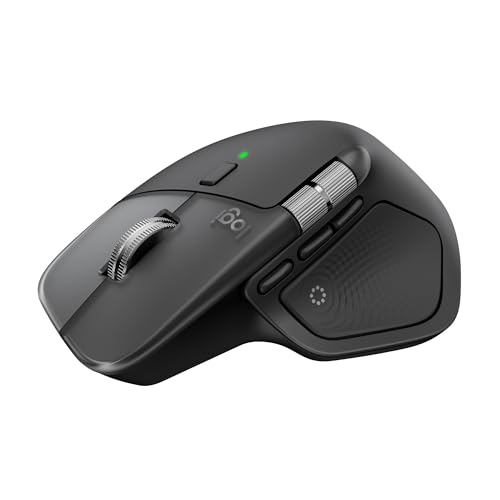
2. Logitech MX Master 4 for Mac
For work · Bluetooth · haptic panel · about 70 days
A mouse for working with lots of windows and in video editing apps. The for Mac version connects over Bluetooth with no receiver. Right-handed users only.

3. Logitech MX Anywhere 3S for Mac
Compact · Bluetooth · works on glass · up to 70 days
A small mouse for your laptop bag. It pairs with three devices and even works on a glass desktop.

4. Logitech Pebble Mouse 2 M350s
Flat · Bluetooth · quiet clicks · AA battery
A flat, lightweight mouse with quiet clicks. It runs on a single AA battery.
Which mouse to choose for gestures, work, travel and wrist comfort
macOS gestures
If you like trackpad gestures, Apple's mouse with a touch surface comes closest. You scroll vertically and horizontally with it, and two fingers open Mission Control. The battery lasts about a month.
Downside: according to Macworld, it's less comfortable for large hands. If you have a big hand, pick a bigger shape.
Fun fact: Apple's mouse has its charging port on the bottom, so you can't use it while it charges.
Multi-window work and video editing
For work where you juggle windows, spreadsheets and a video editor's timeline, Macworld points to a large mouse from the MX Master family. The for Mac version connects over Bluetooth with no receiver, has a haptic panel under the thumb and about 70 days of battery life. It's right-handed only, which rules it out for lefties.
Travel
A small mouse is better for a laptop bag. Logitech's compact Mac model pairs with three devices, so you can switch it between a MacBook, a tablet and a second computer. If you prefer a flat, light mouse with quiet clicks, look for models that run on a single AA battery.
Fun fact: One of Logitech's compact Mac mice even works on a glass desktop.
Wrist comfort
A vertical mouse is a good fit for long work sessions. Your hand rests on it like in a handshake, which takes the strain off your wrist. Logitech's for Mac model has quiet clicks and Bluetooth, but it's made for small and medium hands.
If you're buying just one: get a compact Bluetooth mouse that pairs with several devices, because it works both at the desk and in your bag.
Mouse or trackpad: when a mouse makes sense
The Force Touch trackpad with Multi-Touch gestures in the MacBook Pro is very good, and it's enough for typing, browsing and email. Many people never reach for a mouse and lose nothing.
A mouse starts to make sense when precision matters: in spreadsheets, video editing and graphics. It also helps when you work at an external monitor with the lid closed, because the trackpad is out of reach and the mouse is right at hand.
Most common questions about a mouse for MacBook Pro M6
Which mouse for MacBook Pro M6?
A Bluetooth mouse, because the MacBook Pro 14 with M6 has no USB-A port. For gestures, choose Apple's mouse. For work, pick a large mouse with a thumb panel, and for travel a small, compact one. For long sessions, consider a vertical model.
Does the MacBook Pro M6 have a USB-A port for a mouse receiver?
No. It has three USB-C Thunderbolt 4 ports, HDMI, an SDXC card reader, a headphone jack and MagSafe 3. You can connect a mouse with a USB-A receiver only through an adapter or a hub, which takes up a USB-C port.
Does the Magic Mouse work while charging?
No, you can't use it while it charges. Plug it in during a break from work, and it won't be a problem during the day.
Does a Logitech mouse work with macOS without a receiver?
Yes, if it's a model marked for Mac. It connects over Bluetooth, with no receiver. For other models, check the seller's description to see whether the mouse has Bluetooth.
Which mouse for a MacBook if you have wrist pain?
Try a vertical mouse, where your hand rests like in a handshake. This layout takes the strain off your wrist during long work. Keep your hand size in mind, because Logitech's for Mac model is made for small and medium hands. If the pain persists, ask your doctor.
See also
- Best monitor for MacBook Pro M6 - two 4K screens at 165 Hz and USB-C charging
- Best docking station for MacBook Pro 14 M6 - two monitors and Thunderbolt 4
- Best SSD for MacBook Pro M6 - Thunderbolt 4, USB4 and Time Machine
- Which charger for Apple MacBook Pro 14 M6 - an adapter for the desk and travel
- Best power bank for MacBook Pro M6 - from 60 W, fast from 96 W
Sources
- Apple: MacBook Pro 14-inch (M6), tech specs - manufacturer page (apple.com)
- MacRumors: 14-inch MacBook Pro with M6 chip - industry article (macrumors.com)
- Notebookcheck: Apple unveils MacBook Pro with Apple M6 - industry article (notebookcheck.net)
- Macworld: Best mouse for MacBook and Mac - industry article (macworld.com)
- Macworld: Logitech MX Master 4 review - industry article (macworld.com)
- iMore: Best Magic Mouse alternatives - industry article (imore.com)

Leave a comment
This site is protected by hCaptcha and the hCaptcha Privacy Policy and Terms of Service apply.