








As an Amazon Associate I earn from qualifying purchases.
Quick answer: our top pick is SanDisk microSD Express 256GB (256 GB · microSD Express · up to 880 MB/s).
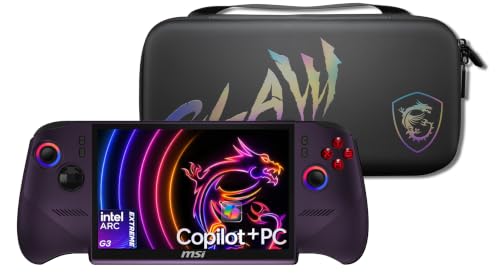
Best microSD card for MSI Claw 8 EX AI+? Express for games, UHS-I for the rest
Many people assume a microSD card is a microSD card and they all perform the same. Regular UHS-I cards top out at around 100 MB/s read speed, while the card reader in this console is built for much more. So buy a microSD Express card for games and keep a regular UHS-I card for everything else.
Speed depends on the card's interface, not on the microSD name itself. When you shop, look for the Express label on the packaging, not just the capacity.
The console has been on sale since June 23, 2026, and it has had a microSD Express reader from day one. That makes the card a real place to keep games, not just a storage spot for files.
What the microSD Express reader gives you
MSI quotes an average reader speed of 600-800 MB/s. The manufacturer notes that real results depend on the card, the system and the specific game, so don't expect identical numbers in every title.
An Express card works well as extra game storage without opening the console. You slide it into the slot and install more titles, no screwdriver needed.
A regular UHS-I card still makes sense. It's enough for older and smaller games, movies and emulators, basically anywhere you're not waiting on fast loading of big maps.
Fun fact: MSI says the reader in this console is up to 8 times faster than a standard microSD reader.
Below you'll find microSD Express cards and regular high-capacity UHS-I cards. We picked them by card standard and by what each one suits best.
The microSD cards for the MSI Claw 8 EX AI+ we recommend

1. SanDisk microSD Express 256GB
256 GB · microSD Express · up to 880 MB/s
microSD Express card with read speeds up to 880 MB/s according to SanDisk. You only get full speed in a microSD Express reader.

2. SanDisk microSD Express 512GB
512 GB · microSD Express · up to 880 MB/s
Same series in 512 GB, for several big games. Read speeds up to 880 MB/s according to SanDisk.

3. Samsung microSD Express 256GB
256 GB · microSD Express
Samsung card in the microSD Express standard, sold with Nintendo branding. In a computer with an Express reader it works like any card of this standard.
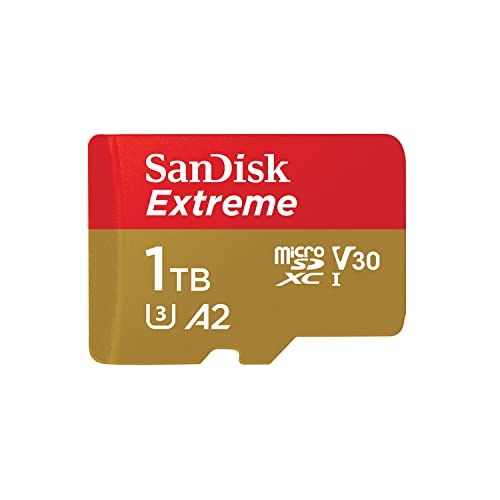
4. SanDisk Extreme 1 TB
1 TB · UHS-I · A2, U3, V30 · up to 245 MB/s
SanDisk Extreme with 1 TB capacity, featuring A2 and V30 ratings. It holds a large game library or many hours of footage.
microSD card or a bigger SSD
The console also has a slot for a full-size M.2 2280 drive. Windows Central describes it as a single M.2 NVMe slot. That drive is faster than any microSD card, but you have to open the console and replace the one that's already inside. A separate article covers the SSD for this console.
At home you have the time and space to open the case. If you plan a big library of new games and want the highest speed, an M.2 drive is the best choice here.
On the road, convenience matters more. A microSD Express card is enough to add a few games before a trip, with no need to take anything apart in a hotel or on a train.
If you're buying only one: a microSD Express card, because it's the only option that combines fast game loading with an install that takes a few seconds.
Capacity and formatting in Windows
Pick a capacity based on what you want installed. A smaller Express card is enough for a few big games, while a full library, videos and emulators call for a larger one. Regular UHS-I cards are available in sizes up to 1 TB, which suits collections where read speed doesn't matter.
One limitation to keep in mind: a card formatted on a Steam Deck (SteamOS) won't work right away in Windows. The console will ask you to format it again, and that erases all the data on the card.
If you're moving a card over from another device, first copy the photos, game saves and other files to your computer. Only then format the card in Windows.
Fun fact: according to TechRadar, a microSD Express card inserted into an older device slows down to UHS-I speeds.
Common questions about microSD cards for the Claw
Does the MSI Claw 8 EX AI+ support microSD Express?
Yes, the console has a microSD Express reader. A card of this standard is the best choice if you want to install games on it.
Does a regular microSD card work in the MSI Claw 8 EX AI+?
Yes, a regular UHS-I card works fine. Its read speed reaches about 100 MB/s, so it suits older and smaller games, videos and emulators. Big new titles are better kept on an Express card or on an M.2 drive.
microSD card or a bigger SSD?
An M.2 2280 drive is faster than any card, but you have to open the console. A microSD Express card is slower, but you can put it in within a few seconds. If you want maximum speed, go for the drive. If you want convenience, go for the card.
What card capacity for the MSI Claw 8 EX AI+?
Work out how many games you want on hand at once. A smaller Express card is enough for a few big titles, while a whole library needs a larger one. You can keep videos and emulators on a regular UHS-I card, even one with 1 TB of capacity.
Will a Steam Deck card work in the MSI Claw?
Not right away. A card formatted for SteamOS needs to be formatted again in Windows, and that erases the data. Copy the contents to your computer before you put the card in the console.
See also
- Best Docking Station for MSI Claw 8 EX AI+ - 65 W and 4K Monitor
- Best SSD for MSI Claw 8 EX AI+ - M.2 2280 and how many TB
Sources
- MSI: Claw 8 EX AI+ - manufacturer page (msi.com)
- MSI: Claw 8 EX AI+ specifications - manufacturer page (msi.com)
- TechRadar: microSD Express vs microSD - industry article (techradar.com)
- T3: What is microSD Express - industry article (t3.com)
- MobileSyrup: MSI Claw 8 EX AI+ review - industry article (mobilesyrup.com)
- Windows Central: MSI Claw 8 EX AI+ review - industry article (windowscentral.com)

Leave a comment
This site is protected by hCaptcha and the hCaptcha Privacy Policy and Terms of Service apply.