








As an Amazon Associate I earn from qualifying purchases.
Quick answer: our top pick is Anker 6-in-1 handheld dock (HDMI 4K 60 Hz · Ethernet · 3 x USB).
Best docking station for MSI Claw 8 EX AI+? Start with USB-C and 4K HDMI
You sit down on the couch in the evening and want to play on the TV, not on the eight-inch screen of the handheld. The HDMI cable is waiting by the TV, and the console has two Thunderbolt 4 ports. All you need is a USB-C dock with 4K HDMI output and charging, powered by a 65 W charger or stronger.
MSI itself shows this kind of use: through a dock, the console becomes a TV device or a desk setup with a monitor, keyboard and mouse. A Tom's Guide reviewer plugged it into TVs in a hotel, so a dock is handy when traveling too.
Ports and charging: how many watts the dock needs
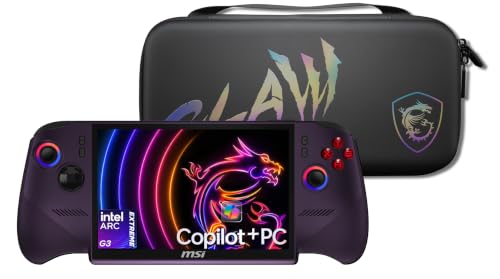
The console has two Thunderbolt 4 ports with DisplayPort and Power Delivery 3.0, plus a microSD Express card reader. All the ports are on the top edge, so one cable to the dock gives you video, power and room for accessories.
MSI recommends a 65 W or stronger PD charger. According to the manufacturer's specs, a 65 W power adapter comes in the box, but check the seller's listing for what's included in the box in your region.
The dock's charging port must accept 65 W or more, because the dock uses part of the power for its own ports. Many manufacturers list up to 100 W, and that headroom makes sense when you connect several accessories at once.
Before you start comparing docks, look at the label on your charger. Three things to check:
- Power: next to Output, look for 65 W or more.
- Protocol: the USB PD or Power Delivery mark.
- Port: a USB-C socket, since that's the connector the dock uses to link to the charger and the console.
We picked docks based on manufacturer data: 4K HDMI output, charging over USB-C, number of ports and how the console is positioned.
Our advice: get a dock with 4K HDMI and a charging port rated for 65 W or more, and choose the stand type based on where and how you play.
The docking stations for MSI Claw 8 EX AI+ we recommend

1. Anker 6-in-1 handheld dock
HDMI 4K 60 Hz · Ethernet · 3 x USB
A simple Anker dock with HDMI 4K 60 Hz, an Ethernet port and USB ports.

2. UGREEN 6-in-1 handheld dock with adjustable stand
HDMI 4K 120 Hz · USB 5 Gb/s · adjustable
Dock with HDMI 4K 120 Hz and an adjustable stand that also fits wider consoles. USB 5 Gb/s ports, according to UGREEN.
See UGREEN 6-in-1 handheld dock with adjustable stand on Amazon →

3. UGREEN 9-in-1 handheld dock
HDMI 4K 60 Hz · USB 10 Gb/s · Ethernet · card reader
Dock with HDMI 4K 60 Hz, USB 10 Gb/s ports, an Ethernet port and a card reader, according to UGREEN.

4. iVANKY 8-in-1 handheld dock (4K 144Hz)
HDMI 4K 144 Hz · 100 W charging · Ethernet
Dock with HDMI up to 4K 144 Hz and 100 W charging, according to the manufacturer. For anyone who games on a high refresh rate monitor.
Cradle or cable dock with ports on the top edge
Since the ports are on the top edge, the cable enters the console from above, not from the side. A cable dock sits next to the TV, and you can rest the console on your lap, a table, or a stand. It's the least hassle if you share one dock between the living room and your desk.
A cradle looks tidier, but it has to fit the shape of the console. The wide body with grips doesn't sit in every cradle made for the Steam Deck. If you want a cradle, look for an adjustable one. Manufacturers list some of these as fitting wider consoles too. The console is 11.7 to 12.6 inches (296 to 321 mm) wide, so spare room matters here.
Fun fact: the MSI Claw 8 EX AI+ has an 80 Wh battery, and the whole console weighs 785 g (1.7 lb).
When a USB-C monitor cable is enough and when you need a Thunderbolt dock
If you have one monitor and nothing else, you can skip the dock. The MobileSyrup reviewer plugged a monitor straight into the Thunderbolt 4 port. You then feed power to the console through the second port.
Once you add a keyboard, mouse, Ethernet cable, or flash drive, a dock is more convenient. A regular USB-C dock with HDMI is plenty for gaming on a TV or a single monitor.
A Thunderbolt dock only makes sense in two cases: when you want to connect two monitors or use fast drives. Separate articles cover an SSD and a microSD card for this console.
Fun fact: the MobileSyrup reviewer wrote a large part of the review using the Claw as a small computer.
Frequently asked questions about a dock for this console
Does the MSI Claw 8 EX AI+ work with a Steam Deck dock?
The problem is mostly physical: the wide body with grips doesn't sit in every Steam Deck dock. An adjustable cradle or a cable dock gets around that. Before you buy, check the listing to see whether the manufacturer mentions wider consoles.
How many watts does a dock for the MSI Claw 8 EX AI+ need?
The dock's charging port should accept 65 W or more, as MSI recommends for the charger. Extra headroom helps, because the dock uses some of the power for its own ports.
Can you connect the MSI Claw 8 EX AI+ to a TV?
Yes, through a dock with a 4K HDMI output. You run the HDMI cable from the dock to the TV, and you connect the console to the dock with a single USB-C cable.
Do you need a Thunderbolt 4 dock?
In most cases, no. You only need a Thunderbolt dock if you want to connect two monitors or fast drives. For a single TV or monitor, a USB-C dock with HDMI is enough.
Does the console charge through the dock while you play?
Yes, if the dock has a charging port and you plug a 65 W or stronger charger into it. With a weaker charger, the dock passes less power to the console, because it uses some for its ports.
See also
- Best microSD Card for MSI Claw 8 EX AI+ - microSD Express or Standard
- Best SSD for MSI Claw 8 EX AI+ - M.2 2280 and how many TB
Sources
- MSI: Claw 8 EX AI+ specifications - manufacturer page (msi.com)
- MSI: One Claw, three ways to play - manufacturer page (msi.com)
- MobileSyrup: MSI Claw 8 EX AI+ review - industry article (mobilesyrup.com)
- Windows Central: MSI Claw 8 EX AI+ review - industry article (windowscentral.com)
- Tom's Guide: MSI Claw 8 EX AI+ review - industry article (tomsguide.com)
- Tom's Hardware: MSI Claw 8 EX AI+ review - industry article (tomshardware.com)

Leave a comment
This site is protected by hCaptcha and the hCaptcha Privacy Policy and Terms of Service apply.