








As an Amazon Associate I earn from qualifying purchases.
Quick answer: our top pick is SanDisk Extreme 256 GB (256 GB · UHS-I · A2, U3, V30 · up to 190 MB/s).
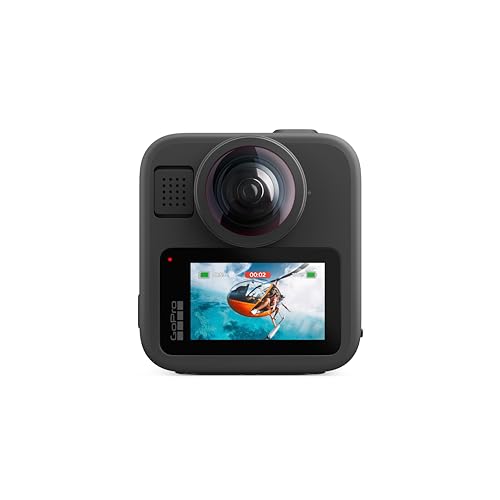
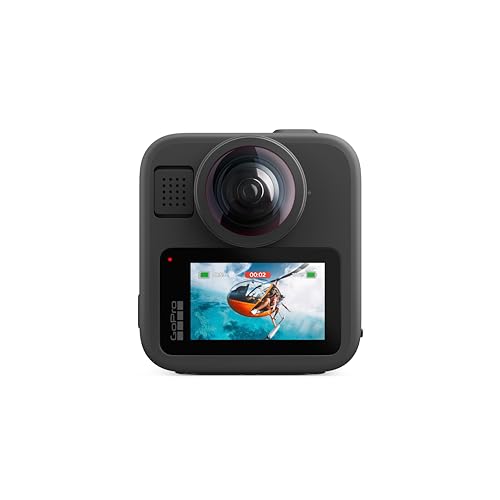
Best microSD card for GoPro MAX2? Short answer
Buy a microSD card from a well-known manufacturer rated A2 and V30 (or higher), with a capacity of up to 1 TB. The easiest option is to pick a model from GoPro's recommended list, so you don't have to guess.
The card is not included in the set, as the manufacturer sells it separately. Order it together with the camera so you can start recording right away on the day you pick it up.
MAX2 records both 360 video and standard video, and the same card requirements apply to both modes.

What V30 and A2 mean and what GoPro recommends
V30 is a video speed class. It means the card will maintain stable write speeds during continuous recording. If writing stalls, the recording may stop, which is why GoPro requires V30 or higher.
A2 is an application performance class. It refers to fast operation with many small files, which helps when the camera is managing the card. Look for both markings together on the packaging.
MAX2 has the same requirements as HERO13 Black, HERO12 and HERO11, so it uses the same list of cards. GoPro recommends:
- SanDisk: Extreme, Extreme PLUS and Extreme PRO, from 64 GB to 1 TB.
- Lexar: Professional 1066x SILVER and Professional SILVER PLUS in 64, 128 and 256 GB capacities.
- Samsung: EVO Plus, EVO Select, PRO Plus and PRO Ultimate, from 128 GB to 1 TB.
- Kingston: Canvas Go! Plus in 64, 128, 256 GB and 1 TB capacities.
There is one exception that is easy to forget. GoPro marks the 512 GB and 1 TB versions of Lexar as not recommended. If you want a large card, choose another brand from the list.
Fun fact: GoPro advises against Lexar 512 GB and 1 TB cards, even though the same Lexar in the 256 GB version is on the recommended list.
Below we have gathered cards only from GoPro's recommended list, in 256 GB, 512 GB and 1 TB capacities, so you can compare several options.

Recommended microSD cards for GoPro MAX2

1. SanDisk Extreme 256 GB
256 GB · UHS-I · A2, U3, V30 · up to 190 MB/s
One of the best-selling microSD cards. It features a V30 rating for 4K video recording and an A2 rating for apps and games.

2. SanDisk Extreme 512 GB
512 GB · UHS-I · A2, U3, V30 · up to 190 MB/s
SanDisk Extreme in a 512 GB capacity. The V30 rating handles 4K recording, while A2 speeds up app and game loading times.
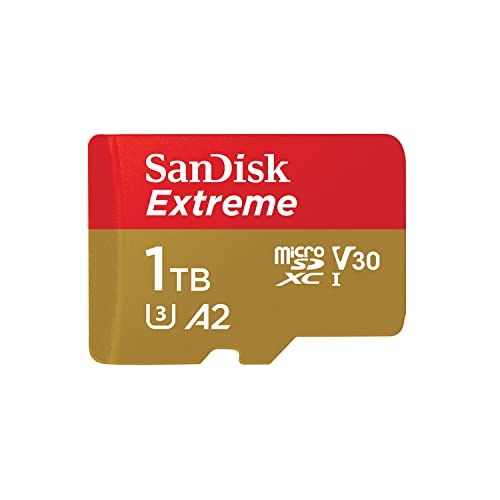
3. SanDisk Extreme 1 TB
1 TB · UHS-I · A2, U3, V30 · up to 245 MB/s
SanDisk Extreme with 1 TB capacity, featuring A2 and V30 ratings. It holds many hours of footage.

4. Lexar Professional SILVER PLUS 256 GB
256 GB · UHS-I · A2, U3, V30 · up to 205 MB/s
A Lexar card with read speeds up to 205 MB/s, A2, and V30 ratings. One of the bestsellers among microSD cards.
Buying on Black Friday? Read our guide: best microSD card for Switch 2, cameras and phones.

Which capacity for whom
360 recordings take up a lot of space, because the camera records video from two lenses at once. A small card will fill up faster than you might expect from experience with single-lens action cameras.
If you only film occasionally, for example on weekend trips or bike rides, 256 GB is a sensible starting point. You can choose from the SanDisk Extreme, Kingston Canvas Go! Plus and Lexar Silver Plus, and all of them in the 256 GB version are on the GoPro list.
If you shoot a lot, go on a longer trip, or don't want to transfer files to your computer every day, consider 512 GB or 1 TB. Here the GoPro list includes, among others, the SanDisk Extreme, which is available in both capacities.
The camera's limit is 1 TB, so there is no point looking for a larger card. Also remember that the bigger the card, the more recordings you keep in one place. If the card gets damaged or you lose it, you lose everything at once.
A good compromise is two smaller cards instead of one very large one. That makes it easier to split your footage and reduce the risk.
Formatting in the camera, a spare card and a card from the HERO13
GoPro recommends formatting the card in the camera regularly. Do it after copying your recordings to a computer, and do it in the camera rather than on the computer, because the camera will prepare the card exactly for itself. Before formatting, make sure you have a backup of your files.
It is also worth keeping a second card in your backpack. When the first one fills up or starts causing problems, you swap it and keep recording. The second card can be the same model, so you don't have to think about anything.
If you already have a HERO13 Black, check whether your card meets A2 and V30 and whether its size is up to 1 TB. If so, you can use it in the MAX2.
Fun fact: The MAX2 has the same card requirements as the HERO13 Black, so a card from that camera will usually work.
Frequently asked questions about cards for the GoPro MAX2
Which microSD card for the GoPro MAX2?
A microSD, microSDHC or microSDXC card from a reputable manufacturer, with A2 and V30 classes or higher, with a capacity of up to 1 TB. The safest choice is a model from the list recommended by GoPro, for example the SanDisk Extreme, Kingston Canvas Go! Plus or Samsung PRO Plus.
Does the GoPro MAX2 support a 1 TB card?
Yes, 1 TB is the maximum capacity GoPro specifies. The recommended list includes the 1 TB versions of the SanDisk, Samsung and Kingston Canvas Go! Plus cards.
Will a 512 GB Lexar work in the GoPro MAX2?
GoPro marks the 512 GB and 1 TB Lexar as not recommended, so it is better to avoid them. If you want a Lexar, choose the 256 GB, 128 GB or 64 GB version from the GoPro list. For larger capacities, go for SanDisk, Samsung or Kingston.
Does a card from the HERO13 fit the GoPro MAX2?
Usually yes. The MAX2 has the same card requirements as the HERO13 Black, HERO12 and HERO11. Just check that the card has A2 and V30 and does not exceed 1 TB.
Is a card included with the GoPro MAX2?
No. According to the manual, the microSD card is bought separately. Without it the camera cannot record footage, so add one to your cart right away.
See also
- Which microSD card for Insta360 Luna Ultra and Luna Pro - cards from Insta360's list
- Best microSD card for GoPro MISSION 1 PRO - no built-in storage and 240 Mbps
- Best microSD card for Insta360 GO Ultra - UHS-I V30 up to 2 TB
Sources
- GoPro: MAX2 user manual - manufacturer page (lensrentals.com)
- GoPro: microSD card considerations - manufacturer page (community.gopro.com)
- Clifton Cameras: GoPro MAX2 specifications - industry article (cliftoncameras.co.uk)
- Photo Rumors: GoPro announces LIT HERO and MAX2 - industry article (photorumors.com)
- Wex Photo Video: GoPro MAX2 - industry article (wexphotovideo.com)

Leave a comment
This site is protected by hCaptcha and the hCaptcha Privacy Policy and Terms of Service apply.