








As an Amazon Associate I earn from qualifying purchases.
Quick answer: our top pick is StarBay keyboard case with trackpad for Idea Tab Plus 12.1 (keyboard case · touchpad · backlight).
See StarBay keyboard case with trackpad for Idea Tab Plus 12.1 on Amazon →
Best keyboard for Lenovo Idea Tab Plus?
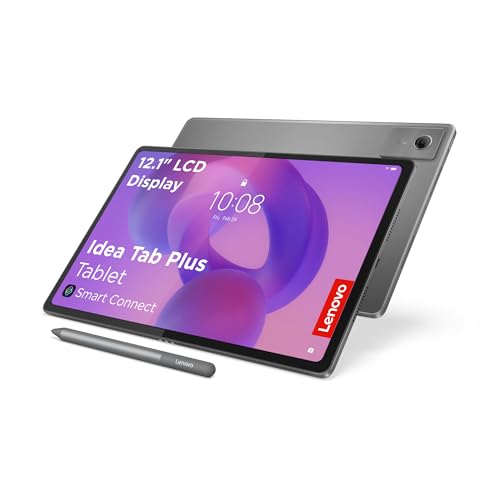
12.1 inches. That's the Idea Tab Plus screen size, and the keyboard case has to match it. The easiest option is a Bluetooth keyboard case from another brand, with a US key layout. An original Lenovo keyboard exists too.
A Bluetooth case has one advantage: it doesn't depend on pins in the tablet, only on pairing, so you can buy it without hunting for a specific Lenovo accessory. You get the keyboard and the cover in one, and you can carry the tablet in a backpack without extra accessories.
Before you browse listings, check three things: the tablet model, the screen size and the key layout. We cover each one below.
Pogo pins or Bluetooth: which to choose
The Idea Tab Plus has pogo pins, the contacts used for accessories. The original Lenovo Folio Keyboard uses them. According to AndroidGuys it attaches magnetically, and sellers say it also has a stand and a place for a stylus. It weighs about 380 g.
Cases from other brands connect over Bluetooth. You pair the keyboard with the tablet once, and after that it reconnects by itself when you switch it on. The price of that convenience is separate power, so the keyboard needs charging from time to time.
Before you pick a case, check these on your own tablet:
- the model on the back panel or in the settings (TB361FU or TB361ZU),
- the screen diagonal, which should be 12.1 inches,
- the key layout you're used to.
Below you'll find keyboard cases picked by these three criteria, sorted by what's available in the US. The specs for each product are in its box.
Keyboards for the Lenovo Idea Tab Plus we recommend

1. StarBay keyboard case with trackpad for Idea Tab Plus 12.1
keyboard case · touchpad · backlight
Backlit keyboard case with touchpad for the Lenovo Idea Tab Plus 12.1-inch.
See StarBay keyboard case with trackpad for Idea Tab Plus 12.1 on Amazon →
Short version: get a Bluetooth keyboard case that fits the TB361FU or TB361ZU, in the key layout of your country. Pick the touchpad and backlight based on how and where you type.
Touchpad, backlight and key layout
A touchpad makes sense if you use the tablet like a small laptop: working in spreadsheets, editing documents, switching windows. Without one you can still do everything by touching the screen, but you keep reaching over the keyboard. For longer typing sessions, a touchpad saves you that motion.
A backlight helps in the evening, on a train or on a plane. If you mostly type during the day at a desk, you can do without it. Some cases have both a touchpad and a backlight, some have only one of them or neither, so read the listing for the exact model.
Choose the layout of your country. It matters most if you regularly type local characters, because on the wrong layout the printed keys don't match what you type. Check this in the listing before you order, since returning a keyboard just because of the letters is a needless hassle.
Fun fact: Techaeris named the 12.1-inch 2.5K display as this tablet's biggest strength.
How to check your tablet model
The names Idea Tab Plus and Tab K12 often get mixed up, as AndroidGuys points out. They are two different tablets, and sellers sometimes put them in one listing. If you are buying a keyboard case, don't trust the product name alone.
The surest way is to look at the back of the tablet or open the tablet info in Settings. Look for the model number TB361FU or TB361ZU, because those are the Idea Tab Plus models that case listings mention. If you see a different number, it's probably not this tablet.
In the listing, also check that the seller says clearly it's for the Lenovo Idea Tab Plus 12.1-inch. A case made for another tablet can have different cutouts for the camera, buttons and speakers, even when the screen size looks similar.
Fun fact: the original Lenovo keyboard doesn't need Bluetooth pairing, because it connects to the tablet through pogo pins.
Frequently asked questions about keyboards for the Idea Tab Plus
Which keyboard for the Lenovo Idea Tab Plus?
The easiest choice is a Bluetooth keyboard case in your country's layout that fits the TB361FU or TB361ZU. If you want a touchpad or a backlight, pick a case that lists them in the description.
Does the original Lenovo keyboard for the Idea Tab Plus work without Bluetooth?
Yes. It connects through the pogo pins on the tablet, so you don't need to pair it.
Does a keyboard case for the Tab K12 fit the Idea Tab Plus?
Don't assume it does. They are two different tablets, and their names often get mixed up. Check the model number (TB361FU or TB361ZU) and look for a case that explicitly names the Idea Tab Plus 12.1-inch.
Does a keyboard for the Idea Tab Plus have a touchpad?
It depends on the case. Some have a touchpad and a backlight, some have neither. The info is in the manufacturer's description, so read it before you buy.
Which keyboard layout should I choose for the Idea Tab Plus?
Choose the layout of your country, the one you know from the keyboard at home or at work. Check that the seller lists exactly that variant. The layout matters most if you often type local characters.
See also
- Which keyboard for Lenovo Idea Tab - the right key layout
- Which charger for Lenovo Idea Tab Plus - how many watts you really need
Sources
- Lenovo: Idea Tab Plus - manufacturer page (lenovo.com)
- Notebookcheck: Lenovo Idea Tab Plus review - industry article (notebookcheck.net)
- AndroidGuys: Lenovo Idea Tab Plus review - industry article (androidguys.com)
- Techaeris: Lenovo Idea Tab Plus review - industry article (techaeris.com)
- Lenovo Folio Keyboard for Idea Tab Plus (retailer specs) - industry article (planeo.cz)

Leave a comment
This site is protected by hCaptcha and the hCaptcha Privacy Policy and Terms of Service apply.