








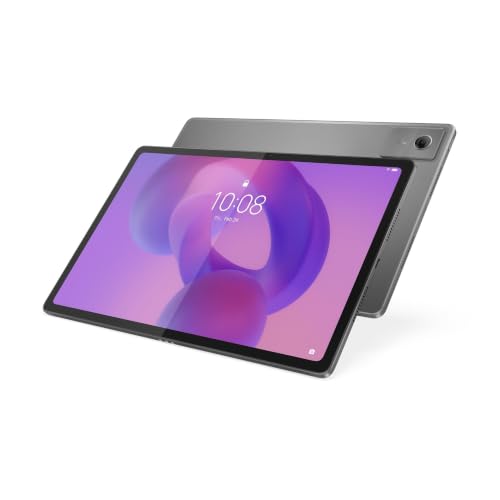
As an Amazon Associate I earn from qualifying purchases.
Quick answer: Which charger for Lenovo Idea Tab Plus? The best choice is INIU 65W 3-Port Charger 65 W - about 100% of the maximum charging speed (tablet: max 45 W).
Which charger for Lenovo Idea Tab Plus? USB PD 45 W is enough, but the box may not include one
It's the night before a trip, the hotel room has one free outlet, and the tablet needs to be full by morning for train movies and the kids' shows in the car. Notebookcheck measured 1 hour 21 minutes for a full charge, so one evening is plenty.
So, which charger for Lenovo Idea Tab Plus? A USB-C Power Delivery (PD) charger rated 45 W or more. PD is the standard that lets the charger and the tablet agree on how much power to send.
One thing to check before you order: the box. Lenovo's spec sheet lists either a 45 W adapter or no adapter, depending on version, and PCWorld describes a box with only a cable. For the US, plan on getting the charger yourself and read the seller's description to see what's in the set. A USB-C cable comes with the tablet either way.
Specs and charging
The key Lenovo Idea Tab Plus specs that matter when choosing a charger:
- Battery: 10200 mAh
- Wired charging: 45 W
- On a standard USB PD charger: ~45 W
Phone cube, laptop brick or the one from a smaller Idea Tab: which one works?
The 12.1-inch Idea Tab Plus has a 10,200 mAh battery and takes up to 45 W over USB-C. Check the small print on the charger you already own:
- "PD" or "Power Delivery" on the label: it will charge the tablet. If it says 45 W or more, you get full speed.
- A phone charger rated below 45 W: it works, but the tablet charges at the charger's lower power, so it takes longer than the 1 h 21 min figure.
- A USB-C laptop charger (65 W or 100 W): full speed, and a good second use for a charger you already own. The tablet still draws only about 45 W from it.
- A charger with no fast-charging protocol: expect only about 5-10 W. It will charge the tablet, but slowly.
- The charger from the smaller Idea Tab (11 inches): that tablet has a 7,040 mAh battery and comes with a 20 W adapter or none. A 45 W charger will fill it too, but at its own lower power, in roughly 2 hours.
A full tablet in 1 h 21 min: what that means at a hotel and at home
Notebookcheck charged the tablet from empty to full in 1 hour 21 minutes with a 100 W charger. In practice, that's about one episode and a half of a show, or the time between sitting down to dinner and coming back to the room.
Take the hotel evening. You plug in when you walk in, go out for dinner, and the tablet is full when you get back. With a charger that only gives 5-10 W, the same tablet would still be charging long after you've gone to bed.
At home it matters less. If you charge overnight, almost any PD charger will do. The 45 W charger pays off when you remember at the last minute: before a flight, before a long drive, or before the kids start asking for a movie.
Which cube to pack for the trip, and which to leave at home
The simplest choice is the INIU 65W 3-Port Charger. It gives the tablet about 45 W, which is 100% of what it can take, and the two extra ports charge a phone and earbuds from the same outlet.
The UGREEN Nexode 65W is a second full-speed option with 3 ports, and it has enough power for a USB-C laptop too. The Anker 735 (Nano II 65W) is the one to look at if you want something compact for a travel bag. It also has 3 ports and the same 65 W, so you can leave the laptop charger at home on a short trip.
If you buy just one: pick a 65 W charger with three ports, so the tablet gets its full 45 W and your phone has a spot too.
| Charger | Power | Estimated speed |
|---|---|---|
| INIU 65W 3-Port Charger | 65 W | 100% |
| UGREEN Nexode 65W | 65 W | 100% |
| Anker 735 (Nano II 65W) | 65 W | 100% |

1. INIU 65W 3-Port Charger (65W GaN)
3 ports - several devices at once · Enough power for a USB-C laptop
65W GaN charger. With the Idea Tab Plus it charges at up to about 45 W via USB PD, which is full speed. Handy when several devices share one power strip at home.

2. UGREEN Nexode 65W (65W GaN)
3 ports - several devices at once · Enough power for a USB-C laptop
65W GaN charger. With the Idea Tab Plus it charges at up to about 45 W via USB PD, which is full speed. One charger for the desk: the Idea Tab Plus, earbuds and watch from a single outlet.

3. Anker 735 (Nano II 65W) (65W GaN)
3 ports - several devices at once · Enough power for a USB-C laptop
65W GaN charger. With the Idea Tab Plus it charges at up to about 45 W via USB PD, which is full speed. Saves an outlet when several devices charge overnight.
Four things that can spoil the 45 W plan
- A stronger charger won't be faster. The tablet tops out at 45 W, so a 100 W charger gives the same speed as a 65 W one.
- No PD on the label means slow charging. Without a fast-charging protocol you're stuck at about 5-10 W, even if the cube looks modern.
- Three ports share the power. When you plug a phone and a laptop in next to the tablet, the charger divides its output, and the tablet may get less than 45 W.
- The box varies by version. Some sets include a 45 W adapter and others only a cable, so read the seller's description before you buy a charger you may not need.
Fun fact: the USB-C port on this tablet is USB 2.0 for data, even though it accepts 45 W for charging. On USB-C, charging power and data speed are two separate things.
Quick answers for Idea Tab Plus owners
Does the Lenovo Idea Tab Plus come with a charger in the US?
Plan on getting one yourself. Lenovo's spec sheet lists either a 45 W adapter or none, depending on version, and PCWorld describes a box with only a cable. Read the seller's description to see what your set includes.
Which charger for Lenovo Idea Tab Plus gives full speed?
A USB-C PD charger rated 45 W or more. The tablet takes up to 45 W, so a stronger charger gives the same speed.
Can I use my phone charger?
If it supports USB PD, yes, but the tablet charges at the charger's power, so a phone charger rated below 45 W is slower. A charger with no fast-charging protocol gives only about 5-10 W.
How long does it take to charge the Idea Tab Plus?
Notebookcheck measured about 1 hour 21 minutes for a full charge with a 100 W charger. The tablet has a 10,200 mAh battery and charges at up to 45 W.
Will a 65 W or 100 W charger harm the battery?
No. The tablet takes up to 45 W, and a more powerful charger just offers more than it uses. You won't get a faster charge, but it's not a problem for the tablet either.
See also
Sources
- Lenovo Idea Tab Plus - psref.lenovo.com - official manufacturer specifications (psref.lenovo.com)
- Lenovo Idea Tab - notebookcheck.net - industry article (notebookcheck.net)
- Lenovo Idea Tab Plus - notebookcheck.net - industry article (notebookcheck.net)
- Lenovo Idea Tab Plus - pcworld.com - industry article (pcworld.com)

Leave a comment
This site is protected by hCaptcha and the hCaptcha Privacy Policy and Terms of Service apply.