





As an Amazon Associate I earn from qualifying purchases.
Quick answer: our top pick is ProCase keyboard case, US QWERTY (US QWERTY layout · Bluetooth · slim shell).
Which keyboard for Lenovo Idea Tab? The simplest options: Folio or a Bluetooth case
For the Lenovo Idea Tab 11 (2025), you have two sensible options. The first is the original Lenovo Folio Keyboard for Idea Tab with a pogo pin connector, and the second is a case with a detachable Bluetooth keyboard from another manufacturer.
Whichever you choose, pay attention to the key layout. It should match the computer you use every day: QWERTZ in Germany, AZERTY in France, Italian QWERTY in Italy, US QWERTY in the USA.
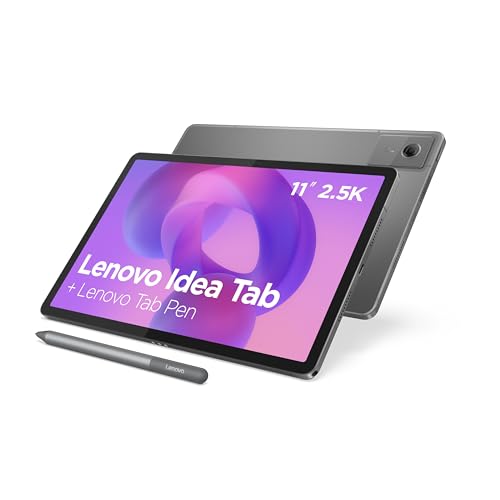
The tablet has an 11-inch 2.5K display, a MediaTek Dimensity 6300 processor and Android 15. Notebookcheck describes it as an affordable tablet for pupils and students, so a keyboard is a natural add-on if you want to take notes or write papers.

Pogo pin or Bluetooth: what actually differs
According to Lenovo PSREF, the tablet has a 3-pin pogo pin connector for the original Folio keyboard. You snap it on and start typing. According to store descriptions, it needs no pairing or charging.
A case with a detachable Bluetooth keyboard works differently. The keyboard has to be charged and paired with the tablet, and after a longer break it may need to be reconnected. In return, you get a case that often combines tablet protection with a keyboard.
There is also the question of availability. Lenovo notes that the availability of the original keyboard depends on the country, so it may simply not be in stock in your store.
Fun fact: because the Idea Tab connects to the original keyboard through three pogo pin contacts, this keyboard has no battery of its own. It draws power straight from the tablet.

Key layout: why it pays to read the description
This is the most common trap. On Amazon, the original Lenovo Folio has the same ASIN in several countries, and you can't tell which key layout you will get. That is why we don't recommend it in the product box.
Before you click "buy", check the description for the layout. Look at the name (QWERTZ, AZERTY, QWERTY italiano, US QWERTY), not just at the photos. If the description doesn't say, it is better to look for another listing.
The differences are practical. In QWERTZ, Y and Z are swapped, in AZERTY many letters sit in different places, and special characters and accents have their own positions. On the wrong layout, you will quickly start making mistakes and getting frustrated.
The alternatives we show are cases with a detachable Bluetooth keyboard. Their descriptions list the Idea Tab 11 2025 (TB-336FU and TB-336ZU). We selected them so that the boxes show cases with the layout suited to your market.

Recommended keyboards for Lenovo Idea Tab

1. ProCase keyboard case, US QWERTY
US QWERTY layout · Bluetooth · slim shell
A case with a detachable Bluetooth keyboard whose listing names the Lenovo Idea Tab. US QWERTY layout, like a US laptop. Slim shell.

2. Fintie keyboard case, US QWERTY
US QWERTY layout · Bluetooth · pen holder
A case with a detachable Bluetooth keyboard whose listing names the Lenovo Idea Tab. US QWERTY layout, like a US laptop. Pen holder.

3. Wineecy keyboard case, US QWERTY
US QWERTY layout · Bluetooth · backlit keys
A case with a detachable Bluetooth keyboard whose listing names the Lenovo Idea Tab. US QWERTY layout, like a US laptop. Backlit keys.
Touchpad, backlighting, stylus holder and compatibility with Tab M11
With keyboard cases, the extras make the difference. Some models have a touchpad, which makes working feel more like on a laptop, because you don't have to keep reaching for the screen. Others have backlit keys, which are useful in the evening.
If you use a stylus, choose a case with a stylus holder. If a slim and light setup matters to you, look for models with a thin body.
Many replacement cases also fit the Lenovo Tab M11 (2024), because their descriptions list both tablets. That's convenient if you have both models at home. Even so, always check that the description explicitly mentions the Idea Tab 11 2025, ideally with the numbers TB-336FU or TB-336ZU.
It's also worth remembering what the reviews say. GDGTme praises the 2.5K display and four speakers, but criticizes the stutters when switching quickly between apps. For typing and note-taking that is enough, but for heavy multitasking don't expect the smoothness of an expensive tablet.
Fun fact: Lenovo promises two major Android updates for the Idea Tab (TechEBlog). So a keyboard that looks like an add-on today will serve the tablet for a long time.
Most common questions about the Idea Tab keyboard
Does the Lenovo Idea Tab come with a keyboard?
No, you have to buy the keyboard separately. The original one is the Lenovo Folio Keyboard for Idea Tab with a pogo pin connection, and the alternative is a case with a Bluetooth keyboard.
Does the Lenovo Tab M11 keyboard fit the Idea Tab?
It depends on the product. Many cases with a Bluetooth keyboard list both tablets in the description, so they fit both. Buy only if the description explicitly states the Idea Tab 11 2025 or TB-336FU/TB-336ZU.
Pogo pin or Bluetooth keyboard for the Idea Tab?
Pogo pin is more convenient, because it requires neither pairing nor charging. Bluetooth offers a wider choice, often cases with a stylus holder, touchpad or backlighting, but it needs to be charged and paired.
How do I check the key layout before buying a case?
Read the listing description and look for the layout name: QWERTZ, AZERTY, QWERTY italiano or US QWERTY. Don't rely only on the product photo or on the model name alone.
Does a case with a keyboard for the Idea Tab need to be charged?
Yes, a case with a detachable Bluetooth keyboard needs to be charged and paired with the tablet. Only the original pogo pin keyboard works without charging and pairing.
Keyboards for other tablets
See also
- Which keyboard for Redmi Pad 2 - the right key layout
- Which keyboard for Galaxy Tab S11 Ultra - also fits the S12 Ultra
- Which keyboard for Galaxy Tab A11+ - also fits the A9+, with a US layout
Sources
- Lenovo PSREF: Idea Tab specifications - manufacturer page (psref.lenovo.com)
- Notebookcheck: Lenovo Idea Tab, a budget tablet for students - industry article (notebookcheck.net)
- GDGTme: Lenovo Idea Tab review - industry article (gdgtme.com)
- TechEBlog: Lenovo Idea Tab 2025 - industry article (techeblog.com)

Leave a comment
This site is protected by hCaptcha and the hCaptcha Privacy Policy and Terms of Service apply.