









As an Amazon Associate I earn from qualifying purchases.
Quick answer: our top pick is Samsung Pro Keyboard for Galaxy Tab S11 Ultra (Samsung original · POGO pins · trackpad · aluminium).
See Samsung Pro Keyboard for Galaxy Tab S11 Ultra on Amazon →
Which keyboard for Galaxy Tab S11 Ultra?
For the Galaxy Tab S11 Ultra, it is best to choose the official Samsung Pro Keyboard with a touchpad or the lighter Book Cover Keyboard Slim variant. Universal Bluetooth keyboard cases from other manufacturers are also a good and often cheaper option. Both official Samsung keyboards also fit the newer Galaxy Tab S12 Ultra - Samsung lists both tablets on their product pages.
However, you need to watch out for accessories from older models. Keyboards dedicated to the Galaxy Tab S10 Ultra and earlier generations will not fit your device. Samsung changed the design and moved the magnetic POGO pins to the back of the case, so older keyboards have nothing to connect to.

Samsung Pro Keyboard or the Slim version - which works better?
The Samsung Pro Keyboard with model number EF-DX935 is the choice for those looking for a laptop-like experience. The accessory features an aluminum body, 81 keys, a dedicated AI key, and a physical touchpad that is 14.6% larger than the previous generation. You can turn off the touchpad at any time with a shortcut, and closing the case turns off the tablet screen automatically. The keyboard connects via the rear POGO connector, so it requires no charging or pairing.
The Book Cover Keyboard Slim, marked EF-DX930, focuses primarily on lower weight and simplicity. It weighs 466 g and features a one-piece design without a touchpad, requiring you to touch the screen or carry a separate mouse. In return, you get a Caps Lock LED, a DeX mode shortcut, and the ability to charge the tablet without removing the cover.
The choice depends on how you plan to use the device on the go. The Pro Keyboard weighs 636 g and is 5.3 mm thick, but it does not protect the back of the tablet case and lacks key backlighting. The Slim version is lighter and more portable, but the lack of a touchpad limits comfort during hours of typing.
Fun fact: The Galaxy Tab S11 Ultra combined with the Samsung Pro Keyboard weighs around 1300 g in total. This is very close to the weight of the popular MacBook Air laptop.

Third-party Bluetooth keyboards
If you are looking for other features, cases with wireless Bluetooth keyboards are an interesting option. Third-party accessories offer features missing from the originals, such as 7-color key backlighting or built-in touchpads. Manufacturers like MicroTunk or EHLCYS include a separate wireless mouse in the set, the Doohoeek brand uses a small LCD screen indicating battery status, while companies like Sackei and JUQITECH focus on adjustable stands that raise the tablet or rotate it vertically.
However, you need to keep in mind the limitations of wireless connectivity. Third-party keyboards have their own battery that needs to be regularly charged via a USB-C cable, and the connection requires prior pairing in the tablet menu. Before purchasing, always make sure which models the manufacturer lists in the specifications. Some alternatives fit only the Galaxy Tab S11 Ultra, while others are designed to also accommodate the S12 Ultra.
Below you will find selected Samsung keyboards and third-party Bluetooth models whose descriptions list the Galaxy Tab S11 Ultra.

Recommended keyboards for Galaxy Tab S11 Ultra
1. Samsung Pro Keyboard for Galaxy Tab S11 Ultra
Samsung original · POGO pins · trackpad · aluminium
Samsung's aluminium keyboard connects through the POGO pins on the back of the tablet, so there is no pairing and no charging. It has 81 keys and a trackpad 14.6% larger than the previous model. Samsung lists the Tab S11 Ultra and Tab S12 Ultra. There is no backlight and it does not cover the back of the tablet.
See Samsung Pro Keyboard for Galaxy Tab S11 Ultra on Amazon →

2. JUQITECH magnetic keyboard case
Magnetic detachable · rotating kickstand · trackpad
A soft case with a rotating kickstand that holds the tablet in landscape or portrait, plus a magnetically detachable keyboard with a large multi-touch trackpad. The maker lists the Tab S12 Ultra and S11 Ultra.

3. Sackei floating-stand keyboard case
Floating stand · 5-inch trackpad · backlit
A floating-style keyboard case: a magnetic stand on an aluminium hinge, scissor-switch keys, a 5-inch trackpad, AI and DeX keys and 7-colour backlighting. The maker lists the Tab S12 Ultra, S11 Ultra, S10 Ultra, S9 Ultra and S8 Ultra.
Key Layout and Language Versions
When buying a keyboard for such a large tablet, pay special attention to the markings printed on the keys. Each keyboard model is sold in specific regional versions, such as German QWERTZ, French AZERTY, or international US English. In online stores, individual language variants are separate inventory items.
Always verify the exact listing title before placing your order. In some listings, Samsung Pro Keyboard is only available with the US English layout. Choosing the wrong version will mean the characters on the physical keys won't match your typing habits.
S Pen and Case Design
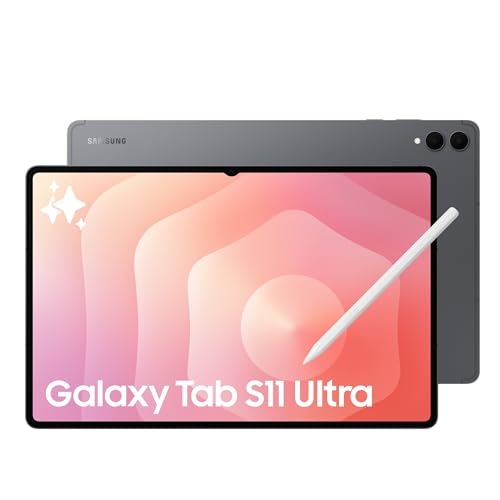
In the box with Galaxy Tab S11 Ultra, you will find the tablet, a USB-C cable, a SIM tray tool, and the S Pen stylus. The stylus features a hexagonal cross-section resembling a classic pencil, meets the IP68 water and dust resistance standard, and its tip differs from older stylus models. Samsung lists the replacement S Pen (EJ-PX730) for Galaxy Tab S11, S11 Ultra, S12+, and S12 Ultra.
Fun fact: The S Pen included with Galaxy Tab S11 Ultra does not have a built-in battery or Bluetooth module, drawing power directly from the tablet's screen.
The stylus attaches magnetically to the housing, but the built-in magnets hold it quite weakly when carrying it in a bag. If you care about safely transporting the accessory, look for a case with a dedicated pocket or holder. The official Samsung Book Cover Keyboard Slim case lacks a dedicated slot for the stylus, which increases the risk of accidentally losing it.
Frequently Asked Questions
Does the keyboard from Galaxy Tab S10 Ultra fit S11 Ultra?
No, older keyboards from Galaxy Tab S10 Ultra and earlier models do not fit Galaxy Tab S11 Ultra. Samsung changed the case design to a one-piece version and moved the POGO pin connector directly to the back of the device. Previous accessories used a different pin layout and will not connect to the new tablet.
Does the keyboard for Tab S11 Ultra fit Tab S12 Ultra?
Yes, official Samsung accessories designed for Galaxy Tab S11 Ultra also fit Galaxy Tab S12 Ultra. This applies to both the Samsung Pro Keyboard model and the Book Cover Keyboard Slim variant. Samsung lists both Tab S11 Ultra and Tab S12 Ultra on the product pages for both keyboards. For third-party cases, check the model list in the description, as some only list S11 Ultra.
Does Samsung Pro Keyboard need to be charged or paired?
No, you do not need to charge Samsung Pro Keyboard or pair it manually via Bluetooth. The device uses a direct connection through the magnetic POGO connector located on the back of the tablet. The keyboard draws power directly from the tablet's battery and works immediately once attached to the housing.
Is the S Pen included with Galaxy Tab S11 Ultra?
Yes, the S Pen stylus is included in the retail box with the Galaxy Tab S11 Ultra tablet. However, the keyboard itself is not included in the box and must be purchased separately. The included stylus features a hexagonal shape, an IP68 rating, and works without needing a battery recharge.
Which key layout should I choose?
The one you are used to on your computer. You can check the layout in the listing title: each keyboard has separate versions, such as German QWERTZ, French AZERTY, Italian, or US English. The version determines which characters are printed on the physical keys. In some listings, Samsung Pro Keyboard is only available in US English.
Keyboards for other Galaxy tablets
Sources
- Samsung: Pro Keyboard für das Galaxy Tab S11 Ultra | Tab S12 Ultra - manufacturer page (samsung.com)
- Samsung: Book Cover Keyboard Slim für das Galaxy Tab S11 Ultra | Tab S12 Ultra - manufacturer page (samsung.com)
- Samsung: S Pen für die Galaxy Tab S11-Serie | Tab S12-Serie - manufacturer page (samsung.com)
- Engadget: Samsung Galaxy Tab S11 Ultra hands-on - industry article (engadget.com)
- EFTM: Samsung Galaxy Tab S11 Ultra review - industry article (eftm.com)
- 9to5Google: Samsung Galaxy Tab S11 Ultra Pro Keyboard released - industry article (9to5google.com)

Leave a comment
This site is protected by hCaptcha and the hCaptcha Privacy Policy and Terms of Service apply.