









As an Amazon Associate I earn from qualifying purchases.
Quick answer: our top pick is SAMTUNK backlit keyboard case with mouse (Bluetooth · 7-colour backlight · mouse included).
Which keyboard for Galaxy Tab S10 FE? Best options to get started
The best choice for Galaxy Tab S10 FE is the original Samsung Book Cover Keyboard with a trackpad or the lighter Book Cover Keyboard Slim model without a trackpad. Both versions connect to the tablet via physical POGO pins, which means there is no need to charge a battery or pair manually.
If you are looking for a more affordable solution, you can opt for a Bluetooth keyboard case from third-party manufacturers. Many of them offer a built-in trackpad and multi-color key backlighting, which makes typing in the evening easier.
Both Samsung keyboards also fit Galaxy Tab S10 Lite as well as the older Galaxy Tab S9 and Tab S9 FE, as Samsung lists these models on both accessory pages. However, they do not fit the larger Galaxy Tab S10 FE+ with a 13.1-inch screen or Galaxy Tab S11, which have their own keyboards.

Book Cover Keyboard or the Slim version: which one to choose?
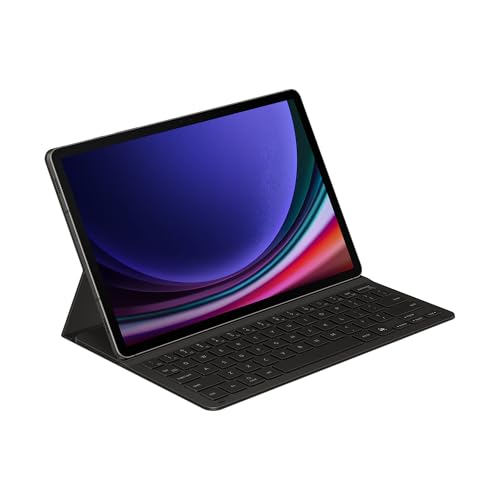
The original Samsung Book Cover Keyboard (model number EF-DX725) consists of two independent parts. The back of the case features a stylus compartment and stays on the tablet, while the section with keys and the trackpad can be detached at any time.
This model offers a row of function keys, a dedicated button to launch DeX mode, and an AI key to summon the Bixby or Gemini assistant. In addition, the Wireless Keyboard Sharing feature allows you to type via Bluetooth on up to three devices, and the accessory requires One UI 6.1.1 or newer for full functionality.
The Book Cover Keyboard Slim version (code EF-DX720), on the other hand, is a one-piece design. It is slimmer and lighter, features a DeX shortcut, a stylus compartment, and an AI key, but lacks a trackpad, so you must control the cursor by touching the screen.
The AI key on both Samsung keyboards currently works only with Galaxy Tab S10 series tablets, so on the S10 FE and S10 Lite, you can use it to summon Bixby or Gemini.
Third-party Bluetooth keyboards: advantages and trade-offs
Third-party accessories are an interesting alternative when you want extra features. Many models offer a multi-touch trackpad and 7-color key backlighting, and the SAMTUNK set even includes a separate wireless mouse.
The Dexnor keyboard stands out with an interesting design, featuring a magnetic stand that elevates the tablet directly above the keys. Most third-party cases also include a practical holder or compartment for the S Pen included with the tablet.
When choosing a Bluetooth model, however, you must remember to recharge its built-in battery regularly. The keyboard does not draw power from the tablet's pins, so it requires a separate charging cable and standard wireless pairing.
Before purchasing, always check the list of compatible devices in the specific product description. Although most manufacturers list Tab S10 FE, S10 Lite, S9 FE, and S9 at the same time, some listings are dedicated exclusively to a single variant.
Below you will find recommended keyboards tailored to your tablet that will make daily work and typing longer texts easier.

Recommended keyboards for Galaxy Tab S10 FE
1. SAMTUNK backlit keyboard case with mouse
Bluetooth · 7-colour backlight · mouse included
A case with a magnetically detachable Bluetooth keyboard, 7-colour backlighting, an S Pen holder and a mouse in the box. The maker lists the Tab S10 FE, S10 Lite, S9 FE, S9 and S8.
2. Samsung Book Cover Keyboard Slim for Galaxy Tab S10 FE
Samsung original · POGO pins · light · no trackpad
A one-piece keyboard cover that connects through the POGO pins, so there is no pairing and no charging. It has an AI key, a DeX shortcut and an S Pen slot, but no trackpad. Samsung lists the Tab S10 FE, S10 Lite, S9 and S9 FE.
See Samsung Book Cover Keyboard Slim for Galaxy Tab S10 FE on Amazon →

3. Dexnor magnetic floating keyboard with trackpad
Bluetooth · floating stand · trackpad · backlight
A Magic Keyboard-style design: the tablet attaches magnetically to a cantilever arm and seems to float above the keys. It has a multi-touch trackpad, 7-colour backlighting and an S Pen holder. The maker lists the Tab S10 FE, S10 Lite, S9 FE and S9.
See Dexnor magnetic floating keyboard with trackpad on Amazon →

4. Samsung Book Cover Keyboard for Galaxy Tab S10 FE
Samsung original · POGO pins · trackpad · AI key
A two-piece cover with a detachable keyboard, function keys and a trackpad. It connects through the POGO pins, so there is no charging, and over Bluetooth it can also type on other Galaxy devices. It has an S Pen slot and an AI key. Samsung lists the Tab S10 FE, S10 Lite, S9 and S9 FE.
See Samsung Book Cover Keyboard for Galaxy Tab S10 FE on Amazon →

5. SNOODU backlit keyboard case with trackpad
Bluetooth · trackpad · 7-colour backlight · US layout
A TPU case with a rechargeable Bluetooth keyboard, multi-touch trackpad, 7-colour backlighting and a pen holder. US layout. The maker lists the Tab S10 FE, S10 Lite, S9 FE and S9.
Keyboard layout: pay attention to the markings
When buying a wireless keyboard or a case, pay close attention to the physical layout printed on the keys. Every manufacturer releases separate language versions, such as German QWERTZ, French AZERTY, Italian, or US English.
In online stores, each language variant is usually a separate listing. Always check the listing title and specifications to confirm which markings are on the keys before finalizing your purchase.
S Pen and DeX mode: turn your tablet into a mini laptop
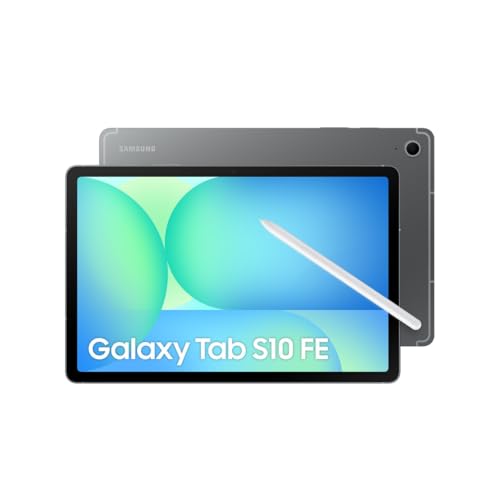
Both the Galaxy Tab S10 FE and the cheaper Tab S10 Lite come with an S Pen in the box, while the keyboard must always be purchased separately. Unlike the more expensive Tab S10+, the S10 FE does not have a rear magnetic strip for storing the stylus, which makes a case with a dedicated slot very useful when traveling.
After connecting a physical keyboard and enabling DeX mode, the tablet turns into a compact, functional portable computer. You get a classic taskbar, split-screen multitasking, quick app switching, and application windows that you can move around freely.
The Galaxy Tab S10 FE features a fingerprint reader in the power button and IP68 certification, while the S10 Lite lacks both. However, both devices offer the same 10.9-inch display, allowing for comfortable document editing on the go.
Fun fact: According to MyNextTablet, the Tab S10 FE has IP68 certification, which no other tablet manufacturer offers. Furthermore, the included S Pen has no built-in battery at all, meaning you never have to charge it and it is always ready to write.
Questions and Answers
Does the Galaxy Tab S10 FE keyboard fit the S10 Lite?
Yes. Samsung lists both the Galaxy Tab S10 FE and Tab S10 Lite for both of its keyboards, the Book Cover Keyboard and Book Cover Keyboard Slim. Most third-party Bluetooth cases also list both models, but check the list in the description before buying.
Does the Tab S10 FE keyboard fit the Tab S10 FE+?
No, accessories from the smaller model do not fit the Galaxy Tab S10 FE+. The Plus version has a significantly larger 13.1-inch screen, requiring completely different, larger keyboard cases designated with the model numbers EF-DX625 or EF-DX620.
Does the Samsung Book Cover Keyboard need to be charged or paired?
No, the original Samsung Book Cover Keyboard and Book Cover Keyboard Slim do not need to be charged or manually paired. They connect to the tablet via POGO pins and work immediately upon attachment.
Is the S Pen included with the Galaxy Tab S10 FE?
Yes, you will find the S Pen right in the box with the Galaxy Tab S10 FE tablet, just like with the S10 Lite. However, the package does not include a physical keyboard, which must be purchased as a separate accessory.
Which keyboard layout should you choose?
Choose the same layout you use on your computer so that the labels on the keys match what appears on the screen. The listing title usually states the layout: German QWERTZ, French AZERTY, Italian, or US English. If it is not there, check the keyboard photos before purchasing.
Keyboards for other Galaxy tablets
Sources
- Samsung: Book Cover Keyboard für das Galaxy Tab S9 | S9 FE | S10 FE | S10 Lite - manufacturer page (samsung.com)
- Samsung: Book Cover Keyboard Slim für das Galaxy Tab S9 | S9 FE | S10 FE | S10 Lite - manufacturer page (samsung.com)
- MyNextTablet: Samsung Galaxy Tab S10 FE review - industry article (mynexttablet.com)
- MyNextTablet: Samsung Galaxy Tab S10 Lite review - industry article (mynexttablet.com)
- ITPro: Samsung Galaxy Tab S10 FE review - industry article (itpro.com)

Leave a comment
This site is protected by hCaptcha and the hCaptcha Privacy Policy and Terms of Service apply.