








As an Amazon Associate I earn from qualifying purchases.
Quick answer: our top pick is WD Red Pro 16TB NAS HDD (3.5 inch · 16 TB · CMR · 7200 RPM).
Best drives for UGREEN DXP2800 GT? Two CMR NAS drives in RAID 1
A common myth says a fast NAS needs the fastest PCIe 4.0 NVMe drive. In the DXP2800 GT it won't help: the M.2 slots run at PCIe 3.0 x2 here, so you get about 2 GB/s at most (data from Mighty Gadget).
Buy two CMR NAS drives of the same capacity and set them up in RAID 1. Add an M.2 drive only if you want a cache or a fast pool for apps.
What the DXP2800 GT offers and what it means for drives
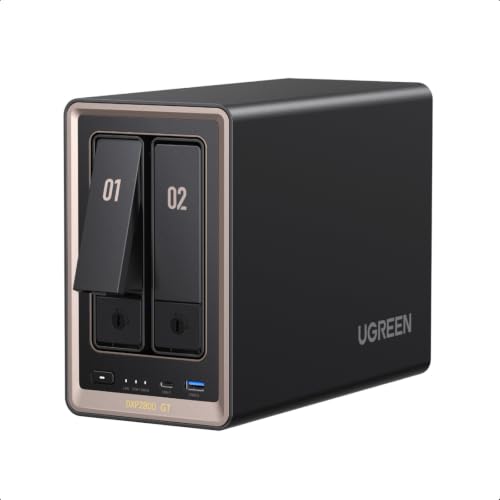
This is a small NAS with two bays for 3.5 or 2.5 inch SATA drives. Next to them are two M.2 NVMe slots, an AMD Ryzen Embedded R2514 processor and a 10 GbE port. It ships without drives, so you have to put the whole setup together yourself.
According to NASCompares, the NAS supports up to 80 TB. Two bays are enough for a home archive of photos and videos, plus computer backups.
Fun fact: the UGOS Pro system runs from built-in eMMC storage, so both bays stay fully available for your data.
Before you order anything, check three things:
- the drive compatibility list on the UGREEN website, to see whether your chosen model is on it,
- in the drive's description, that it uses CMR, not SMR, and that it's made for NAS use, not a regular desktop drive,
- that both drives have the same capacity.
Short version: get two CMR NAS drives from the UGREEN compatibility list, with the same capacity, in RAID 1, and treat an M.2 drive as an add-on for cache.
Below we've gathered CMR NAS drives and an M.2 drive built for NAS use, picked for two bays and RAID 1.
Drives for UGREEN DXP2800 GT we recommend

1. WD Red Pro 16TB NAS HDD
On sale3.5 inch · 16 TB · CMR · 7200 RPM
The more powerful WD series for NAS units with more drives: 16 TB, CMR recording and 7200 RPM. For people who want a lot of space right away and use their NAS for work.

2. Samsung 990 PRO 1TB M.2 2280 NVMe SSD
On saleM.2 2280 · NVMe PCIe 4.0 · 1 TB
One of the most popular M.2 NVMe 2280 drives. Samsung lists up to 7450 MB/s read speed on a PCIe 4.0 slot; in a device with a slower slot the drive runs slower, but works the same way.

3. WD Red Plus 12TB NAS HDD
3.5 inch · 12 TB · CMR · 7200 RPM
The higher-capacity option in the WD Red Plus series: 12 TB per drive, CMR recording and 7200 RPM. It runs louder than the smaller models in this series, but it gives you a lot of space in a single bay.

4. WD Red Plus 8TB NAS HDD
3.5 inch · 8 TB · CMR · for NAS
The best-selling NAS drive in this roundup. CMR recording, 24/7 operation and a slower spin speed, so it runs quieter than 7200 rpm drives. A safe choice for photos, computer backups and movies at home.

5. WD Red SN700 1TB NVMe NAS SSD
M.2 2280 · NVMe · for NAS · cache
An M.2 NVMe drive built to run around the clock in a NAS. It works well as cache or as a small, fast pool for apps and containers.

6. Toshiba N300 8TB NAS HDD
3.5 inch · 8 TB · 7200 rpm · 512 MB
A faster NAS drive: 7200 rpm and 512 MB of cache. Handy when several people use files at the same time, but it runs louder than 5400 rpm drives.
RAID 1 in plain English and how many TB to buy
RAID 1 on two drives works like a mirror. Every file is written to both drives, so if one fails, the other still holds all your data. The price is capacity: you get the space of just one drive.
That's why you should buy two drives of the same size. The array sizes itself to the smallest drive, so any extra space on a larger one is simply wasted.
RAID 5 and RAID 6 are different layouts. With four drives, RAID 5 gives you the capacity of three and survives one drive failure, while RAID 6 gives you the capacity of two and survives two failures. In a two-bay NAS, these options are off the table anyway.
How many TB should you pick? Add up what your photos, videos and computer backups take up today, then leave room for a few years of growth. Remember that usable capacity is one drive, not the sum of two.
RAID is not a backup. If you delete a file or ransomware hits your data, it disappears from all drives at once. Keep important files in a second place too, for example on a portable USB-C SSD or in the cloud.
5400 vs 7200 RPM, noise and 10 GbE
7200 RPM drives are faster, but louder than 5400-5640 RPM drives. If the NAS sits in your living room or in the room where you work, go with the slower spin speed. For photos, videos and computer backups, you probably won't notice a speed difference at home.
A faster drive makes sense when several people use the same files at once and the NAS sits somewhere the noise doesn't bother anyone.
Fun fact: Notebookcheck measured 29.11 dB(A) at idle from a distance of 12 inches (30 cm).
A 10 GbE port only lets you get more out of the drives if the whole path is 10 GbE: router or switch, cable and computer. On a typical home 1 GbE network, the network is the bottleneck, not the drive. A faster model won't speed anything up for you.
An M.2 NVMe drive makes sense as a cache or a fast pool for apps and containers, not as the fastest drive for games. Pick a model made for NAS use, because it will run around the clock.
A separate article covers RAM for the GT series.
Most common questions about drives for the DXP2800 GT
Which drives for the UGREEN DXP2800 GT?
Two NAS drives with CMR recording, the same capacity, set up in RAID 1. Avoid SMR drives and regular desktop drives in RAID arrays. Before you buy, check UGREEN's compatibility list.
Does the UGREEN DXP2800 GT come with drives?
No, the NAS is sold without drives. Check the seller's listing for what's in the box.
Is it worth adding an M.2 drive to the DXP2800 GT?
Yes, but only as a cache or a fast pool for apps and containers. The slots are PCIe 3.0 x2, so there's no point paying for the fastest PCIe 4.0 model. For storing files at home, you don't need an M.2 drive.
Which RAID should I choose in the DXP2800 GT?
RAID 1. With two bays, it's the simplest protection against a single drive failure, at the cost of half the capacity. Remember that it's not a backup, because a deleted file disappears from both drives.
How is the DXP2800 GT different from the DXP2800?
We don't have a spec comparison for the older model here, so compare the specs on UGREEN's website. What we do know is that the GT has an AMD Ryzen Embedded R2514 processor, a 10 GbE port and two M.2 NVMe slots. The same drive rules apply: CMR, the same capacity and the compatibility list.
See also
- Best hard drives for UGREEN DXP4800 GT - HDDs up to 32TB and M.2 cache
- Best drives for UGREEN DXP2800 - two HDDs up to 80 TB and two M.2
- Best drives for UGREEN DXP4800 Plus - four HDDs, RAID 5 and M.2 PCIe 4.0
Sources
- UGREEN: NASync DXP2800 GT - manufacturer page (ai.ugreen.com)
- Notebookcheck: Ugreen NASync DXP2800 GT review - industry article (notebookcheck.net)
- Mighty Gadget: Ugreen DXP2800 GT NAS review - industry article (mightygadget.com)
- NAS Compares: UGREEN DXP4800 GT and DXP2800 GT before you buy - industry article (nascompares.com)
- Vortez: UGREEN NASync DXP2800 GT and DXP4800 GT review - industry article (vortez.net)
- Android Central: Best long-lasting hard drives for a Synology NAS - industry article (androidcentral.com)
- WunderTech: Best Synology NAS hard drives - industry article (wundertech.net)

Leave a comment
This site is protected by hCaptcha and the hCaptcha Privacy Policy and Terms of Service apply.