








As an Amazon Associate I earn from qualifying purchases.
Quick answer: our top pick is WD Red Pro 16TB NAS HDD (3.5 inch · 16 TB · CMR · 7200 RPM).
Best drives for UGREEN DXP4800 Plus? The short answer
Bought a NAS without drives and not sure where to start? Get four NAS drives with CMR recording, all the same capacity, and build a RAID 5 from them.
Add one M.2 NVMe drive for cache or a fast pool for apps. Skip desktop drives and SMR models. They cause trouble in RAID arrays, and NAS drives are built to run 24 hours a day.
UGREEN sells the DXP4800 Plus without drives. Before you order a specific model, check the compatibility list on the UGREEN website.
What's inside the DXP4800 Plus
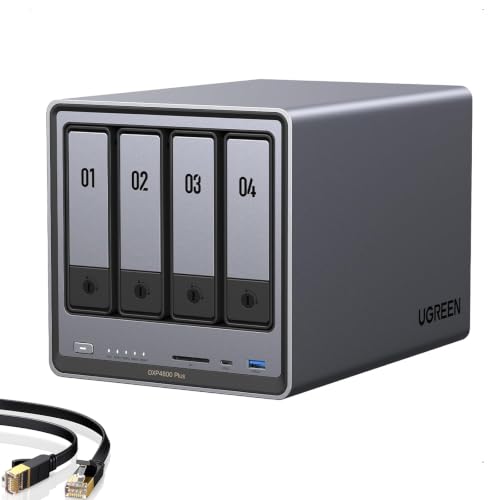
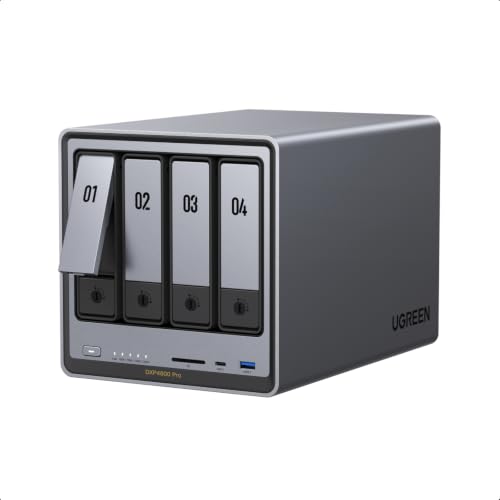
This NAS has four SATA drive bays. It also has two M.2 2280 PCIe 4.0 x4 slots, so four large drives hold your data and two small modules handle fast storage.
The back has 10 GbE and 2.5 GbE ports. A fast network makes sense when several people copy large files at the same time, such as movies or full-quality photos.
It comes with 8 GB of DDR5 RAM, and two SO-DIMM slots let you go up to 64 GB. For plain file storage, the stock amount is enough. You'll want more once you start running containers and extra services.
ITPro praises the hardware and performance of this model, but rates the apps lower. The hardware is stronger than the software, so good drives give you more here than fiddling with settings.
Fun fact: the newer DXP4800 GT has M.2 slots with only PCIe 3.0 x2 (data from NAS Compares). So the older Plus is better equipped in this respect.
Below you'll find NAS drives and an M.2 drive for NAS use. We picked them for how well they suit this job: CMR recording, 24/7 operation, and spin speeds suited to home use.
Drives we recommend for the UGREEN DXP4800 Plus

1. WD Red Pro 16TB NAS HDD
On sale3.5 inch · 16 TB · CMR · 7200 RPM
The more powerful WD series for NAS units with more drives: 16 TB, CMR recording and 7200 RPM. For people who want a lot of space right away and use their NAS for work.

2. Samsung 990 PRO 1TB M.2 2280 NVMe SSD
On saleM.2 2280 · NVMe PCIe 4.0 · 1 TB
One of the most popular M.2 NVMe 2280 drives. Samsung lists up to 7450 MB/s read speed on a PCIe 4.0 slot; in a device with a slower slot the drive runs slower, but works the same way.

3. WD Red Plus 12TB NAS HDD
3.5 inch · 12 TB · CMR · 7200 RPM
The higher-capacity option in the WD Red Plus series: 12 TB per drive, CMR recording and 7200 RPM. It runs louder than the smaller models in this series, but it gives you a lot of space in a single bay.

4. WD Red Plus 8TB NAS HDD
3.5 inch · 8 TB · CMR · for NAS
The best-selling NAS drive in this roundup. CMR recording, 24/7 operation and a slower spin speed, so it runs quieter than 7200 rpm drives. A safe choice for photos, computer backups and movies at home.

5. WD Red SN700 1TB NVMe NAS SSD
M.2 2280 · NVMe · for NAS · cache
An M.2 NVMe drive built to run around the clock in a NAS. It works well as cache or as a small, fast pool for apps and containers.

6. Toshiba N300 8TB NAS HDD
3.5 inch · 8 TB · 7200 rpm · 512 MB
A faster NAS drive: 7200 rpm and 512 MB of cache. Handy when several people use files at the same time, but it runs louder than 5400 rpm drives.
RAID 5, 6 and 1 in plain words
RAID combines several drives into one pool of storage. With four drives, RAID 5 gives you the capacity of three and survives one drive failure. It's a good starting point for a home or small office.
RAID 6 on four drives gives you the capacity of two, but it survives two drives failing at the same time. Pick it if you'd rather have less space and more peace of mind. RAID 10 also gives you the capacity of two on four drives, but it combines mirroring with speed. RAID 1 on two drives is simply a mirror, and the capacity equals one drive.
Buy drives of the same capacity. The array sizes itself to the smallest drive, so you'd pay for any extra space on a bigger one and never use it.
Does RAID protect your data from everything? No. A deleted file or data encrypted by a virus disappears from all drives at once. A real backup has to live somewhere else: on a portable USB-C SSD, on a second NAS, or in the cloud.
Fun fact: with all bays filled, the DXP4800 Plus holds up to 144 TB, according to UGREEN.
5400 or 7200 RPM and how it sounds in the room
7200 RPM drives are faster, but louder than 5400-5640 RPM drives. You'll hear the difference when the NAS sits in your living room or in the office where you work.
Choose the slower drives for photos, computer backups and movies. Your network matters more here than the raw speed of the drive. Faster drives make sense when several people work on files at once and the NAS sits in a closet, a basement or a room where noise doesn't bother anyone.
Also look at the warranty. A higher-end series may come with 5 years, while popular NAS drives often get 3 years. For a drive that runs non-stop, that's a real difference.
In short: for a home or a living space, go with four quieter CMR NAS drives, and reach for 7200 RPM only if the NAS sits away from people or serves several users at once.
Frequently asked questions about drives for the DXP4800 Plus
Which drives for the UGREEN DXP4800 Plus?
Four NAS drives with CMR recording, all the same capacity, in RAID 5. Add an M.2 NVMe drive for cache or apps. Check the UGREEN compatibility list before you buy.
Is an M.2 drive worth adding to the DXP4800 Plus?
Yes, if you run containers or databases, or want faster access to frequently used files. An M.2 drive in a NAS then works as a cache or a fast pool. If your NAS only stores photos and movies, you can add M.2 later.
Which RAID should I choose in the DXP4800 Plus?
Start with RAID 5, which gives you the capacity of three of the four drives. If safety matters more than space, go with RAID 6. Keep in mind that no RAID replaces a backup.
What is the largest drive the DXP4800 Plus supports?
According to UGREEN, SATA drives can be up to 32 TB and M.2 drives up to 8 TB. Not every model will work without problems, though, so check the compatibility list before you buy.
How does the DXP4800 Plus differ from the DXP4800 GT?
The GT is the newer model, while the Plus is from 2024. We cover drives for the DXP4800 GT in a separate article. When choosing, compare the ports, M.2 slots and RAM, because those decide whether the extra cost makes sense.
See also
- Best Drives for UGREEN DXP4800 Pro - HDDs up to 32 TB and M.2 PCIe 4.0
- Best hard drives for UGREEN DXP4800 GT - HDDs up to 32TB and M.2 cache
- Best drives for Synology DS425+ - four HDDs, RAID 5 and DSM 7.3
Sources
- UGREEN: NASync DXP4800 Plus - manufacturer page (ai-eu.ugreen.com)
- TechPowerUp: Ugreen NASync DXP4800 Plus review - industry article (techpowerup.com)
- ITPro: UGREEN NASync DXP4800 Plus review - industry article (itpro.com)
- KitGuru: Ugreen NASync DXP4800 Plus review - industry article (kitguru.net)
- NAS Compares: UGREEN DXP4800 Plus vs DXP4800 GT - industry article (nascompares.com)
- Android Central: Best long-lasting hard drives for a Synology NAS - industry article (androidcentral.com)
- WunderTech: Best Synology NAS hard drives - industry article (wundertech.net)

Leave a comment
This site is protected by hCaptcha and the hCaptcha Privacy Policy and Terms of Service apply.