








As an Amazon Associate I earn from qualifying purchases.
Quick answer: our top pick is WD Red Pro 16TB NAS HDD (3.5 inch · 16 TB · CMR · 7200 RPM).
Best drives for Synology DS425+? Four CMR NAS drives of the same capacity
You often hear that any big drive with "TB" on the label will do for a NAS. In RAID arrays, though, manufacturers and reviewers advise against SMR drives and regular desktop drives.
For the DS425+, buy four NAS drives with CMR recording, ideally from the same series and with the same capacity, and run DSM 7.3 or newer. That is all it takes to build an array that runs around the clock and survives the failure of one drive.
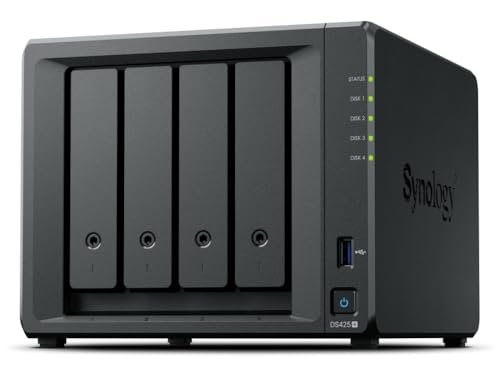
The DS425+ has four front bays for SATA drives. At the back there is a 2.5 GbE port and a 1 GbE port.
DSM 7.3, third-party drives and M.2 slots
Since DSM 7.3 (October 2025), you can use third-party HDDs in a new storage pool, as long as they are not flagged as incompatible. So you don't have to look only for Synology-branded drives. DSM may show a warning, but that doesn't stop the drive from working.
Fun fact: on the 2025 Plus models, Synology first limited pool creation to drives on its compatibility list. DSM 7.3 removed that limit for HDDs.
M.2 drives are a different story. The DS425+ has two M.2 slots for NVMe drives, but the Synology list still applies there. If you plan to add an M.2 drive, check it against that list before you buy.
We picked the drives below using simple criteria: CMR recording, built for 24/7 NAS use, and a range of capacities, from modest to large.
Drives for Synology DS425+ we recommend

1. WD Red Pro 16TB NAS HDD
On sale3.5 inch · 16 TB · CMR · 7200 RPM
The more powerful WD series for NAS units with more drives: 16 TB, CMR recording and 7200 RPM. For people who want a lot of space right away and use their NAS for work.

2. WD Red Plus 12TB NAS HDD
3.5 inch · 12 TB · CMR · 7200 RPM
The higher-capacity option in the WD Red Plus series: 12 TB per drive, CMR recording and 7200 RPM. It runs louder than the smaller models in this series, but it gives you a lot of space in a single bay.

3. WD Red Plus 8TB NAS HDD
3.5 inch · 8 TB · CMR · for NAS
The best-selling NAS drive in this roundup. CMR recording, 24/7 operation and a slower spin speed, so it runs quieter than 7200 rpm drives. A safe choice for photos, computer backups and movies at home.
RAID 5 and SHR in plain terms
RAID makes several drives work as one and protects your data if a drive fails. With four drives, you have two main options.
- RAID 5: you get the capacity of three drives, and the array survives one drive failing.
- RAID 6: you get the capacity of two drives, and the array survives two drives failing.
For most homes, RAID 5 is a sensible balance between space and safety. SHR is the Synology option that DSM suggests when you create a pool, and with four equal drives it gives similar protection.
Buy drives of the same capacity. The array sizes itself by the smallest drive, so a larger drive next to a smaller one simply wastes part of its space.
Pick a capacity with room to spare. The four front bays are all the drive space you get, and memory has little room to grow: there's 2 GB on the board and one slot for a 4 GB module, up to 6 GB in total.
Fun fact: the DS425+ doesn't support an expansion unit.
One important caveat. RAID is not a backup. A deleted file or data encrypted by a virus disappears from all drives at once, so keep your important files in a second place too, for example on a portable USB-C SSD or a USB-C flash drive.
5400 or 7200 RPM, and noise
7200 RPM drives are faster, but louder than 5400-5640 RPM drives. In a server room that doesn't matter. In an apartment, it does.
Here's a concrete example. The NAS sits on a shelf in the living room, next to the TV. Four faster drives run at the same time when someone copies a movie or a nightly backup is running, and you can hear them in the evening. Four slower drives in the same spot blend into the background.
7200 RPM drives make sense when you keep your work on the NAS, not just backups, and when the device sits in a separate room. There's one more plus, a longer warranty: selected Pro-class NAS drives come with 5 years, while standard models get 3 years.
In short: for photos, computer backups and movies at home, pick four slower CMR NAS drives of the same capacity and set them up as RAID 5. Save 7200 RPM for cases where speed matters and the NAS sits away from people.
Most common questions about drives for the DS425+
Which drives for the Synology DS425+?
Four CMR NAS drives of the same capacity, for example from the dedicated NAS drive lines of makers such as Western Digital, Seagate or Toshiba. Avoid SMR drives and ordinary desktop drives.
Does the Synology DS425+ work with WD Red Plus drives?
Yes. Since DSM 7.3, you can use third-party HDDs in a new pool as long as they aren't flagged as incompatible. CMR NAS drives fit such an array. DSM may show a warning, but it doesn't get in the way of normal use.
How much space do four drives give in RAID 5 in the DS425+?
The capacity of three of the four drives. The fourth drive is used for protection, so the array survives one drive failing. All drives should have the same capacity.
Can the DS425+ be expanded with more drives?
No, the number of bays is fixed, so buy capacity with room to spare from the start. You can add memory, though: there's one free slot for a 4 GB module.
Can I put an M.2 drive in the DS425+?
Yes, the model has two M.2 slots for NVMe drives. However, M.2 drives still have to be on Synology's compatibility list, so before you buy, check that your model is on it.
See also
- Best drives for Synology DS725+ and DS725neo+ - two HDDs in RAID 1 and DSM 7.3
- Best Drives for UGREEN DXP4800 Pro - HDDs up to 32 TB and M.2 PCIe 4.0
- Best drives for Synology DS925+ and DS925neo+ - HDD, M.2 and DSM 7.3
Sources
- Synology: Synology introduces DiskStation DS425+ - manufacturer page (synology.com)
- Synology Knowledge Center: Drive compatibility policies - manufacturer page (kb.synology.com)
- Dong Knows Tech: Synology DS425+ review - industry article (dongknows.com)
- ITdaily: Synology introduces compact NAS systems DS725+ and DS425+ - industry article (itdaily.com)
- NAS Compares: Synology DSM 7.3 NAS - full details on HDD and SSD support - industry article (nascompares.com)
- TechRadar: Synology now allows 3rd party HDDs - industry article (techradar.com)
- Android Central: Best long-lasting hard drives for a Synology NAS - industry article (androidcentral.com)
- WunderTech: Best Synology NAS hard drives - industry article (wundertech.net)

Leave a comment
This site is protected by hCaptcha and the hCaptcha Privacy Policy and Terms of Service apply.