








As an Amazon Associate I earn from qualifying purchases.
Quick answer: our top pick is WD Red Pro 16TB NAS HDD (3.5 inch · 16 TB · CMR · 7200 RPM).
Best drives for Synology DS725+?
A computer drive is still a drive, so it should work, right? Not quite. For a RAID array, you want NAS drives with CMR recording, and you should avoid SMR drives and ordinary desktop drives. For both models, buy two NAS CMR drives of the same capacity, set them up in RAID 1 and install DSM 7.3 or later.
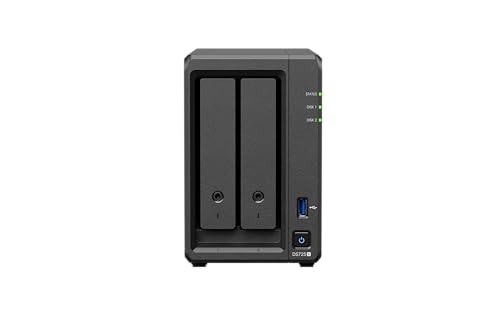
Each unit has two bays for 3.5-inch SATA drives. That is usually enough for photos, computer backups and home movies. The drives are bought separately, because the NAS is sold without them.
Matching capacity matters because the array sizes itself to the smaller drive. A larger drive next to a smaller one simply goes to waste.
DSM 7.3, third-party drives and M.2 slots
The most common worry is whether a non-Synology drive is safe in this NAS. On the 2025 Plus models, Synology first limited pool creation to drives on its compatibility list. Since DSM 7.3 (October 2025), third-party HDDs and SATA SSDs can be used for a new pool again, as long as they are not flagged as incompatible. DSM may show a warning, but with a NAS CMR drive from the compatibility list there is no reason to panic.
The two M.2 2280 NVMe slots are a different story. Pools and cache on M.2 drives still require drives from Synology's list. If you plan to use an SSD cache, check the list before you buy.
For the DS725neo+, Synology does not publish a separate drive policy. Before buying, check the compatibility list and update DSM to the latest version.
Fun fact: The DS725neo+ has the same processor and chassis as the DS725+, but its memory has no ECC error correction.
Below, we have collected NAS CMR drives for 24/7 operation, picked by capacity and noise level.
Our recommended drives for Synology DS725+ and DS725neo+

1. WD Red Pro 16TB NAS HDD
On sale3.5 inch · 16 TB · CMR · 7200 RPM
The more powerful WD series for NAS units with more drives: 16 TB, CMR recording and 7200 RPM. For people who want a lot of space right away and use their NAS for work.

2. WD Red Plus 12TB NAS HDD
3.5 inch · 12 TB · CMR · 7200 RPM
The higher-capacity option in the WD Red Plus series: 12 TB per drive, CMR recording and 7200 RPM. It runs louder than the smaller models in this series, but it gives you a lot of space in a single bay.

3. WD Red Plus 8TB NAS HDD
3.5 inch · 8 TB · CMR · for NAS
The best-selling NAS drive in this roundup. CMR recording, 24/7 operation and a slower spin speed, so it runs quieter than 7200 rpm drives. A safe choice for photos, computer backups and movies at home.
RAID 1 in plain English and how many TB to pick
RAID 1 on two drives works like a mirror. You get the capacity of one drive, and the second holds an exact copy. If one drive fails, the NAS keeps running on the other while you replace the dead one.
With more drives, the math changes. RAID 5 on four drives gives you the capacity of three and survives one drive failure. RAID 6 on four drives gives you the capacity of two and survives two failures.
RAID is not a backup. A deleted file or data encrypted by ransomware disappears from all drives at once, because the mirror copies mistakes too. Keep your important photos on a portable USB-C SSD as well, or in a second location away from home.
Here's how to count capacity: two 8 TB drives in RAID 1 give you 8 TB of usable space. Two 6 TB drives give you 6 TB, and two 4 TB drives give you 4 TB. If your NAS will mostly hold family photos and backups of a few computers, a smaller capacity is usually enough. If you plan to store movies and an archive for years, get the biggest drives you can afford.
5400 or 7200 RPM, and expanding with the DX525
7200 RPM drives are faster, but louder than 5400-5640 RPM drives. If your NAS sits in a living room or in a room where you sleep or work, slower drives will be quieter. Faster drives make sense when you keep active work on the NAS, not just backups, and it sits in a hallway, closet, or basement.
Check the warranty too. In the drive lines we know from the market, the stronger Pro series has a 5-year warranty, while the popular standard series has 3 years.
When the two drives fill up, you don't have to buy a new NAS. You can add a DX525 expansion unit, which adds more bays. For it, also buy CMR NAS drives, ideally the same capacity as in the main unit.
Fun fact: with a DX525 expansion unit, the two-bay DS725+ can handle seven drives.
Our advice: buy two CMR NAS drives of the same capacity, set up RAID 1 or SHR, and when you run out of space, add a DX525.
Frequently asked questions about drives for the DS725+
Which drives for the Synology DS725+?
Two CMR NAS drives of the same capacity, in RAID 1. Avoid SMR drives and ordinary desktop drives. Also install DSM 7.3 or later.
Does the DS725+ require Synology drives?
No. Since DSM 7.3, third-party HDDs and SATA SSDs can be used for a new storage pool, as long as they aren't marked as incompatible. DSM may show a warning. Storage pools and cache on M.2 drives still require drives from Synology's list.
How much space do two drives in RAID 1 give in the DS725+?
The same as one drive. The second holds the mirror copy. So two 8 TB drives give you 8 TB of usable space.
Is the DS725neo+ different from the DS725+?
Not much. The bays, networking, and enclosure are the same. You choose drives the same way, but Synology doesn't publish a separate drive policy for the neo+, so check the compatibility list.
Can the DS725+ be expanded with more drives?
Yes, with the DX525 expansion unit. You connect it to the NAS when two bays are no longer enough. You still buy the drives separately.
See also
- Best drives for Synology DS925+ and DS925neo+ - HDD, M.2 and DSM 7.3
- Best drives for Synology DS425+ - four HDDs, RAID 5 and DSM 7.3
- Best Drives for UGREEN DH2300 - Two HDDs up to 60 TB and RAID 1
Sources
- Synology: DiskStation DS725+ - manufacturer page (synology.com)
- Synology: DiskStation neo+ Series lineup - manufacturer page (synology.com)
- Synology Knowledge Center: Drive compatibility policies - manufacturer page (kb.synology.com)
- NAS Compares: Synology DSM 7.3 NAS - full details on HDD and SSD support - industry article (nascompares.com)
- TechRadar: Synology now allows 3rd party HDDs - industry article (techradar.com)
- iFeelTech: Synology DS725+ review - industry article (ifeeltech.com)
- Need To Know IT: Synology DS925+ vs DS725+ - industry article (needtoknowit.com.au)
- Android Central: Best long-lasting hard drives for a Synology NAS - industry article (androidcentral.com)
- WunderTech: Best Synology NAS hard drives - industry article (wundertech.net)


Leave a comment
This site is protected by hCaptcha and the hCaptcha Privacy Policy and Terms of Service apply.