








As an Amazon Associate I earn from qualifying purchases.
Quick answer: our top pick is WD Red Plus 8 TB (3.5" · 8TB · CMR · NAS drive).
Best hard drives for UGREEN DXP4800 GT? Short answer
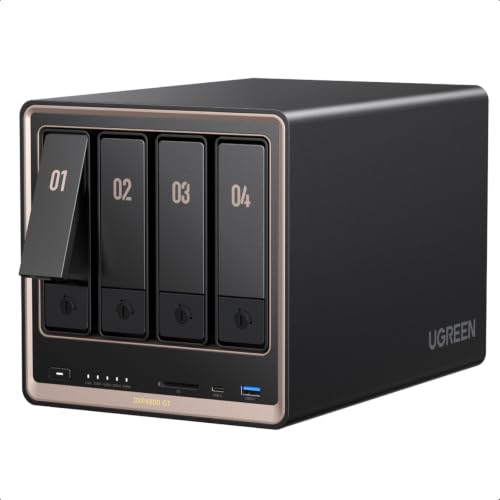
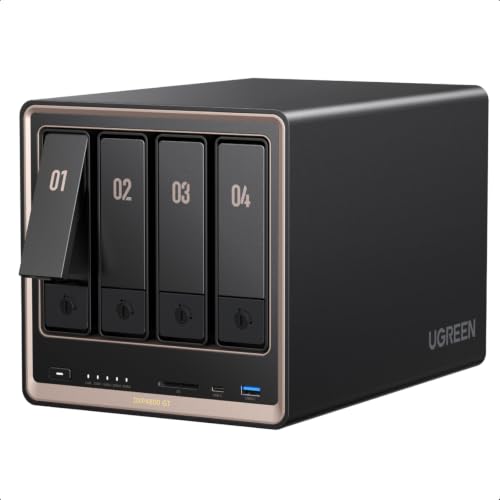
For the UGREEN DXP4800 GT, buy four 3.5-inch NAS drives of the same capacity, for example WD Red Plus, Seagate IronWolf or Toshiba N300. Every bay should hold the same drive.
You only need to add an NVMe drive for cache if you often read the same files from the NAS. If you mainly store photos, videos and backups from your computers, hard drives alone are plenty to start with.
The NAS is sold without drives, so you choose everything from scratch. The UGOS Pro system runs from built-in eMMC storage, so it doesn't take up any bay. Check the UGREEN compatibility list before you buy.

How many TB and how many drives to buy
The DXP4800 GT has four SATA 6 Gb/s bays for 3.5-inch and 2.5-inch drives, up to 32 TB per bay. In a RAID, the drives should have the same capacity, because the array calculates space based on the smallest one. A larger drive in a mixed set simply goes to waste.
The supported modes are Basic, JBOD, RAID 0, 1, 5, 6 and 10. Here is what they mean in practice:
- RAID 1: two drives hold the same data. You get the space of one drive, and the array survives the failure of one of them.
- RAID 5: from three drives, with the space of one drive used for protection. Four 16 TB drives give about 48 TB and survive the failure of one drive.
- RAID 6: the space of two drives goes to protection, so with four drives you keep half of the capacity. The array survives the failure of two drives.
- RAID 10: four drives in mirrored pairs, leaving half of the space. It is fast and gives you extra safety.
For most home uses, RAID 5 on four drives is a sensible choice. If you want a larger safety margin, choose RAID 6 or RAID 10.
Most important: RAID is not a replacement for a backup. It protects against a drive failure, but not against deleted files, a virus or a fire. Keep your important data in a second place as well.
For reference: PCWorld measured four WD Red Plus 2 TB drives in RAID 5 and got 340 MB/s write and 430 MB/s read. That is enough for everyday work with files. The maximum you can fit in the NAS is 144 TB (4 x 32 TB and 2 x 8 TB on M.2), but at home that is rarely needed.
Below we have collected the drives that suit the DXP4800 GT. We chose them based on what PCWorld lists, as well as on capacity and rotational speed.

Recommended drives for UGREEN DXP4800 GT
1. WD Red Plus 8 TB
3.5" · 8TB · CMR · NAS drive
A popular NAS drive with CMR recording and a 5,400 RPM speed, so it runs quieter than 7,200 RPM drives. PCWorld reviewed the DXP4800 GT with WD Red Plus drives.
2. Seagate IronWolf 8 TB
3.5" · 8TB · 24/7 use · NAS drive
A NAS drive built for 24/7 use with CMR recording. PCWorld names the IronWolf as a cheaper option for the DXP4800 GT.

3. Toshiba N300 8 TB
3.5" · 8TB · 7,200 RPM · 512MB
A faster NAS drive: 7,200 RPM and 512MB of cache. It helps when several people use files at once, but it's louder. PCWorld names the N300 as a cheaper option.

4. Seagate IronWolf Pro 16 TB
3.5" · 16TB · 7,200 RPM · CMR
For anyone who wants lots of space from day one: 16TB per bay, 7,200 RPM and CMR. Four of them in RAID 5 give about 48TB, but they're louder than 5,400 RPM drives.

5. WD Red SN700 1 TB (M.2 NVMe)
M.2 2280 · NVMe PCIe 3.0 · NAS · cache
An M.2 SSD built for NAS use, on PCIe 3.0, the same standard as the DXP4800 GT slots. A faster PCIe 4.0 drive adds nothing here, since the slots top out at about 2 GB/s.
5400 or 7200 RPM and noise at home
Lower-speed drives, such as the WD Red Plus, run more quietly. 7200 RPM drives, such as the Toshiba N300 or Seagate IronWolf Pro, are faster with several simultaneous users, but they are clearly more audible.
According to Club386 measurements, the NAS produces 33 dBA at idle and 38 dBA under load. PCWorld notes that when data is being accessed, the drives are clearly louder than the fan. So it is the drives that decide how loud the room will be.
If the NAS sits in a living room or office, choose the slower speed. If it sits in a cabinet or hallway and several people open files at the same time, 7200 RPM makes sense.
Fun fact: bays 1 and 2 in the DXP4800 GT accept not only SATA drives, but also server-grade U.2 drives.
M.2 slots: cache or a separate pool
The DXP4800 GT has two M.2 2280 NVMe slots, up to 8 TB each. According to Club386, they are located on the underside of the case. You can use them as a read cache or as a separate, fast pool.
A read cache speeds up access to files you open often. A separate pool makes sense when you want to keep, for example, databases or projects you work with every day on an SSD.
A fast PCIe 4.0 drive will not show its full speed here, and it costs more. A good choice is a NAS drive with the PCIe 3.0 standard, for example the WD Red SN700.
Fun fact: the slots are PCIe 3.0 x2, so even the fastest NVMe drive will deliver at most about 2 GB/s in them.
DXP2800 GT in brief
The DXP2800 GT version has two bays and up to 80 TB. The selection rules are the same: two identical NAS drives, and RAID 1 gives you the capacity of one of them and protects against the failure of one drive.
Frequently asked questions about drives for the DXP4800 GT
Which drives for the UGREEN DXP4800 GT?
3.5-inch NAS drives of the same capacity, for example the WD Red Plus, Seagate IronWolf or Toshiba N300. Optionally, add an M.2 NVMe PCIe 3.0 drive for cache. Before buying, check the UGREEN compatibility list.
Does the UGREEN DXP4800 GT come with drives included?
No. The NAS is sold without drives, so you buy the drives separately. The UGOS Pro system runs on built-in eMMC memory and does not take up a bay.
What is the maximum drive size the DXP4800 GT supports?
Up to 32 TB per SATA bay and up to 8 TB per M.2 slot. Altogether, that gives up to 144 TB.
Is it worth adding an M.2 drive for cache in the DXP4800 GT?
Yes, if you often read the same files. With an ordinary archive of photos and videos, you may not notice a difference. The slots are PCIe 3.0 x2, so do not buy the most expensive PCIe 4.0 drive.
Which RAID should I choose in the DXP4800 GT?
With four drives, RAID 5 is most often chosen, because you keep the capacity of three drives. RAID 6 and RAID 10 give a larger safety margin at the cost of half the capacity. Remember that RAID is not a substitute for a backup.
See also
- Best RAM for UGREEN DXP4800 GT - DDR4 SO-DIMM, how many GB and whether you need ECC
- Best UPS for UGREEN NAS - US3000 or classic APC
Sources
- UGREEN: NASync DXP4800 GT 4-bay NAS - manufacturer page (ai.ugreen.com)
- PCWorld: UGREEN DXP4800 GT review - industry article (pcworld.com)
- Club386: UGREEN NASync DXP4800 GT review - industry article (club386.com)
- NASCompares: UGREEN DXP4800GT and DXP2800GT, before you buy - industry article (nascompares.com)


Leave a comment
This site is protected by hCaptcha and the hCaptcha Privacy Policy and Terms of Service apply.