








As an Amazon Associate I earn from qualifying purchases.
Quick answer: our top pick is KICKDOT wireless phone controller (Bluetooth · extendable · Hall effect sticks).
Best controller for iPhone Duo? A telescoping Bluetooth pad or a regular pad and a stand
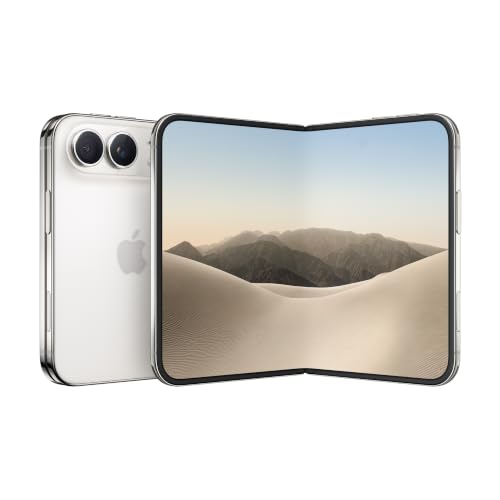
An open iPhone Duo works with a Bluetooth pad that extends wider than 164.6 mm (6.5 inches), or with a regular console pad and a phone stand. Both options work, just in different situations.
At home, the pad you already own is enough. Apple confirms that iPhone connects over Bluetooth to Xbox, PlayStation and other Bluetooth pads. You put the phone on a stand or lay it open on a table, and hold the pad in your hands like you would with a console.
On the go, a pad with grips on both sides of the phone works better. You get on a train, unfold the iPhone, clamp the pad on and play without hunting for a table. Some of these pads fold down small enough to fit in a bag.
Why a regular phone pad might not fit
Most pads with grips were made for a single screen. An open iPhone Duo is 164.6 mm (6.5 inches) wide, so the pad has to extend even further. If the gap between the grips is too small, the pad simply won't fit around the phone.
Manufacturers list the maximum device width a pad can hold. Look for that number in the description and compare it with the width of the open phone, not the screen diagonal. With values well above 164.6 mm (6.5 inches), you have room to spare for a case and some slack.
The second issue is the plug. USB-C pads slide into the phone's port, and on an open iPhone Duo you need to check where that port ends up. The maker of one telescoping USB-C pad lists compatibility with devices up to 8 inches, but that doesn't settle whether the plug will line up with the port.
We picked pads based on how they connect to the phone and how wide they extend.
Our recommended controllers for iPhone Duo

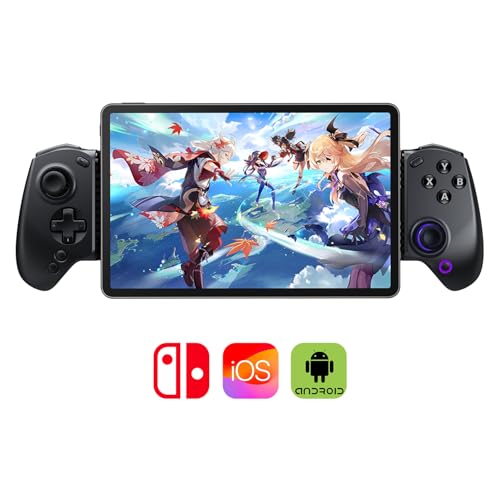
1. KICKDOT wireless phone controller
Bluetooth · extendable · Hall effect sticks
An extendable Bluetooth pad with Hall effect sticks and extra buttons on the back. The manufacturer describes it for iPhone, Android and iPad mini.
2. abxylute S8 (Bluetooth)
Bluetooth · foldable · phones and tablets
A foldable Bluetooth pad with Hall effect sticks, which the manufacturer describes as compatible with phones, iPad and Switch.

3. Xbox Wireless Controller
Bluetooth · AA batteries · also works with a computer
The standard Xbox pad, which connects to your phone and tablet over Bluetooth. The phone sits next to it on a stand, and you use the same pad with your console and computer too.
Bluetooth or USB-C
You pair a Bluetooth controller once, and after that it connects on its own. It has its own battery, so you need to charge it now and then, but your phone doesn't have to carry anything. The choice of models is bigger, because regular console controllers work too.
Fun fact: Bluetooth controllers skip the plug problem, because you don't have to hit the USB-C port of an unfolded phone.
A USB-C controller has no battery and supports pass-through charging, so your phone can top up while you play. That's handy for longer sessions. There's one condition: the plug has to line up with the port. According to Windows Central, one manufacturer's expandable USB-C controller works with USB-C phones and tablets running iOS 18 or later, so check the system requirements too.
A regular controller with a phone stand doesn't depend on width or port. It does need more room, because the phone sits separately. For someone who mostly plays at home, it's often the simplest route.
Our advice: if you want to play with the phone in your hands, go for an expandable Bluetooth controller. Choose a USB-C controller only if the manufacturer clearly confirms it will fit around an unfolded iPhone Duo and reach the plug.
Cases and playing with the phone folded
A thick case can ruin the whole plan. The controller clamps onto the sides of the phone, and an extra layer can take up the few millimeters you need for the grips to snap shut. Take the case off for gaming or pick a thin one.
Fun fact: the unfolded iPhone Duo is only 0.2 inches (5.2 mm) thick, so the controller grips hold a very thin slab, not a block.
When you play with the phone folded, you can use a Bluetooth controller without worrying about the port. If you're considering a controller with clamp grips, check the listing for the width range it covers and where the plug sits. Without that information, don't assume the controller fits both modes.
Frequently asked questions about controllers for iPhone Duo
Which controller fits an unfolded iPhone Duo?
Most likely an expandable Bluetooth controller that supports devices wider than 6.48 inches (164.6 mm). The other option is a regular Bluetooth controller with a phone stand. Check the maximum width in the manufacturer's listing.
Does iPhone Duo work with Xbox and PlayStation controllers?
Yes. Apple says iPhone connects over Bluetooth to Xbox, PlayStation and other Bluetooth controllers. Put the phone on a stand or unfold it on a table.
Will a USB-C controller work with iPhone Duo?
It might, but nothing is certain up front. The controller has to extend wider than the phone, and the plug has to line up with the port of the unfolded device. Read the manufacturer's listing carefully before you buy.
How wide is an unfolded iPhone Duo?
According to Apple's specs, the unfolded iPhone Duo is 6.48 inches (164.6 mm) wide and 4.64 inches (117.8 mm) tall. The inner display is 7.6 inches. An expandable controller has to span at least that width.
Can a controller fit iPhone Duo in a case?
It depends on the case thickness and the controller design. A thick case may keep the grips from clamping shut. The safest option is to take the case off while you play or use a thin one.
See also
- Best Monitor for iPhone Duo - USB-C, 4K and What the Screen Shows
- Best power bank for iPhone Duo - 25 W MagSafe or a 60 W cable
- Apple Pencil for iPhone Duo - only the USB-C model works, not the Pencil Pro
- Best controller for iPhone 18 Pro - USB-C or Bluetooth, and what about your case
Sources
- Apple: iPhone Duo technical specifications - manufacturer page (apple.com)
- Apple: Connect a wireless game controller - manufacturer page (support.apple.com)
- iThinkDifferent: Best iPhone Duo game controllers - industry article (ithinkdiff.com)
- Windows Central: Razer Kishi V3 Pro review - industry article (windowscentral.com)
- Tom's Guide: Best mobile game controllers - industry article (tomsguide.com)
- 9to5Toys: Gear for iPhone Duo - industry article (9to5toys.com)

Leave a comment
This site is protected by hCaptcha and the hCaptcha Privacy Policy and Terms of Service apply.