








As an Amazon Associate I earn from qualifying purchases.
Quick answer: our top pick is Apple Pencil (USB-C) (only one that works with iPhone Duo · both screens · USB-C).
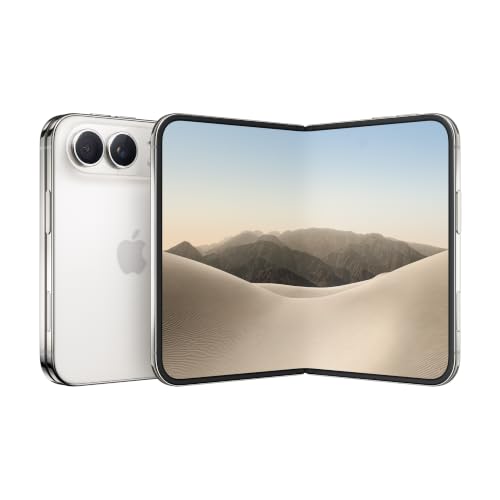
Apple Pencil for iPhone Duo? Only Apple Pencil (USB-C)
Only the Apple Pencil (USB-C) works with iPhone Duo. No other Apple stylus model is compatible with it, so the Apple Pencil Pro, Apple Pencil 2 and Apple Pencil 1 are out.
There is one more condition: stylus support is only added by iOS 27.2. 9to5Mac announced its release for around October 26, so before you use it for the first time, check in the settings that you have this version of the system or a newer one.
The stylus is not included. In the iPhone Duo box you will find the phone and a 1 m USB-C cable, and you buy the stylus separately.

What works with the stylus on iPhone Duo and what is missing
The stylus works on both screens, the inner and the outer one. So you can take notes on the unfolded phone, but also quickly jot something down on the outer screen.
In the settings you will find a palm rejection option. Thanks to it, you can rest your hand on the screen while writing, and the phone will not interpret it as a touch.
You do need to know what this stylus lacks, though. The Apple Pencil (USB-C) has no pressure sensor, so the line thickness does not change with how hard you press. It also has no double tap or squeeze.
Engadget adds that on iPhone Duo there is also no haptic feedback and no Find My support. For notes, signing documents and sketches, that is enough. For a refined drawing with shading, you will miss it.
Fun fact: according to an Apple footnote, the hover function, that is, a preview above the screen without touching it, does not work with the Apple Pencil (USB-C) on iPhone Duo.
Below we show the only stylus that Apple allows to work with iPhone Duo. We chose it based on the compatibility information for this phone.
The recommended pencil for iPhone Duo
1. Apple Pencil (USB-C)
only one that works with iPhone Duo · both screens · USB-C
The only Apple Pencil that works with the iPhone Duo, on both the inner and outer screens. It pairs and charges over a USB-C cable and only sticks to the phone's hinge. No pressure sensitivity, double-tap or squeeze.
Pairing and charging step by step
Both pairing and charging are done with a USB-C cable. The one you get in the iPhone Duo box is enough.
- Make sure your phone has iOS 27.2 or later.
- Slide the port cover on the stylus. The USB-C port is hidden underneath.
- Connect the cable to the stylus and the other end to the USB-C port on the iPhone Duo.
- Wait until the phone detects the stylus and finishes pairing.
The same cable and the same port are then used for charging. When the stylus stops responding, connect it the same way as for pairing.
Fun fact: Apple Pencil attaches magnetically to the hinge of the iPhone Duo, but it does not charge there (MacRumors).
I already have an iPad stylus: which one will work
If you have an Apple Pencil (USB-C) for your iPad, it will also work with the iPhone Duo. You just need to pair it again, using a USB-C cable, as we described above.
If you have an Apple Pencil Pro or an Apple Pencil 2, you can't use it with the iPhone Duo. The same goes for the first-generation Apple Pencil.
Apple has not given a reason why the Pencil Pro does not work. MacRumors and Engadget speculate that the cause is the lack of a magnetic surface for attaching and charging the stylus. This is only a guess, not confirmed information from the manufacturer.
In practice, if your stylus charges magnetically on the side of the iPad, you will need to buy an Apple Pencil (USB-C) for the iPhone Duo. The sources are silent about styluses from other brands, so we do not settle whether they work with this phone.
Most common questions about the iPhone Duo stylus
Which stylus works with the iPhone Duo?
Only the Apple Pencil (USB-C). It works on the inner and outer screen, but it has no pressure sensor, double tap or squeeze. No other Apple stylus model is compatible with this phone.
Does the Apple Pencil Pro work with the iPhone Duo?
No. MacRumors confirms that the Pencil Pro, Pencil 2 and Pencil 1 do not work with the iPhone Duo. Apple has not given a reason, and the media speculate that the phone has no magnets for attaching and charging the stylus.
How do I pair an Apple Pencil with the iPhone Duo?
Slide the port cover on the stylus and connect it to the phone with a USB-C cable. The cable from the iPhone Duo box is enough. The phone must have iOS 27.2 or later.
Does the Apple Pencil charge on the iPhone Duo hinge?
No. The stylus attaches there magnetically, but it only stays in place. You charge it with a USB-C cable, the same one you use to pair it.
From which iOS version does the iPhone Duo support the Apple Pencil?
Stylus support is added by iOS 27.2. 9to5Mac announced its release for around October 26. If the stylus won't pair, start by checking the system version.
Sources
- Apple: iPhone Duo technical specifications - manufacturer page (apple.com)
- MacRumors: Using an Apple Pencil with the iPhone Duo - industry article (macrumors.com)
- 9to5Mac: iPhone Duo adding Apple Pencil support with iOS 27.2 - industry article (9to5mac.com)
- Engadget: Can you use an Apple Pencil with an iPhone? - industry article (engadget.com)
- Daring Fireball: iPhone Duo only works with the USB-C Apple Pencil - industry article (daringfireball.net)

Leave a comment
This site is protected by hCaptcha and the hCaptcha Privacy Policy and Terms of Service apply.