








As an Amazon Associate I earn from qualifying purchases.
Quick answer: our top pick is Backbone One (2nd gen, USB-C) (USB-C · pass-through charging · headphone jack).
Best controller for iPhone 18 Pro? The short answer
You're on a train, and the on-screen buttons cover half the game. Your thumbs keep missing. Which controller for iPhone 18 Pro? For gaming on the go, get a telescoping USB-C controller. If you also play on a tablet or computer, get a Bluetooth controller.
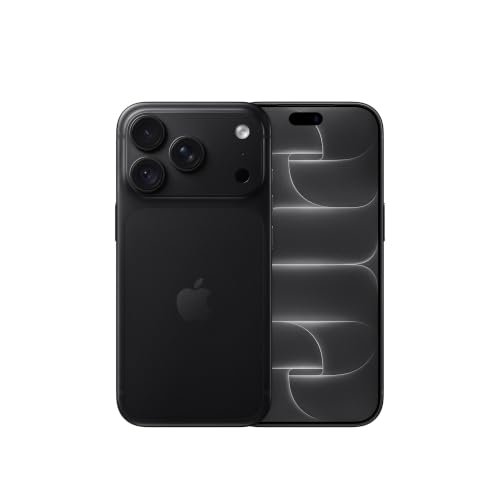
The iPhone 18 Pro and 18 Pro Max have been on sale since September 2026 and have a USB-C port, so controllers with a USB-C plug connect straight to the phone. This kind of controller grips the phone on both sides and turns it into a small handheld console. There's nothing to pair.
A Bluetooth controller works differently: the phone sits on a stand next to you, and you hold a regular controller. It takes up more room, but the same controller works with more devices.
There's a separate article for iPhone Duo.
USB-C or Bluetooth: which to pick for iPhone 18 Pro
USB-C controllers have one big advantage: you launch a game and play. No pairing, no battery to keep an eye on, and latency is low. Most also offer pass-through charging, so you can plug in a charger while you play.
There's one downside, and it's a specific one: plug fit and cases. We cover that below.
Bluetooth controllers work with a phone, a tablet and a Mac, so one controller does the job in several places. They do have their own battery, or AA batteries you have to remember to replace.
- Telescoping USB-C controller: for anyone who mostly plays on a phone, on a train, in a line or on the couch.
- Bluetooth controller: for anyone who also plays on a tablet or computer and doesn't mind the phone sitting on a stand.
- Controller with tablet support: some telescoping models also fit small tablets, which helps when the phone isn't your only screen.
Fun fact: an iPhone also connects to a regular Xbox or PlayStation controller over Bluetooth.
Below, we've grouped controllers by how they play on an iPhone: telescoping USB-C models and a classic Bluetooth controller you can pair with your phone. Descriptions and specs come from the manufacturers. If you're buying just one: get a telescoping USB-C controller if you mostly play on the go, and a Bluetooth controller if the same one also has to work with a tablet and a computer.
Controllers for iPhone 18 Pro we recommend

1. Backbone One (2nd gen, USB-C)
USB-C · pass-through charging · headphone jack
A controller that wraps around the phone from the sides and connects over USB-C. Backbone describes the USB-C version as compatible with new iPhones and Android. It has pass-through charging and a headphone jack.

2. GameSir X5 Lite
USB-C · extendable · Hall sticks
A simple USB-C controller with Hall sticks. GameSir lists compatibility with Android phones and iPhones with USB-C.

3. Backbone Pro
USB-C and Bluetooth · rear buttons
A more powerful Backbone model with larger sticks and rear buttons. It works over USB-C or over Bluetooth with a tablet and computer.
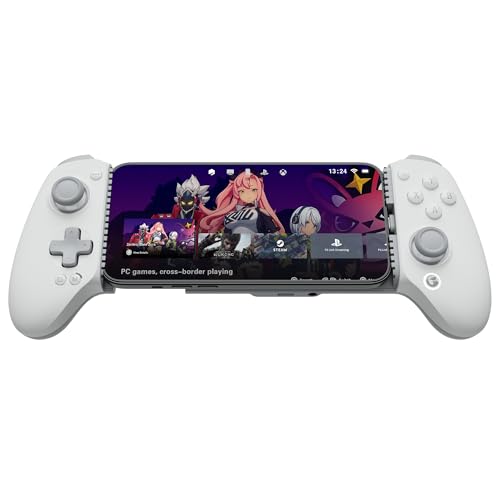
4. GameSir G8 Plus MFi (USB-C)
USB-C · MFi certified · extendable
The USB-C version of the G8 Plus with a movable connector and Apple MFi certification according to the manufacturer. It has Hall sticks and pass-through charging.

5. Xbox Wireless Controller
Bluetooth · AA batteries · also works with a computer
The standard Xbox pad, which connects to your phone and tablet over Bluetooth. The phone sits next to it on a stand, and you use the same pad with your console and computer too.
Cases and the camera bump: where controllers most often don't fit
A telescopic controller has a USB-C plug that goes into the bottom edge of the phone. With the phone in a case, the plug often can't reach the port, or the clamps won't close. The simplest fix is to take the case off while you play.
Fun fact: The iPhone 18 Pro is 8.75 mm thick, so with a telescopic controller the case usually decides the fit more than the phone does.
The second thing to check is the camera bump. On the iPhone 18 Pro it's large, so some makers add rubber inserts to their controllers to hold the phone level. If you use a thick case, check the controller's listing to see how much room the clamp leaves. If the maker doesn't say, it's safer to assume the case has to come off.
The fit also matters the first time you use it. Slide the phone in, check that the cameras aren't pressing against any part of the controller, and only then start playing. A clamp that squeezes the camera bump quickly gets uncomfortable.
A Bluetooth controller doesn't have this problem. The case stays on the phone because nothing clamps onto it.
Charging while you play, and headphones
A USB-C controller without a battery draws power from the phone, so it never needs charging itself. The phone drains the way it does in any long gaming session. That's why pass-through charging matters here: the controller has a second USB-C port where you plug in a charger or a power bank.
You notice the difference in real use. Say you're on a train and the phone's battery is low. With a controller that has no pass-through charging, you have to stop playing, take the phone out and plug in a cable. With pass-through charging, you plug in a power bank and keep playing without removing anything.
A Bluetooth controller works the other way around. The phone's USB-C port stays free, so you charge the phone with an ordinary cable. The controller itself has a battery, though, which you also need to charge or replace.
With a USB-C controller, the plug takes up the port, so connecting wired headphones can be awkward. Some controllers have a 3.5 mm headphone jack, which solves it. If you use wireless headphones, the problem doesn't exist at all.
Frequently asked questions about controllers for the iPhone 18 Pro
Does the iPhone 18 Pro work with a USB-C controller?
Yes. The iPhone 18 Pro has a USB-C port, so you can plug telescopic controllers straight in. Check the listing to see whether the maker confirms compatibility with the newer iPhones. Some models also come in versions for older connectors, which you don't need here.
Does a controller for the iPhone 18 Pro work with a case on?
Usually not, or at least not with a thick one. The plug has to reach the port, and the clamps have to close. Check the controller's listing to see whether the maker allows for a case, or take the case off while you play.
Can you connect an Xbox controller to the iPhone 18 Pro?
Yes. Pair it in the Bluetooth settings and put the phone on a stand in front of you. It's a good option if you already use the same controller with a console or a computer.
Does a USB-C controller need charging?
A telescopic USB-C controller usually has no battery of its own and draws power from the phone. Many models do have pass-through charging, so you can charge the phone while you play. A Bluetooth controller needs its own battery or AA batteries.
Does the same controller fit the iPhone 18 Pro Max?
Telescopic controllers are adjustable, so they can often handle both models. The extension range and the clamp differ between makers, though, so check the listing to see whether the Pro Max is named. A Bluetooth controller doesn't have this problem, because the phone sits separately.
See also
- Best Controller for iPhone Duo - Bluetooth or Extendable to 165 mm
- Best gimbal for iPhone 18 Pro and Pro Max - DJI Osmo Mobile 8 or a cheaper one
- Best wireless microphone for iPhone 18 Pro and 17 Pro - with USB-C receiver
- Best power bank for iPhone 18 Pro - 25 W Qi2.2 or 45 W wired
Sources
- Apple: iPhone 18 Pro technical specifications - manufacturer page (apple.com)
- Apple: Connect a wireless game controller - manufacturer page (support.apple.com)
- Razer: the new Kishi V3 lineup - manufacturer page (razer.com)
- Tom's Guide: Best mobile game controllers - industry article (tomsguide.com)
- GamesRadar: Best mobile controller - industry article (gamesradar.com)
- iMore: Best game controllers for iPhone - industry article (imore.com)
- Windows Central: Razer Kishi V3 Pro review - industry article (windowscentral.com)

Leave a comment
This site is protected by hCaptcha and the hCaptcha Privacy Policy and Terms of Service apply.