








As an Amazon Associate I earn from qualifying purchases.
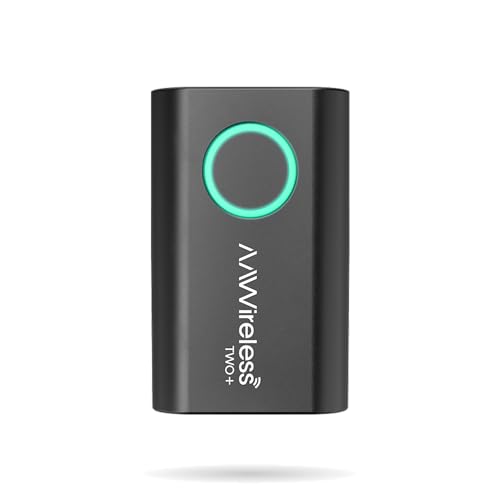
Quick answer: our top pick is AAWireless Two+ (CarPlay and Android Auto · button · app).
Best adapter for wireless CarPlay and Android Auto? In short: which one when
If several different phones are used in your car, or you want settings in an app, pick an AAWireless adapter with a button for switching between phones. If you want the smallest and usually the cheapest option, get the Carlinkit Mini Ultra 3. The Ottocast Mini 3.0 is a small, popular 2-in-1 adapter that does the same thing as the rest.
If only Android phones are used in your car, the older AAWireless Two is enough, as it supports only Android Auto. It won't work with an iPhone.
All three families of adapters do essentially the same thing: they turn the wired connection to your car's stereo into a wireless one. They differ in how they handle multiple phones, how they are updated, and in size.
First, check your car and phone
An adapter only works in a car or stereo that already has factory CarPlay or Android Auto over a USB cable. If your car doesn't have this feature, an adapter won't change that.
The reverse also applies. A car with factory wireless CarPlay doesn't need an adapter.
You plug the adapter into the USB port you currently use to connect your phone with a cable. So check whether that port is USB-A or USB-C. The Carlinkit Mini Ultra 3 has a USB-A plug and comes with a USB-C adapter in the set. The AAWireless adapter has a USB-C connector and a USB-C to USB-A cable.
Then check your phone. Android Auto requires Android 11 or newer. For CarPlay with the AAWireless adapter, you need an iPhone X or newer. Carlinkit lists an iPhone 6 or newer with iOS 10.
The phone must also support 5 GHz Wi-Fi, because that is how the adapter connects wirelessly.
Below we've gathered adapters for wireless CarPlay and Android Auto. We chose them based on how they handle phones, how they are updated, and how small they are.

Wireless CarPlay and Android Auto adapters we recommend

1. AAWireless Two+
CarPlay and Android Auto · button · app
Adapter that turns wired CarPlay and Android Auto into a wireless setup. It has a button for pairing and switching phones, plus an app for updates. Requires an iPhone X or newer, or Android 11.
2. Ottocast Mini 3.0
CarPlay and Android Auto · very small
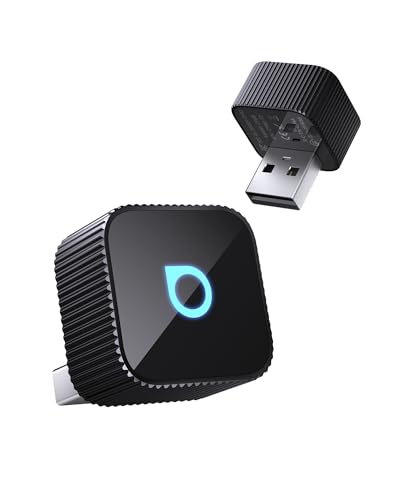
Small 2-in-1 adapter for CarPlay and Android Auto, sold as Mini 3.0, Mini Slim or Mini Cube 3.0 depending on where you buy it. Works in a car that has wired CarPlay or Android Auto.
3. Carlinkit Mini Ultra 3
CarPlay and Android Auto · 7 g · cheapest
The smallest and lightest of the three adapters, weighing 7 g. It supports CarPlay and Android Auto, and you install updates through a web page in your phone's browser.

4. AAWireless Two (Android Auto only)
Android Auto only · previous model
The previous AAWireless model, which supports only Android Auto. It makes sense if only Android phones ride in your car; it won't work with an iPhone.
How these adapters differ
Two phones and a button
The AAWireless adapter has a single button. Hold it for 2 seconds to pair a new phone. MobileSyrup points out that one adapter can handle two phones, even ones running different operating systems. That's handy when you have an iPhone and your partner has an Android phone.
Carlinkit connects on its own when you start the car. That's enough for everyday driving with one phone, but there's no button for switching between phones.
Fun fact: on the newer AAWireless adapter, a single click of the button switches the car to the next paired phone (EFTM).
App and updates
AAWireless has an app for settings and software updates. You do everything from your phone, in one place.
Carlinkit has no app. You install updates by entering a web address in your phone's browser. If you don't like digging through settings, it makes no difference, since you rarely need to touch them anyway.
Size and connector
The Carlinkit Mini Ultra 3 is the smallest and lightest of the three. It weighs 7 g and barely sticks out of the port. The AAWireless adapter measures 2.2 x 1.4 x 0.6 in and weighs 18 g, so it's small too, but larger than the Carlinkit.
The Ottocast Mini 3.0 is a small 2-in-1 adapter. The same product family is sold under different names in different countries, such as Mini 3.0 Slim, Mini Slim or Mini Cube 3.0, so check the product description when buying, not just the name.
Fun fact: the Carlinkit Mini Ultra 3 draws only 0.75 W (manufacturer data).
The older AAWireless Two
The previous AAWireless model supports only Android Auto. It makes sense if only Android phones ride in your car. If there's even one iPhone in the family, look for the newer version.
What to expect day to day
The biggest change is battery life. When running wirelessly, your phone doesn't charge from the car's port, so it drains faster than it would on a cable (ArenaEV). On a longer trip, bring a car charger or plug the phone in separately.
Occasional glitches happen too. In ArenaEV's 3-week test, the controls on the car's radio stopped working twice when the app was in full-screen mode.
ArenaEV also notes that the Ottocast Mini Cube tends to run a little warm. Keep that in mind if the USB port is in a tight compartment.
MobileSyrup noticed no lag or loss of audio quality with the AAWireless adapter.
Frequently asked questions about the adapters
Which adapter is better: AAWireless, Ottocast or Carlinkit?
It depends on your needs. AAWireless has the most features for multiple phones, thanks to its button and app. Carlinkit is the smallest and usually the cheapest, and Ottocast is small and popular. If you only use Android phones, the AAWireless Two is enough.
Does a wireless CarPlay adapter work in every car?
No. The car or its head unit must come with factory CarPlay or Android Auto over a USB cable. A car without that feature gains nothing, and one with factory wireless CarPlay doesn't need an adapter.
Does the AAWireless Two support iPhone?
No. The previous AAWireless Two model supports only Android Auto. For an iPhone you need a newer adapter that also supports CarPlay.
Does wireless CarPlay drain the phone battery?
Yes, faster than on a cable. The phone doesn't charge from the car's port in that mode (ArenaEV). For a longer trip, a separate charger will come in handy.
Can one adapter handle two phones?
Yes, for example the AAWireless adapter. MobileSyrup confirms it can handle two phones, even ones with different operating systems. You pair a new phone with the button, then switch between them.
Related guides
- How to add CarPlay and Android Auto to an older car: head unit, screen or adapter
- Which cable for Apple CarPlay? The best choice for iPhone and cars
- Which USB cable for Android Auto? We recommend a good cable for Android Auto
Sources
- AAWireless: TWO+ product page - manufacturer page (aawireless.io)
- Carlinkit: Mini Ultra3 product page - manufacturer page (carlinkit.com)
- ArenaEV: AAWireless TWO+ review - industry article (arenaev.com)
- MobileSyrup: AAWireless TWO+ review - industry article (mobilesyrup.com)
- EFTM: AAWireless TWO+ review - industry article (eftm.com)

Leave a comment
This site is protected by hCaptcha and the hCaptcha Privacy Policy and Terms of Service apply.