








As an Amazon Associate I earn from qualifying purchases.
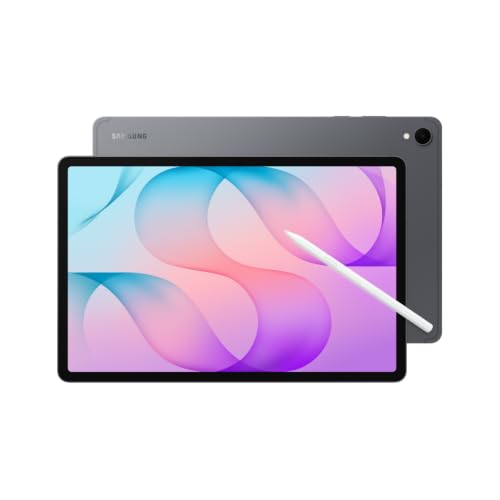
Quick answer: our top pick is Samsung Pro Keyboard Tab S12+ (Tab S12+ · POGO · trackpad · aluminium).
Which keyboard for Galaxy Tab S12+ and S12 Ultra?
The simplest choice is the original Samsung keyboard, which connects through the POGO pins on the back of the tablet. You can choose between the Pro Keyboard and the Book Cover Keyboard Slim, and the Pro Keyboard has a touchpad. The keyboard is not included in the box, and the Galaxy Tab S12+ (12.6 inches) and S12 Ultra (14.6 inches) have been on sale since October 7, 2026.
The S12 Ultra works with the same models as the S11 Ultra: the Pro Keyboard EF-DX935 and the Slim EF-DX930. If you already have one of these keyboards, you don't need to buy a new one.
If Samsung's S12+ offer isn't available in your country, you're left with third-party cases with a Bluetooth keyboard. They are a cheaper option, but they have their drawbacks, which we describe below. Samsung's S12+ offer is not available on Amazon in every market.


Pro Keyboard or Slim: touchpad, weight, protection, charging
The Pro Keyboard is an aluminum keyboard that you attach to the tablet through the POGO pins. You don't pair it over Bluetooth and you don't need to charge it. Samsung states that the touchpad in the S12+ version is 40% larger than in the previous model.
The S12 Ultra version has 81 keys and weighs 636 g. That's quite a lot, and it also doesn't protect the back of the tablet. If you carry your tablet in a backpack, you'll need a separate case.
The Book Cover Keyboard Slim is a case with a keyboard in one piece. For the Ultra it weighs 466 g and has no touchpad, so you control the cursor with your finger or a stylus. On the other hand, it has an AI key and DeX mode, and it connects through POGO, just like the Pro.
The Slim for the S12+ (EF-DX840) attaches with magnets, has LEDs for Caps Lock and Fn, and also has an AI key and DeX mode. With the case on, you can charge the tablet and use the S Pen. The screen turns off when you close the cover.
The practical takeaway: choose the Pro if you type a lot and want a touchpad. Choose the Slim if protecting the tablet matters more and you want one case for everything.

S12+ and S12 Ultra are different sizes, don't mix up the keyboards
Each Tab S12 model has its own keyboard. The Slim for the S12+ fits only the S12+, and for the Ultra you buy separate models, EF-DX935 and EF-DX930. Screen size matters here, so before you click "buy", check the model in the listing's title and description.
Third-party listings cause the most confusion. ROOFEI and VANKEYPAD list the numbers SM-X930 and X936 for the S12+, and some listings mention 12.9 inches, even though the Tab S12+ has 12.6 inches. We don't know whether this is a description error or whether the seller means a different device, so check the details in the listing and ask the seller if something doesn't add up.
We chose the products for this guide using one criterion: we show Samsung keyboards for the S12+ and for the S12 Ultra separately, and next to them third-party cases that you can buy when Samsung's offer is unavailable.

Recommended keyboards for Galaxy Tab S12+ and S12 Ultra
1. Samsung Pro Keyboard Tab S12+
Tab S12+ · POGO · trackpad · aluminium
Samsung's aluminium keyboard that connects through POGO pins on the back of the tablet, with no Bluetooth pairing. Samsung lists a trackpad 40% larger than the previous model. This is the first year the Pro Keyboard also comes in a Plus size.
2. Samsung Book Cover Keyboard Slim Tab S12+
Tab S12+ · 364 g · 13.4 mm · no trackpad
A one-piece keyboard cover, 13.4 mm thin and 364.4 g per Samsung. It has an AI key, DeX mode and a Caps Lock LED, and you can charge the tablet and use the S Pen with the cover on. It fits only the Tab S12+.
3. Samsung Pro Keyboard Tab S12 Ultra
Tab S12 Ultra and S11 Ultra · POGO · trackpad
Samsung's EF-DX935 aluminium keyboard, shared by the Tab S12 Ultra and S11 Ultra. It connects through POGO pins on the back, so there is no pairing or charging. It has 81 keys and weighs 636 g. It does not protect the back of the tablet.

4. StarBay keyboard case for Tab S12+
Tab S12+ · Bluetooth · trackpad · RGB backlight
A keyboard case for the 12.6-inch Tab S12+ with a trackpad and 7-colour backlight. It connects over Bluetooth, so you have one more battery to charge, in exchange for a much lower outlay than Samsung's keyboards.
Bluetooth cases: what you get, what you lose
Third-party cases connect to the tablet via Bluetooth and have their own battery. You have to charge them, and if they run out of power in the middle of work, you are left without a keyboard. Original POGO keyboards do not have this problem.
In return, you usually get more extras. ROOFEI and VANKEYPAD have a detachable keyboard and touchpad, and ROOFEI also has 7-color backlighting. VANKEYPAD has a DeX key and a stylus holder, but the S Pen is not included. A detachable keyboard is convenient when you want to use just the tablet with the case.
Watch out for compatibility in the listing title. The MicroTunk case for the S12 Ultra also lists the S11 Ultra, S10 Ultra, S9 Ultra and S8 Ultra in its title, which is one more reason to read the description to the end.
Fun fact: in the previous generation, the Pro Keyboard was available only for the Ultra model, and now every Tab S12 has its own.
Check the key layout in the listing title
Every listing has its own layout: German QWERTZ, French AZERTY, Italian or American. Especially with listings from abroad, it is easy to buy a keyboard with key prints you are not used to.
The layout is usually in the listing title, so start there. ROOFEI descriptions sometimes mention a German layout, and for the Slim for Ultra, the layout depends on the specific listing. If it is not in the title, ask the seller before ordering.
Fun fact: the Book Cover Keyboard Slim for Tab S12+ weighs 364.4 g and is 13.4 mm thick.
Frequently asked questions about Tab S12 keyboards
Is a keyboard included with the Galaxy Tab S12+?
No. There is no keyboard in the box with either the S12+ or the S12 Ultra. You have to buy it separately, ideally choosing the model for your screen size right away.
Does the Tab S11 Ultra keyboard fit the Tab S12 Ultra?
Yes, if it is the Pro Keyboard EF-DX935 or the Book Cover Keyboard Slim EF-DX930. Samsung states that both models are shared between the S12 Ultra and the S11 Ultra.
Does the Tab S12+ keyboard fit the Tab S12 Ultra?
No. The Slim EF-DX840 fits only the Tab S12+, and each Tab S12 model has its own keyboard. For the Ultra, look for the EF-DX935 or EF-DX930 models.
Does the Pro Keyboard need to be charged or paired?
No. It connects via the POGO contacts on the back of the tablet, with no Bluetooth pairing and no charging. However, keyboards from other brands do need charging, because they have their own battery.
Which key layout should I choose?
The one you are used to. Listings have different layouts: German QWERTZ, French AZERTY, Italian or American. Check this in the listing title before you order.
Keyboards for other Galaxy tablets
- Which keyboard for Galaxy Tab S11 Ultra - also fits the S12 Ultra
- Which keyboard for Galaxy Tab S10 FE - also fits the S10 Lite
- Which keyboard for Galaxy Tab A11+ - also fits the A9+, with a US layout
Sources
- Samsung: Book Cover Keyboard Slim for Galaxy Tab S12+ - manufacturer page (samsung.com)
- Samsung: Pro Keyboard für das Galaxy Tab S11 Ultra | Tab S12 Ultra - manufacturer page (samsung.com)
- SamMobile: every Galaxy Tab S12 accessory Samsung announced - industry article (sammobile.com)
- Android Police: Samsung reveals the Galaxy Tab S12 series - industry article (androidpolice.com)
- GSMArena: Galaxy Tab S12 Ultra and Tab S12+ debut - industry article (gsmarena.com)
- Expert Reviews: Samsung Galaxy Tab S12 Ultra review - industry article (expertreviews.co.uk)

Leave a comment
This site is protected by hCaptcha and the hCaptcha Privacy Policy and Terms of Service apply.